# vue的一些基本知识
# class和style动态改变
v-bind 用于 class 和 style 时,Vue.js 做了专门的增强。表达式结果的类型除了字符串之外,还可以是对象或数组。
<template>
  <div class="wrap">
    <div class="left">
      <div v-for="(item,index) in arr1" class="roles" :key='index' :class='index==isActive?"isActive":""' @click="changeroles(item,index)">
        {{item}}
      </div>
    </div>
  </div>
</template>

<script>
export default {
  data(){
    return {
      arr:['1','2','3','4','5','6','7','8','9','10','10','3','4','5','6','7','8','9','10'],
      arr1:[],
      selectroles:'',
      isActive:0,
      nowroles:''
    }
  },
  created(){
    this.arr1=this.arr;
    this.nowroles=this.arr1[0]
  },
  methods:{
    changeroles(item,i){
      this.nowroles=item
      this.isActive=i
    }

  }
}
</script>

<style scoped lang="scss">
.left{
  .roles{
    width:280px;
    margin:0 20px;
    height:40px;
    line-height:40px;
    padding-left:40px ;
    &:hover{
      background:#1890ff;
      color:#FFF;
      cursor:pointer
    }
  }
  .isActive{
    background:#1890ff;
    color:#FFF;
  }
}

</style>
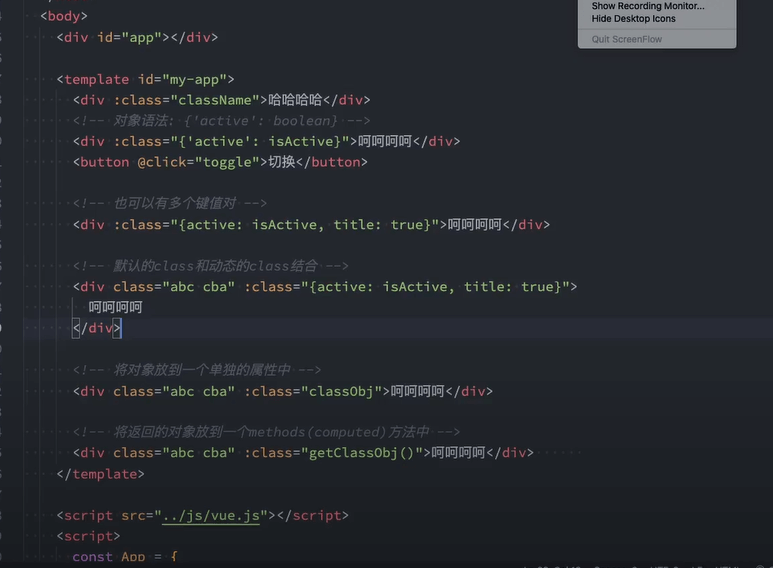
- 可以在对象中传入更多字段来动态切换多个 class
<div
  class="static"
  v-bind:class="{ active: isActive, 'text-danger': hasError }"
></div>
data: {
  isActive: true,
  hasError: false
}
<!--渲染结果-->
<div class="static active"></div>
- 绑定的数据对象不必内联定义在模板里绑定的数据对象不必内联定义在模板里
<div v-bind:class="classObject"></div>
data: {
  classObject: {
    active: true,
    'text-danger': false
  }
}
渲染的结果和上面一样
- 也可以在这里绑定一个返回对象的计算属性
<div v-bind:class="classObject"></div>
data: {
  isActive: true,
  error: null
},
computed: {
  classObject: function () {
    return {
      active: this.isActive && !this.error,
      'text-danger': this.error && this.error.type === 'fatal'
    }
  }
}
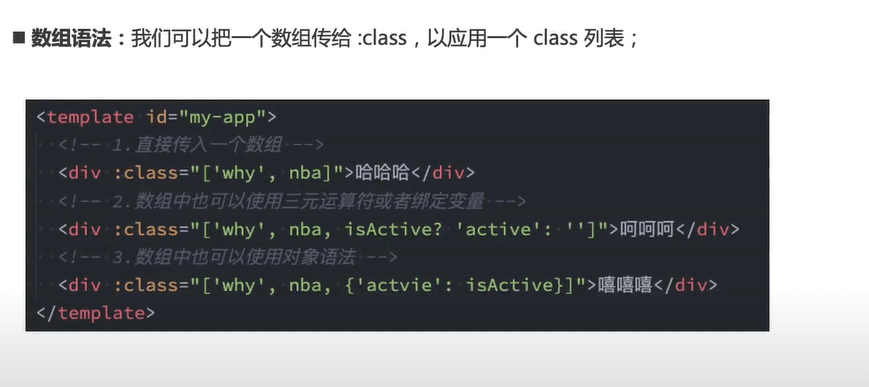
- 可以把一个数组传给 v-bind:class,以应用一个 class 列表
<div v-bind:class="[activeClass, errorClass]"></div>
data: {
  activeClass: 'active',
  errorClass: 'text-danger'
}
<div class="active text-danger"></div>
- 根据条件切换列表中的 class,可以用三元表达式
<div v-bind:class="[isActive ? activeClass : '', errorClass]"></div>
这样写将始终添加 errorClass,但是只有在 isActive 是 truthy[1] 时才添加 activeClass。 也可以改成这样:
<div v-bind:class="[{ active: isActive }, errorClass]"></div>
# style写法
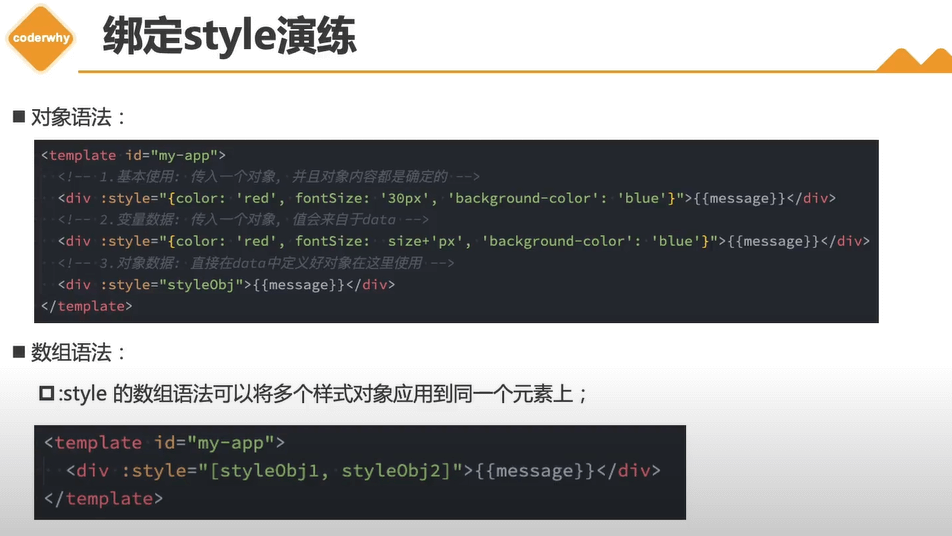
<div v-bind:style="{ color: activeColor, fontSize: fontSize + 'px' }"></div>
data: {
  activeColor: 'red',
  fontSize: 30
}
直接绑定到一个样式对象通常更好,这会让模板更清晰:
<div v-bind:style="styleObject"></div>
data: {
  styleObject: {
    color: 'red',
    fontSize: '13px'
  }
}
v-bind:style 的数组语法可以将多个样式对象应用到同一个元素上:
<div v-bind:style="[baseStyles, overridingStyles]"></div>
# $attrs(V2.40版本添加)and $listeners $props
项目中有多层组件传参可以使用$attrs,可以使代码更加简洁,维护代码的时候更方便,inheritAttrs判断是否继承。
- v-bind="$props": 可以将父组件的所有props下发给它的子组件,子组件需要在其props:{} 中定义要接受的props。
- vm.$props: 当前组件接收到的 props 对象。Vue 实例代理了对其 props 对象属性的访问。官网介绍: (opens new window)
- v-bind="$attrs": 将调用组件时的组件标签上绑定的非props的特性(class和style除外)向下传递。在子组件中应当添加inheritAttrs: false(避免父作用域的不被认作props的特性绑定应用在子组件的根元素上)。
- vm.$attrs :包含了父作用域中不作为 prop 被识别 (且获取) 的特性绑定 (class 和 style 除外)。当一个组件没有声明任何 prop 时,这里会包含所有父作用域的绑定 (class 和 style 除外),并且可以通过+ v-bind="$attrs" 传入内部组件——在创建高级别的组件时非常有用。官网介绍: (opens new window)参考 (opens new window)
- vue3将$listeners合并到$attrs上
- v-on="$listeners": 将父组件标签上的自定义事件向下传递,其子组件可以直接通过this.$emit(eventName)的方式调用。
- vm.$listeners: 包含了父作用域中的 (不含 .native 修饰器的) v-on 事件监听器。它可以通过 v-on="$listeners" 传入内部组件——在创建更高层次的组件时非常有用。
- index.vue
<template>
  <div>
	<h1>props、属性、事件传递</h1>
	<app-parent test="123"  :name="name" :age="age" v-on:start1="say1" @start2="say2"></app-parent>
  </div>
</template>

<script>
  import AppParent from './parent.vue';
  export default {
	data() {
	  return {
		  name: '传给父组件的值',
		  age: '18'
	  };
	},
	components: {
		AppParent
	},
	methods: {
		say1() {
			console.log('第一个。。。。。');
		},
		say2() {
			console.log('第二个。。。。。');
		}
	}
  }
</script>
- parent.vue
<template>
  <div>
	  <h3>父组件</h3>
	  <div>组件名上绑定的非props特性($attrs): {{$attrs}}</div>
	  <!--$listeners可以将父级的方法传递给孙子组件-->
	  <app-child v-on="$listeners" v-bind="$props"></app-child>
  </div>
</template>

<script>
  import AppChild from './child.vue';
  export default {
	data() {
	  return {

	  };
	},
	inheritAttrs: false,
	props: ['name', 'age'],
	components: {
		AppChild
	},
	mounted() {
		this.$emit('start1');
	}
  }
</script>
- child.vue
<template>
  <div>
	  <h3>子组件</h3>
	  <div>父组件传递过来的名称: {{name}}</div>
	  <div>父组件传递过来的年龄: {{age}}</div>
  </div>
</template>

<script>
  export default {
	data() {
	  return {

	  };
	},
	props: ['name', 'age'],
	components: {},
	created() {

	},
	mounted() {
		this.$emit('start2');
	},
  }
</script>
- 父组件中使用子组件,将子组件的type和placeholder传入子组件的属性上
<validate-input
  type="password"
  placeholder="请输入密码"
  :rules="passwordRules"
  v-model="passwordVal"
/>
<template>
  <div class="validate-input-container pb-3">
    <input
      class="form-control"
      v-bind="$attrs"
    >
  </div>
</template>

<script lang="ts">
import { defineComponent} from 'vue'
export default defineComponent({
  inheritAttrs: false,//父元素不继承attr,如果为true则是父元素继承
  setup(props, context) {
	console.log(context.attrs)//可以获取属性里的数据
  }
})
</script>
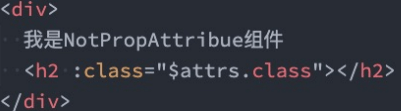
- Attribute继承
- 当组件有单个根节点时,非Prop的Attribute将自动添加到根节点的Attribute中
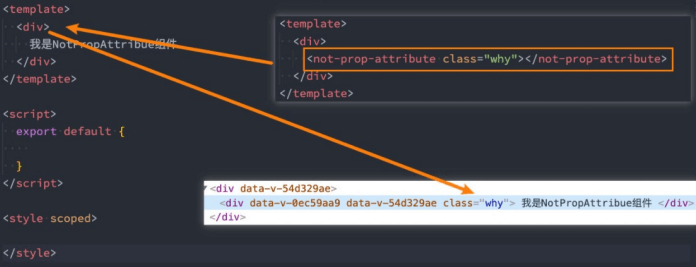
- 如果我们不希望组件的根元素继承attribute,可以在组件中设置 inheritAttrs: false:
- 禁用attribute继承的常见情况是需要将attribute应用于根元素之外的其他元素;
- 我们可以通过 $attrs来访问所有的 非props的attribute;
<!-- 多个属性都会从父级元素传递过来 -->
<child v-bind='$attrs'/>
- 多个根节点的attribute如果没有显示的绑定,那么会报警告,必须手动的指定要绑定到哪一个属性上
# $attrs 和 $props
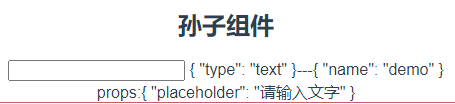
- 父级传来的值,如果没有用props接受,那么都在$attrs上,如果子组件用v-bind传递给孙组件,那么如果孙组件将某些当成props接受,剩下当成attrs也是可以的
- 如果子组件使用props接受了部分,然后利用v-bind绑定props传给孙组件,孙组件仍然可以根据需要将他们作为props或者attrs进行处理
<!--父组件-->
<template>
  <div>
    <bb type="text" placeholder="请输入文字" name="demo"></bb>
  </div>
</template>
<script>
import bb from './b.vue';
export default {
  components: {
    bb
  }
};
</script>
<!--子组件-->
<template>
  <div>
    <child v-bind="$attrs"/>
	props:{{$props}}
  </div>
</template>
<script>
import child from './c.vue';

export default {
  components: {
    child
  },
  mounted(){

  },
  props: ['placeholder']
}
</script>
<!--孙子组件-->
<template>
  <div>
    <h2>孙子组件</h2>
    <input />
	{{$props}}---{{$attrs}}
  </div>
</template>
<script>
export default {
  props:['type'],
  mounted() {
    console.log(this.$attrs);
  }
}
</script>
参考 (opens new window) inheritAttrs (opens new window)
# v-once v-bind 动态参数
- v-bind用于绑定一个或多个属性值,或者向另一个组件传递props值
- v-bind动态绑定一些数据,可以简写v-bind:title=>:title
- v-once,便不会随着数据一直变动,第一次加载之后就不在变化,可以提高性能的一种措施
# 动态参数不固定时
<!DOCTYPE html>
<html lang="en">
<head>
  <meta charset="UTF-8">
  <meta name="viewport" content="width=device-width, initial-scale=1.0">
  <title>lesson 5</title>
  <script src="https://unpkg.com/vue@next"></script>
</head>
<body>
  <div id="root"></div>
</body>
<script>
  // createApp 表示创建一个 Vue 应用, 存储到 app 变量中
  // 传入的参数表示,这个应用最外层的组件,应该如何展示
  // MVVM 设计模式,M -> Model 数据, V -> View 视图, VM -> ViewModel 视图数据连接层
  const app = Vue.createApp({
    data() {
      return {
        message: '333',
		event:'click',
		name:''
      }
    },
	mounted(){
		this.name='title'
	},
	methods:{
		init(){
			console.log('init')
		}
	},
    template: "<div @[event]='init' :[name]='22222'>{{message}}</div>"
  });
  // vm 代表的就是 Vue 应用的根组件
  const vm = app.mount('#root');
</script>
</html>
# v-bind
# 兼容性
2.x 语法 在 2.x 中,如果一个元素同时定义了 v-bind="object" 和一个相同的独立 attribute,那么这个独立 attribute 总是会覆盖 object 中的绑定。
<!-- 模板 -->
<div id="red" v-bind="{ id: 'blue' }"></div>
<!-- 结果 -->
<div id="red"></div>
3.x 语法 在 3.x 中,如果一个元素同时定义了 v-bind="object" 和一个相同的独立 attribute,那么绑定的声明顺序将决定它们如何被合并。换句话说,相对于假设开发者总是希望独立 attribute 覆盖 object 中定义的内容,现在开发者能够对自己所希望的合并行为做更好的控制。
<!-- 模板 -->
<div id="red" v-bind="{ id: 'blue' }"></div>
<!-- 结果 -->
<div id="blue"></div>

<!-- 模板 -->
<div v-bind="{ id: 'blue' }" id="red"></div>
<!-- 结果 -->
<div id="red"></div>
# v-bind绑定一个全是 attribute 的对象
这个对象的所有可以都会被作为属性绑定到对应的元素之上

<template>
	<!-- 这种后面不跟冒号参数的v-bind一个元素上只能添加一个 -->
    <div v-bind="s1" >s1</div>
</template>
<script>
export default {
  data(){
   return {
    s1:{
      name:'plx',
      age:82
    }
  }
}
</script>
<img :='info'>
data() {
        return {
          info: {
			alt:'xxxx',
			title:'yyyy'
          }
        }
}
- 传递props对象时:
父组件
<show-message v-bind="message"></show-message>
 message: {
          title: "嘿嘿嘿",
          content: "我是嘿嘿嘿"
        }
子组件
props: {
      title: String,
      content: {
        type: String,
        required: true,
        default: "123"
      }
}
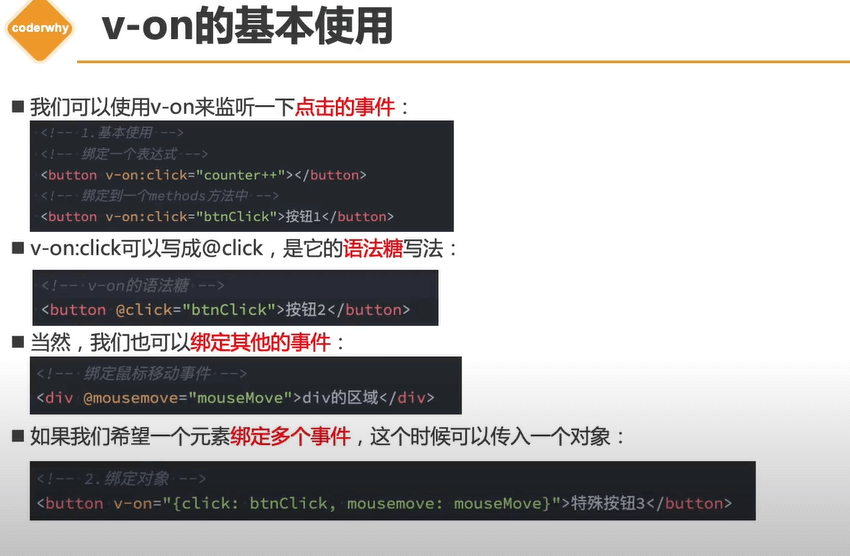
# vue事件
- event, $event
- 事件修饰符:stop, prevent, capture, self, once, passive
- 按键修饰符:enter, tab, delete, esc, up, down, left, right
- 鼠标修饰符:left, right, middle
- 精确修饰符:exact
<!-- 阻止单击事件继续冒泡 -->
<a @click.stop="doThis"></a>

<!-- 提交事件不再重载页面 -->
<form @submit.prevent="onSubmit"></form>

<!-- 修饰符可以串联,注意顺序 -->
<a @click.stop.prevent="doThat"></a>

<!-- 只有修饰符 -->
<form @submit.prevent></form>

<!-- 添加事件监听器时使用事件捕获模式 -->
<!-- 即内部元素触发的事件先在此处理,然后才交由内部元素进行处理 -->
<div @click.capture="doThis">...</div>

<!-- 只当在 event.target 是当前元素自身时触发处理函数 -->
<!-- 即事件不是从内部元素触发的 -->
<div @click.self="doThat">...</div>

<!-- Alt + Enter -->
<input @keyup.alt.enter="clear" />
# 多个同类型点击事件写法
<template>
	<div>
		<button  @click="one($event), two($event)" >
		  Submit
		</button>
	</div>
</template>

<script>
	import { ref } from 'vue'
	import Children1 from './com/Children1.vue'
	export default {
		 data() {
		      return {
				arr:[1,2,3]
		      }
		    },
		methods:{
			 one(event) {
			    // 第一个事件处理器逻辑...
				console.log(1)
			  },
			  two(event) {
			   // 第二个事件处理器逻辑...
			   console.log(2)
			  },

		}

	}
</script>
# exact 修饰符
<template>
	<div>
		<!-- 即使 Alt 或 Shift 被一同按下时也会触发 -->
		<el-button @click.ctrl="A">A</el-button>
		<!-- 有且只有 Ctrl 被按下的时候才触发 -->
		<el-button @click.ctrl.exact="B">B</el-button>
		<!-- 没有任何系统修饰符被按下的时候才触发 -->
		<el-button @click.exact="C">C</el-button>
	</div>
</template>

<script>
	import { ref } from 'vue'
	import Children1 from './com/Children1.vue'
	export default {
		 data() {
		      return {
				arr:[1,2,3]
		      }
		    },
		methods:{
			A(){
				console.log('a')
			},
			B(){
				console.log('b')
			},
			C(){
				console.log('c')
			}

		}


	}
</script>

<style scoped>

</style>
# 总结
<!DOCTYPE html>
<html lang="en">
<head>
  <meta charset="UTF-8">
  <meta name="viewport" content="width=device-width, initial-scale=1.0">
  <title>lesson 9</title>
  <style>
    .red {
      color: red;
    }
    .green {
      color: green;
    }
  </style>
  <script src="https://unpkg.com/vue@next"></script>
</head>
<body>
  <div id="root"></div>
</body>
<script>
  const app = Vue.createApp({
    data() {
      return {
        classString: 'red',
        classObject: { red: false, green: true },
        classArray: ['red', 'green', {brown: false}],
        styleString: 'color: yellow;background: orange',
        styleObject: {
          color: 'orange',
          background: 'yellow'
        }
      }
    },
    template: `
      <div :style="styleObject">
        Hello World
      </div>
    `
  });

  app.component('demo', {
    template: `
      <div :class="$attrs.class">one</div>
      <div :class="$attrs.class">two</div>
    `
  })

  const vm = app.mount('#root');
</script>
</html>
# vue-functional函数式组件
组件没有管理任何状态,也没有监听任何传递给它的状态,也没有生命周期方法时,可以将组件标记为functional ,这意味它无状态 (没有响应式数据),也没有实例 (没有 this 上下文)。
- 无状态
- 无法实例化
- 内部没有任何生命周期处理函数
- 轻量,渲染性能高,适合只依赖于外部数据传递而变化的组件(展示组件,无逻辑和状态修改)
- 在template标签里标明functional
- 只接受props值
- 不需要script标签
- 傻瓜组件
Vue.component('heading', {
	functional: true, //标记函数式组件
	props: ['level', 'title', 'icon'],
	render(h, context) { //上下文传参
		let children = []; // 属性获取
		const {icon, title, level} = context.props
		if (icon) {
			children.push(h( 'svg',{ class: 'icon' },
			[h('use', { attrs: { 'xlink:href': '#icon-' + icon } })])) // 子元素获取
			children = children.concat(context.children) }
			vnode = h( 'h' + level, { attrs: { title } }, children )console.log(vnode);
			 return vnode
		}
	})
<template  functional>
  <div>
      <div v-for='item in props.arr' :key="item">{{item}}</div>
  </div>
</template>
# vue元素位置受限解决 vue2 和 vue3异同
有些 HTML 元素,诸如 <ul>、<ol>、<table> 和 <select>,对于哪些元素可以出现在其内部是有严格限制的。而有些元素,诸如 <li>、<tr> 和 <option>,只能出现在其它某些特定的元素内部。
这会导致使用这些有约束条件的元素时遇到一些问题。例如:
<table>
  <blog-post-row></blog-post-row>
</table>
这个自定义组件 <blog-post-row> 会被作为无效的内容提升到外部,并导致最终渲染结果出错。幸好这个特殊的 is attribute 给了我们一个变通的办法:
<table>
  <tr is="blog-post-row"></tr>
</table>
vue3:当它用于原生 HTML 元素时,is 的值必须以 vue: 开头,才可以被解释为 Vue 组件。这是避免和原生自定义元素混淆。
<table>
  <tr is="vue:blog-post-row"></tr>
</table>
← vue过滤器&监听&计算 vue指令 →