# [vuex状态管理模式]
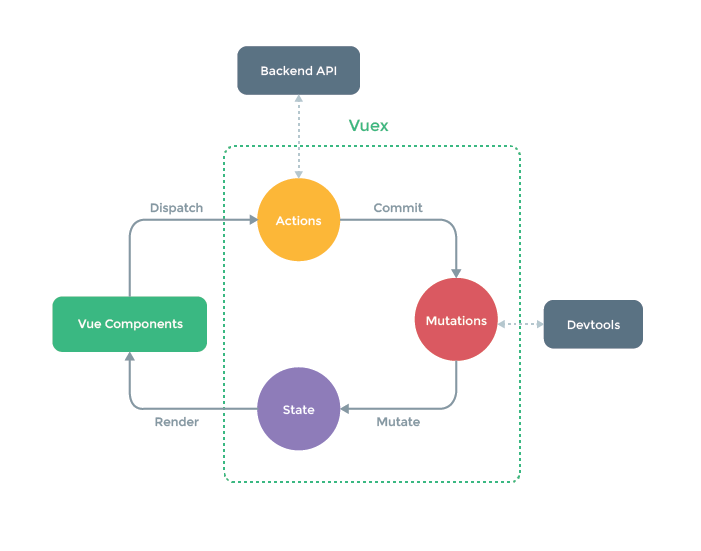
每一个Vuex应用的核心就是store(仓库)。“store”基本上就是一个容器,它包含着你的应用中大部分的状态 (state)。
# 安装vuex
npm install vuex --save
理解
vuex理解
是状态管理模式。它采用集中式存储管理应用的所有的状态,并以相应的规则保证状态以一种可预测的方式发生变化。可以理解为是一个全局变量
- state 数据中心
- mutations 操作数据
- actions 什么时候触发操作,执行动作,改变数据
# 使用vuex
# 创建一个store.js用来存取数据
import Vue from 'vue'
import Vuex from 'vuex'

Vue.use(Vuex)

const store = new Vuex.Store({
  // state :localStorage.getItem('state') ? JSON.parse(localStorage.getItem('state')) 刷新后保留数据的办法
  state: {
    count: 0,
	todos: [
	      { id: 1, text: '...', done: true },
	      { id: 2, text: '...', done: false }
	]
  },
  getters: {
    // getter可以认为是store的计算属性
    // getter正常接受两个参数,分别表示 state, getters(在使用module时,还会有根store的state和getters)
    doubleCount: (state, getters) => {
      return state.count * 2
    },
	doneTodos (state) {
	      return state.todos.filter(todo => todo.done)
	},
	//Getter 也可以接受其他 getter 作为第二个参数:
	doneTodosCount (state, getters) {
	  return getters.doneTodos.length
	}

  },
  mutations: {
    increment (state) {
      state.count++
    },
    addForNum (state, payload) {
      state.count += Number(payload.num)
    },
    asyncAdd (state) {
      state.count += 10
    },
	login(state){

	}
  },
  actions: {
    // 异步操作需要放在actions中执行,然后使用commit交给对应的mutations修改state的值
    asyncAddAction (context) {
		//这里的context和我们使用的$store拥有相同的对象和方法
      setTimeout (function () {
        context.commit('asyncAdd')
      }, 500)
    },
	login({commit}, username) {
		return new Promise((resolve, reject) => {
			setTimeout(() => {
				if (username === 'admin') {
					commit('login')
					resolve()
				} else {
					reject()
				}
			}, 1000);
		})
	}
  }
})

export default store
- Action 通常是异步的,那么如何知道 action 什么时候结束呢?可以通过让action返回Promise,在Promise的then中来处理完成后的操作;
- dispatch派发请求异步接受信息
this.$store.dispatch('login', 'admin').then(() => {
	  this.$router.push(this.$route.query.redirect)
	}).catch(() => {
	  alert('用户名或密码错误')
  })
# computed与vuex数据的结合运用
computed:{
    category: {
     get() {
     return this.$store.state.category
     },
     set (value) {
     console.log("Value of category changed")
     this.store.commit("SET_CAT", value)
     }
    }
}
import { mapGetters } from 'vuex'

computed: {
    ...mapGetters(['name'])
}
# 在main.js里引用
import store from './store'
new Vue({
  el: '#app',
  router,
  store,
  components: { App },
  template: '<App/>'
})
# 在vue文件中使用
<template>
  <div>
    <h2>这是计数器页面</h2>
    <div>
      <div>计数:{{count}}</div>
      <div>双倍计数:{{doubleCount}}</div>
      <br/>
      <button @click="increment">+1</button>
      <div>
        增加值 <input type="text" v-model="num" />
        <button @click="addForNum">=</button>
      </div>
      <div>
        <button @click="asyncAdd">异步加10</button>
      </div>
    </div>
  </div>
</template>
<script>
export default {
  name: 'index',
  data () {
    return {
      num: 0
    }
  },
  computed: {
    count () {
      return this.store.state.count
    },
    doubleCount () {
      return this.store.getters.doubleCount
    }
  },
  methods: {
    // 自增1
    increment () {
		//this.$store.state.number++ //不推荐,严格模式无效
      this.store.commit('increment')
    },
    // 加指定的值
    addForNum () {
      this.store.commit('addForNum', {num: this.num})
    },
    // 异步加1
    asyncAdd () {
      this.$store.dispatch('asyncAddAction')
    }
  }
}
</script>
# vuex的辅助函数
可以使用map辅助函数使代码更精简
- store文件中的内容不需要变动,只要在组件中使用map辅助函数来替代全局的this.$sotre下的属性和方法即可。
- 注意辅助函数mapGetters的对象写法,只有重命名,没有函数形式
<template>
  <div>
    <h2>这是计数器页面</h2>
    <div>
      <div>计数:{{count}}  -  {{countAlias}}</div>
      <div>双倍计数:{{doubleCount}}  -  {{doubleCountAlias}}</div>
      <br/>
      <button @click="increment">+1</button>
      <div>
        增加值 <input type="text" v-model="num" />
        <button @click="incrementBy(num)">=</button>
      </div>
      <div>
        <button @click="asyncAdd">异步加10</button>
      </div>
    </div>
  </div>
</template>
<script>
import { mapState, mapGetters, mapMutations, mapActions } from 'vuex'

export default {
  name: 'index',
  data () {
    return {
      num: 0,
      localCount: 10
    }
  },
  // computed:mapState(['a','b']),
  //如果computed只获取store中的数据且不需要转换,那么可以直接使用mapState,不需要解构
  //mapState本身返回的就是个对象
  computed: {

    /*
    * ------------------------------------------------------------
    * mapState
    */

    // 【传统形式】
    // count () {
    //   return this.store.state.count
    // },

    // 【对象形式】
    ...mapState({
      // 箭头函数可使代码更简练
      count: state => state.count,

      // 传字符串参数 'count' 等同于 `state => state.count`
      // 使用这种方式可以更简洁地为state生成的计算属性定义一个别名
      countAlias: 'count',

      // 为了能够使用 `this` 获取局部状态,必须使用常规函数
      countPlusLocalState (state) {
        return state.count + this.localCount
      }
    }),

    // 【数组形式】
    // 当映射的计算属性的名称与 state 的子节点名称相同时,我们也可以给 mapState 传一个字符串数组。
    ...mapState([
      // 映射 this.count 为 store.state.count
      'count'
    ]),


    /*
    * ------------------------------------------------------------
    * mapGetters
    */

    // 【传统形式】
    // doubleCount () {
    //   return this.store.getters.doubleCount
    // }

    // 【对象形式】
    // 如果你想将一个 getter 属性另取一个名字,使用对象形式
    ...mapGetters({
      // 把 `this.doubleCountAlias` 映射为 `this.store.getters.doubleCount`
      doubleCountAlias: 'doubleCount'
    }),

    // 【数组形式】
    ...mapGetters(['doubleCount'])
  },
  methods: {

    /*
    * ------------------------------------------------------------
    * mapMutations
    */

    // 【传统形式】
    // 自增1
    // increment () {
    //   this.store.commit('increment')
    // },
    // // 加指定的值
    // incrementBy (amount) {
    //   this.store.commit('incrementBy', amount)
    // },

    // 【数组形式】
    ...mapMutations([
      'increment', // 将 `this.increment()` 映射为 `this.store.commit('increment')`

      // `mapMutations` 也支持载荷:
      'incrementBy' // 将 `this.incrementBy(amount)` 映射为 `this.store.commit('incrementBy', amount)`
    ]),

    // 【对象形式】
    ...mapMutations({
      add: 'increment' // 将 `this.add()` 映射为 `this.store.commit('increment')`
    }),

    // // 异步加1
    // asyncAdd () {
    //   this.store.dispatch('asyncAddAction')
    // }

    /*
    * ------------------------------------------------------------
    * mapActions
    */

   // 【数组形式】
    ...mapActions([
      'asyncAddAction', // 将 `this.asyncAddAction()` 映射为 `this.store.dispatch('asyncAddAction')`
    ]),

    // 【对象形式】
    ...mapActions({
      asyncAdd: 'asyncAddAction' // 将 `this.asyncAdd()` 映射为 `this.$store.dispatch('asyncAddAction')`
    })
  }
}

</script>
因为辅助函数返回的本来就是对象,所以要用一次展示运算符,除非是直接如computed:mapState(['xxx'])这种外层没加包裹形式
<button @click="login" v-if="!isLogin">登录</button>
当需要映射的值时模块化的值,如是user模块,可以用以下两种方式来写
import { mapState } from 'vuex'
computed: {
...mapState('user', ['isLogin']) //推荐,在template中可以直接使用isLogin
//...mapState(['user/isLogin']) // 不推荐,用的时候不好写
}
import { mapActions } from 'vuex'
methods: {
login() {
	this['user/login']('admin').then(...)
},
...mapActions(['user/login', 'user/logout'])
//...mapActions(user,['login'])//这种写法也可以,但是如果methods中还有别的也叫login的方法就冲突了!!!
},
# vuex modules模块化设计
新建modules文件夹在store文件夹内,选项namesapced保证命名不冲突
+ store
	+ modules
		- a.js
		- b.js
		- index.js
//a.js b.js与之结构类似
const state={
	count:1
}

const mutations={
	add(state){
		state.count++
	}
}
const actions={
	add:({commit})=>{
		commit("add")
	}
}

export default{
	namespaced:true,
	state,
	mutations,
	actions
}
//index.js
import Vue from 'vue'
import Vuex from 'vuex'
import count from './a'
import number from './b'

Vue.use(Vuex)
export default new Vuex.Store({
	modules:{
		count,
		number
	}
})
//项目main.js
import store from './store/modules/index.js'
<template>
  <div class="home">
		<div>{{$store.state.count.count}}</div>
		<button @click="add">+</button>
		<button @click="miss">-</button>
  </div>
</template>
<script>
import {mapMutations} from 'vuex'

export default {
  name: 'Home',
  data(){
	  return{
		  a:""
	  }
  },
  methods:{
	  add(){
		  this.$store.state.count.count++;
	  },
	  miss(){
		   this.$store.commit('count/add')//两种操作写法,效果一致
       //对象写法风格
		   this.$store.commit({
			   type:'count/add'
		   })
	  }

  }
}
</script>
提示
默认情况下,模块内部的action和mutation仍然是注册在全局的命名空间中的,也就是说,子模块中有mutation/action/getters中有某个属性或者方法funa,根模块也有,那么比如操作commit('funa'),都会触发!
- 默认情况下Getter 同样也默认注册在全局命名空间;(this.$store.state.a.b(正确)=>a模块下的state中的b,this.$store.getters.a.geta(错误),不需要.getters)
- 如果希望模块具有更高的封装度和复用性,可以添加 namespaced: true 的方式使其成为带命名空间的模块:
- 当模块被注册后,它的所有 getter、action 及 mutation 都会自动根据模块注册的路径调整命名;
$store.getters["home/doubleHomeCounter"]:home模块下的doubleHomeCounter
<template>
    <div>
      {{this.$store.state.count}}<br/>
      {{count}}<br/>
      {{this.$store.getters.changeCount}}<br/>
      <el-button type="primary" @click="add">主要按钮</el-button>
    </div>
</template>

<script>
import {mapState} from 'vuex'
export default {
  name: 'home',
  computed: {
    ...mapState([
      'count'
    ])
  },
  methods: {
    add () {
      this.$store.dispatch('addFun', 10) // actions    this.$store.commit('add',10) //mutations
    }
  },
  mounted: {
  }
}
</script>

<style scoped>

</style>
import Vue from 'vue'
import Vuex from 'vuex'

Vue.use(Vuex)
const store = new Vuex.Store({
  state: {
    count: 1
  },
  getters: {
    changeCount: state => {
      return state.count + 1
    }
  },
  mutations: {
    add (state, n) {
      state.count = state.count + n
    }
  },
  actions: {
    addFun (context, n) {
      context.commit('add', n)
    }
  }
})
export default store
总结
- modules模块使用需要在每个js里加上命名空间选项namespaced:true
- indexjs注意写法
- this.$store.commit('count/add')
# createNamespacedHelpers
可以使用 createNamespacedHelpers 创建基于某个命名空间辅助函数。它返回一个对象,对象里有新的绑定在给定命名空间值上的组件绑定辅助函数。
<template>
  <div>
    <hr>
    <h2>{{ homeCounter }}</h2>
    <h2>{{ doubleHomeCounter }}</h2>
    <!-- <h2>{{ doubleRootCounter }}</h2> -->
    <button @click="increment">home+1</button>
    <button @click="incrementAction">home+1</button>
    <hr>
  </div>
</template>

<script>
  import { createNamespacedHelpers, mapState, mapGetters, mapMutations, mapActions } from "vuex";

  import { useState, useGetters } from '../hooks/index'

  const { mapState, mapGetters, mapMutations, mapActions } = createNamespacedHelpers("home")

  export default {
    computed: {
      // 1.写法一:
      // ...mapState({
      //   homeCounter: state => state.home.homeCounter
      // }),
      // ...mapGetters({
      //   doubleHomeCounter: "home/doubleHomeCounter"
      // })

      // 2.写法二:
      ...mapState("home", ["homeCounter"]),
      ...mapGetters("home", ["doubleHomeCounter"])

      // 3.写法三:直接通过createNamespacedHelpers绑定对应的命名空间,可以不需要像写法二那样去处理
      ...mapState(["homeCounter"]),
      ...mapGetters(["doubleHomeCounter"])
    },
    methods: {
      // 1.写法一:
      // ...mapMutations({
      //   increment: "home/increment"
      // }),
      // ...mapActions({
      //   incrementAction: "home/incrementAction"
      // }),

      // 2.写法二
      ...mapMutations("home", ["increment"]),
      ...mapActions("home", ["incrementAction"]),

      // 3.写法三:
      ...mapMutations(["increment"]),
      ...mapActions(["incrementAction"]),
    },

    setup() {
      // {homeCounter: function}
      const state = useState(["rootCounter"])
      const rootGetters = useGetters(["doubleRootCounter"])
      const getters = useGetters("home", ["doubleHomeCounter"])

      const mutations = mapMutations(["increment"])
      const actions = mapActions(["incrementAction"])

      return {
        ...state,
        ...getters,
        ...rootGetters
        ...mutations,
        ...actions
      }
    }
  }
</script>
- useState.js
import { mapState, createNamespacedHelpers } from 'vuex'
import { useMapper } from './useMapper'

export function useState(moduleName, mapper) {
  let mapperFn = mapState
  if (typeof moduleName === 'string' && moduleName.length > 0) {
    mapperFn = createNamespacedHelpers(moduleName).mapState
  } else {
    mapper = moduleName
  }

  return useMapper(mapper, mapperFn)
}
- useMapper
import { computed } from 'vue'
import { useStore } from 'vuex'

export function useMapper(mapper, mapFn) {
  // 拿到store独享
  const store = useStore()

  // 获取到对应的对象的functions: {name: function, age: function}
  const storeStateFns = mapFn(mapper)

  // 对数据进行转换
  const storeState = {}
  Object.keys(storeStateFns).forEach(fnKey => {
    const fn = storeStateFns[fnKey].bind({$store: store})
    storeState[fnKey] = computed(fn)
  })

  return storeState
}
# require.context 借助webpack来读modules文件下文件,避免一个个手动引入
import Vue from 'vue'
import Vuex from 'vuex'
import getters from './getters'

Vue.use(Vuex)

// https://webpack.js.org/guides/dependency-management/#requirecontext
const modulesFiles = require.context('./modules', true, /\.js$/)

// you do not need `import app from './modules/app'`
// it will auto require all vuex module from modules file
const modules = modulesFiles.keys().reduce((modules, modulePath) => {
  // set './app.js' => 'app'
  const moduleName = modulePath.replace(/^\.\/(.*)\.\w+$/, '$1')
  const value = modulesFiles(modulePath)
  modules[moduleName] = value.default
  return modules
}, {})

console.log( modulesFiles,modules)

const store = new Vuex.Store({
  modules,
  getters
})

export default store
require.context(directory, useSubdirectories, regExp)
//directory: 要查找的文件路径
//useSubdirectories: 是否查找子目录
// regExp: 要匹配文件的正则
代码很简单,require.context执行后,返回一个方法webpackContext,这个方法又返回一个__webpack_require__,
这个__webpack_require__就相当于require或者import。同时webpackContext还有二个静态方法keys与resolve,一个id属性。

keys: 返回匹配成功模块的名字组成的数组
resolve: 接受一个参数request,request为test文件夹下面匹配文件的相对路径,返回这个匹配文件相对于整个工程的相对路径
id: 执行环境的id,返回的是一个字符串,主要用在module.hot.accept,应该是热加载
# vuex严格模式
无论何时发生了状态变更且不是由 mutation 函数引起的,将会抛出错误。这能保证所有的状态变更都能被调试工具跟踪到。开启严格模式 strict: true
const store = new Vuex.Store({
	// ...
	strict: true
})
# vuex插件写法
Vuex 的 store 接受 plugins 选项,这个选项暴露出每次 mutation 的钩子。Vuex 插件就是一个函数,它接收 store 作为唯一参数:
const myPlugin = store => {
	// 当 store 初始化后调用
}
注册插件:
import myPlugin from "xxx"
const store = new Vuex.Store({
	// ...
	plugins: [myPlugin]
})
范例:实现登录状态持久化,store/plugins/persist.js
- store.subscribe插件中的方法,可以监听到对应的mutation state变更信息,同步操作
export default store => {
	// 初始化时从localStorage获取数据
	if(localStorage) {
		const user = JSON.parse(localStorage.getItem('user'))
	if (user) {
		store.commit('user/login')
		store.commit('user/setUsername', user.username)
	}
	}
	// 用户状态发生变化时缓存之
	store.subscribe((mutation, state) => {
	if (mutation.type.startsWith('user/')) {
	localStorage.setItem('user', JSON.stringify(state.user))
	} else if (mutation.type === 'user/logout') {
	localStorage.removeItem('user')
	}
	})
}
- 借助vuex-createPersistedState插件实现缓存数据。
import createPersistedState from 'vuex-createPersistedState'
const PERSIST_PATHS = ['user']
const store = new Vuex.Store({
  state: {},
  modules: {
    app,
    settings,
    user,
    permission,
    tagsView
  },
  getters,
  plugins: [createPersistedState({
    storage: window.sessionStorage,
    paths: PERSIST_PATHS
  })]
})
# vuex手写
- 实现插件
-实现Store类
- 维持1个响应式状态state
- 实现commit()
- 实现dispatch()
- getters
- 挂载$store
let Vue
class Store{
	constructor(option = {}) {
	  this.$option = option
	  console.log(option)

	  this._wrapgetters =option.getters
	  const computed ={}
	  this.getters ={}
	  const store =this
	  Object.keys(this._wrapgetters).forEach(key=>{
		  //获取用户定义的getters
		  console.log(store,store._wrapgetters)
		  const fn = store._wrapgetters[key]
		  //转化为computed可以使用无参形式
		  computed[key] =function(){
			  return fn(store.state)
		  }
		  Object.defineProperty(store.getters,key,{
			  get:()=>store.vm[key]
		  })
	  })
	  console.log(computed)
	  this.vm = new Vue({
		  data:{
			  state:option.state
		  },
		  computed
	  })

	  this.mutations =option.mutations
	  this.actions =option.actions
	  this.commit =this.commit.bind(this)
	  this.dispatch =this.dispatch.bind(this)

	}
	get state(){
			 return this.vm.state
	}
	set state(v){
			 console.error("warning",'do not to change state')
	}
	commit(v,t){
		console.log(this)
		// 需要在constructor中给commit方法绑定好this的指向,否则调用会undefined
		// console.log(this.mutations[v])
		// console.log(this.vm.state,t)
		if(v){
			this.mutations[v](this.vm.state,t)
		}
	}
	dispatch(v){
		// console.log(v)
		console.log(this.actions[v])
		console.log(this)
		if(v){
			this.actions[v](this,v)
		}
	}
}
function install(vue){
  Vue = vue
  Vue.mixin({
	  beforeCreate(){
		  // console.log('beforeCreate')
		 if(this.$options.store){
		 		  Vue.prototype.$store = this.$options.store
		 }
	  }
  })

}
export default {Store,install}
# vue3中使用vuex
- vuex创建的写法上与之前的也有所不同
- getters类似computed,他返回的是该函数的计算结果,当然也可以返回函数,那么就可以再传递一个可用参数实现复用
import { createStore } from "vuex"
import home from './modules/home'
import user from './modules/user'

const store = createStore({
  state() {
    return {
      rootCounter: 100
    }
  },
  getters: {
    doubleRootCounter(state) {
      return state.rootCounter * 2
    },
    totalPriceCountGreaterN(state, getters) {
      return function(n) {
        let totalPrice = 0
        for (const book of state.books) {
          if (book.count > n) {
            totalPrice += book.count * book.price
          }
        }
        return totalPrice * getters.currentDiscount
      }
    }
  },
  mutations: {
    increment(state) {
      state.rootCounter++
    }
  },
  modules: {
    home,
    user
  }
});

export default store;
# 在setup辅助函数的使用
在setup中,computed里面只能放函数形式,不能类似options中的可以以对象的形式放多个computed的属性,要么一个state使用一个computed,要么通过遍历的方式,利用hooks去处理。mapState返回的其实每个属性就是函数。同样可以对mapGetters进行相同的封装。
import { computed } from 'vue'
import { mapState, useStore } from 'vuex'

export function useState(mapper) {
  // 拿到store独享
  const store = useStore()

  // 获取到对应的对象的functions: {name: function, age: function}
  const storeStateFns = mapState(mapper)

  // 对数据进行转换
  const storeState = {}
  Object.keys(storeStateFns).forEach(fnKey => {
    const fn = storeStateFns[fnKey].bind({$store: store})
    storeState[fnKey] = computed(fn)
  })

  return storeState
}
<template>
  <div>
    <h2>Home:{{ $store.state.counter }}</h2>
    <hr>
    <h2>{{counter}}</h2>
    <h2>{{name}}</h2>
    <h2>{{sCounter}}</h2>
    <h2>{{sName}}</h2>
    <hr>
  </div>
</template>

<script>
  // import { computed } from 'vue'
  import { useState } from '../hooks/useState'
  export default {
    setup() {
      // const sCounter = computed(() => store.state.counter)//默认写法
      const storeState = useState(["counter", "name"])
      const storeState2 = useState({
        sCounter: state => state.counter,
        sName: state => state.name
      })

      return {
        ...storeState,
        ...storeState2
      }
    }
  }
</script>
# mutation在setup中使用
在setup中使用mutation比较简单,不需要像state和getters那样麻烦
<template>
  <div>
    <h2>当前计数: {{ $store.state.counter }}</h2>
    <hr>
      <button @click="increment">+1</button>
      <button @click="add">+1</button>
      <button @click="decrement">-1</button>
      <button @click="increment_n({n: 10})">+10</button>
    <hr>
  </div>
</template>

<script>
  import { mapMutations } from 'vuex'

  import { INCREMENT_N } from '../store/mutation-types'

  export default {
    methods: {
      ...mapMutations(["increment", "decrement", INCREMENT_N]),
      ...mapMutations({
        add: "increment"
      })
    },
    setup() {
      const storeMutations = mapMutations(["increment", "decrement", INCREMENT_N])
      return {
        ...storeMutations
      }
    }
  }
</script>

<style scoped>

</style>