# redux
Redux 中,状态是不能直接被修改的,而是通过 Action、Reducer 和 Store 3 部分协作 完成的。具体的运作流程可简单地概括为三步,首先由 Action 说明要执行的动作,然后让 Reducer 设计状态的运算逻辑,最后通过 Store 将 Action 和 Reducer 关联并触发状态的更新, 下面用代码演示这个流程。
function caculate(previousState = {digit: 0}, action) { //Reducer
 let state = Object.assign({}, previousState);
 switch (action.type) {
 case "ADD":
 state.digit += 1;
 break;
 case "MINUS":
 state.digit -= 1;
 }
 return state;
}
let store = createStore(caculate); //Store
let action = { type: "ADD" }; //Action
store.dispatch(action); //触发更新
store.getState(); //读取状态
# redux基础知识
TIP
- redux import{createStore,combineReducers,compose,applyMiddleware} from 'reudx'
- store=createStore(reducer) => 创建store
- store.getState() => 获取仓库数据
- unsubscribe=store.subscribe(listener)=> 订阅监听函数,返回卸载函数
- unsubscribe()卸载监听事件
- store.dispatch(action) 派发action,reducer函数去匹配对应的actiontype返回新值
- (state=stateDefault,action)=>{} reducer return newstate
- actionTypes&actionCreators统一管理type和actionCreators,防止书写错误的bug
- combineReducers:拆分reducer
- compose
- applyMiddleware:中间件需要的api
let reducer=combineReducers({ china:todos, counter }) - store=createStore(reducer) => 创建store
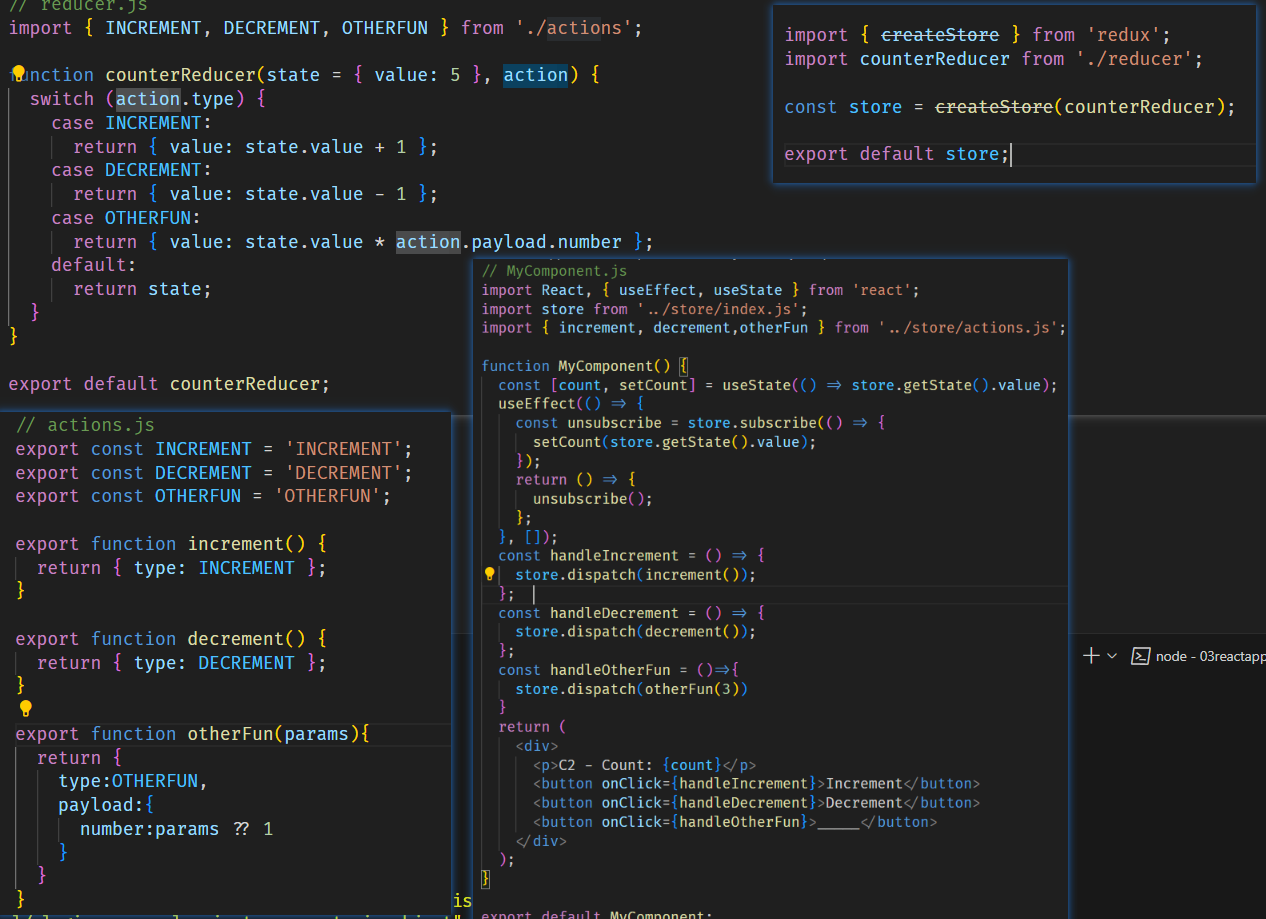
Redux 的设计思想:
- Web 应用是一个状态机,视图与状态是一一对应的。
- 所有的状态,保存在一个对象里面。
谷歌插件 redux devtools
redux = reducer + flux
cnpm install --save redux
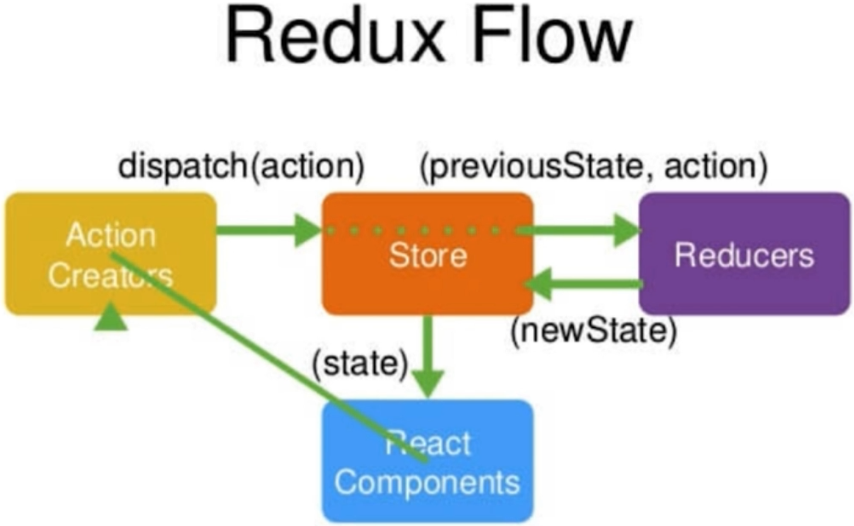
# redux组成
- Store:保存数据的地方,可把它看成一个容器。整个应用只有一个 Store。Redux提供 createStore 这个函数,用来生成Store。
- State:Store对象包含所有数据。这种数据集合,就叫做 State。当前时刻的 State,可以通过 store.getState() 拿到。
import { createStore } from 'redux';
const store = createStore(fn);
const state = store.getState();
- Action:State 的变化,会导致 View 的变化。但是,用户接触不到 State,只能接触到 View。所以,State 的变化必须是 View 导致的。Action 就是 View 发出的通知,表示 State 应该要发生变化了。Action 是一个对象。其中的 type 属性是必须的,表示 Action 的名称。
const action = {
  type: 'ADD_TODO',
  payload: 'Learn Redux'
};
Action 描述当前发生的事情。改变 State 的唯一办法,就是使用 Action。它会运送数据到 Store。
- Action Creator:View 要发送多少种消息,就会有多少种 Action。如果都手写,会很麻烦。可以定义一个函数来生成 Action,这个函数就叫 Action Creator。
const ADD_TODO = '添加 TODO';

function addTodo(text) {
  return {
    type: ADD_TODO,
    text
  }
}

const action = addTodo('Learn Redux');
- store.dispatch() :store.dispatch()是 View 发出 Action 的唯一方法。
import { createStore } from 'redux';
const store = createStore(fn);

store.dispatch({
  type: 'ADD_TODO',
  payload: 'Learn Redux'
});
store.dispatch(addTodo('Learn Redux'));
- Reducer:Store 收到 Action 以后,必须给出一个新的 State,这样 View 才会发生变化。这种 State 的计算过程就叫做 Reducer。Reducer 是一个函数,它接受 Action 和当前 State 作为参数,返回一个新的 State。
const reducer = function (state, action) {
  // ...
  return new_state;
};
const defaultState = 0;
const reducer = (state = defaultState, action) => {
  switch (action.type) {
    case 'ADD':
      return state + action.payload;
    default:
      return state;
  }
};

const state = reducer(1, {
  type: 'ADD',
  payload: 2
});
上面代码中,reducer函数收到名为ADD的 Action 以后,就返回一个新的 State,作为加法的计算结果。其他运算的逻辑(比如减法),也可以根据 Action 的不同来实现。
实际应用中,Reducer 函数不用像上面这样手动调用,store.dispatch方法会触发 Reducer 的自动执行。为此,Store 需要知道 Reducer 函数,做法就是在生成 Store 的时候,将 Reducer 传入createStore方法。
import { createStore } from 'redux';
const store = createStore(reducer);
上面代码中,createStore接受 Reducer 作为参数,生成一个新的 Store。以后每当store.dispatch发送过来一个新的 Action,就会自动调用 Reducer,得到新的 State。
为什么这个函数叫做 Reducer 呢?因为它可以作为数组的reduce方法的参数。请看下面的例子,一系列 Action 对象按照顺序作为一个数组。
const actions = [
  { type: 'ADD', payload: 0 },
  { type: 'ADD', payload: 1 },
  { type: 'ADD', payload: 2 }
];

const total = actions.reduce(reducer, 0); // 3
上面代码中,数组actions表示依次有三个 Action,分别是加0、加1和加2。数组的reduce方法接受 Reducer 函数作为参数,就可以直接得到最终的状态3。
- 纯函数:Reducer 函数最重要的特征是,它是一个纯函数。也就是说,只要是同样的输入,必定得到同样的输出。
纯函数是函数式编程的概念,必须遵守以下一些约束。
- 不得改写参数
- 不能调用系统 I/O 的API
- 不能调用Date.now()或者Math.random()等不纯的方法,因为每次会得到不一样的结果
由于 Reducer 是纯函数,就可以保证同样的State,必定得到同样的 View。但也正因为这一点,Reducer 函数里面不能改变 State,必须返回一个全新的对象,请参考下面的写法。
// State 是一个对象
function reducer(state, action) {
  return Object.assign({}, state, { thingToChange });
  // 或者
  return { ...state, ...newState };
}

// State 是一个数组
function reducer(state, action) {
  return [...state, newItem];
}
- store.subscribe() :Store 允许使用store.subscribe方法设置监听函数,一旦 State 发生变化,就自动执行这个函数。
import { createStore } from 'redux';
const store = createStore(reducer);

store.subscribe(listener);
显然,只要把 View 的更新函数(对于 React 项目,就是组件的render方法或setState方法)放入listen,就会实现 View 的自动渲染。
store.subscribe方法返回一个函数,调用这个函数就可以解除监听。
let unsubscribe = store.subscribe(() =>
  console.log(store.getState())
);

unsubscribe();
createStore方法还可以接受第二个参数,表示 State 的最初状态。这通常是服务器给出的。
let store = createStore(todoApp, window.STATE_FROM_SERVER)
上面代码中,window.STATE_FROM_SERVER就是整个应用的状态初始值。注意, 如果提供了这个参数,它会覆盖 Reducer 函数的默认初始值。
# store创建
在src目录下创建一个store目录
编写index.js
import {createStore} from 'redux'
import reducer from './reducer.js'

const store =createStore(
reducer,
window.__REDUX_DEVTOOLS_EXTENSION__ && window.__REDUX_DEVTOOLS_EXTENSION__()//谷歌插件redux配置
);

export default store;
编写reducer.js
const stateDefault={
	inputValue:"",
	list:[1,2,3,4]
}
export default (state=stateDefault,action)=>{
	return state
}
在组件中引用
import store from './store'
this.state=store.getState()
TIP
 import store from './store'
 React.Component.prototype.$store = store;// 不推荐
 //在组件中就可以this.state=this.$store.getState()
# action reducer
当需要修改redux里的值时,需要配置一个action对象
- store.dispatch(action)//通知redux值需要改变
- store.subscribe(this.changestore)//订阅改变的内容
- action包括传送的值和type
  const action = {
      type:'delete_value',
      value:this.state.list[i]
    }
    console.log(action)
    store.dispatch(action)//通知redux值需要改变

	//reducer.js
	const stateDefault={
	inputValue:"",
	list:[1,2,3,4]
}
//state是之前的值,而action中的value是现在变化的值
export default (state=stateDefault,action)=>{
    if(action.type=="delete_value"){
        const newState=JSON.parse(JSON.stringify(state));
        newState.list.splice(action.value,1)
        return newState
    }
}
//通过修改state,然后页面会自动调用钩子函数
。。。。。。
 this.changestore=this.changestore.bind(this)
 store.subscribe(this.changestore)
 ......
 changestore(){
    this.setState(store.getState())
  }
# actionTypes.js
创建一个actionTypes.js 目的就是为了防止输错type类型时界面不报错,很难查证
export const CHANGE_INPUT_VALUE='change_input_value';
export const ADDLIST_VALUE='addlist_value';
export const DELETE_VALUE='delete_value';
在reducer.js和action对象中也是用这个常量,不过要记得先引入
import {CHANGE_INPUT_VALUE,ADDLIST_VALUE,DELETE_VALUE} from './store/actionTypes.js'
const action ={
        type:CHANGE_INPUT_VALUE,
        value:e.target.value
      }
      store.dispatch(action)
 //reducer.js
 import {CHANGE_INPUT_VALUE,ADDLIST_VALUE,DELETE_VALUE} from './actionTypes.js'
 const stateDefault={
	inputValue:"",
	list:[1,2,3,4]
}
export default (state=stateDefault,action)=>{
    if(action.type==CHANGE_INPUT_VALUE){
        const newState=JSON.parse(JSON.stringify(state));
        newState.inputValue=action.value;
        return newState
    }
	return state
}
# 统一管理action:actionCreators
创建一个actionCreators.js
import {CHANGE_INPUT_VALUE,ADDLIST_VALUE,DELETE_VALUE} from './actionTypes.js'
export const getInputValue=(value)=>({
    type:CHANGE_INPUT_VALUE,
    value
})
//action 统一管理
import {getInputValue} from './store/actionCreators.js'
const action=getInputValue(e.target.value)
- subscribe是不可或缺的一步,要不然无法进行更新页面变化
import React,{Component} from 'react'
import store from './store/index.js'
export default class Redux1 extends Component{
	constructor(){
		super()
		this.state = {...store.getState(),val:''}
	}

	render(){
		return (<div>

		<div>{this.state.f1}</div>
		<input value={this.state.val} onChange={this.changeClick}/>
		<button onClick={this.change}>btn</button>
		</div>)
	}
	change = ()=>{
		let action ={
			type:'change',
			text:this.state.val
		}
		store.subscribe(this.changestore)
		store.dispatch(action)

	}
	changeClick = (e)=>{
		this.setState((state)=>{
			return{
				val:e.target.value
			}
		})
	}
	changestore=()=>{
		this.setState({...store.getState(),val:''})
	}
}
# combineReducers
当业务应用变得复杂,就需要对 reducer 函数进行拆分,拆分后的每一块独立负责管理 state 的一部分。
combineReducers() 辅助函数的作用就是:把一个由多个不同 reducer 函数作为 value 的 object 合并成为一个总的 reducers 函数。然后可以对这个 reducers 调用 createStore()。
合并后的 reducers 可以调用各个子 reducer,并把他们的结果合并成一个 state 对象。state 对象的结构由传入的多个 reducer 的 key 决定。
当然也可以如果不想使用导出的子reducer名字,那么可以自己去自定义名字
//reducers/counter.js
export default function counter(state = 0, action) {
	switch (action.type) {
		case 'INCREMENT':
			return state + 1
		case 'DECREMENT':
			return state - 1
		default:
			return state
	}
}
//reducers/todos.js

export default function todos(state = [], action) {
	switch (action.type) {
		case 'ADD_TODO':
			return state.concat([action.text])
		default:
			return state
	}
}
import {createStore} from 'redux'

import { combineReducers } from 'redux'
import todos from './todo'
import counter from './counter'

let reducer=combineReducers({
	china:todos,
	counter
})

let store = createStore(reducer)
export default store;
import React,{Component} from 'react'
import store from './store/index.js'
export default class Redux1 extends Component{
	constructor(){
		super()
		console.log(store.getState())
		//{china: Array(0), counter: 0}
		//重命名todo这个子reducer
	}

	render(){
		return (<div>

		<div>redux2</div>

		</div>)
	}

}
replaceReducer(nextReducer):更新 Store 中的 Reducer 函数,在实现 Redux 热加载时可能会用到。
# redux type重名问题
vuex有module概念,而redux可以模拟手写module,主动在子reducers加上比如是wei.js文件的名字,如dispatch({type:'wei/add'})