# ht hightopo
var gv = window.gv = new ht.graph.GraphView();
var dm = gv.dm();
<====>
dataModel = new ht.DataModel();
graphView = new ht.graph.GraphView(dataModel);
dataModel.add(node)
# ht node
new CreateNodeInteractor(graphView)
// 创建一个node
# ht graphView
拓扑图形组件ht.graph.GraphView(以下简称GraphView)是HT框架中2D功能最丰富的组件
graphView.getLogicalPoint(e)根据交互事件返回逻辑坐标位置
//去掉所有默认交互功能
graphView.setInteractors(null);
graphView.setZoom(0.6);
graphView.translate(-80, -50);
# ht添加画笔
// topPainter绘制的内容呈现在图元之上,bottomPainter绘制的内容呈现在图元之下
graphView.addTopPainter(function(g){
    ht.Default.drawText(g, 'click anywhere you want ..', '24px Arial', 'lightgray', 50, 100, 0, 0, 'left');
});
graphView.addBottomPainter(function(g){
    ht.Default.drawText(g, 'click anywhere you want ..', '24px Arial', 'lightblue', 200, 180, 0, 0, 'left');
});
# ht图元编辑
- 编辑大小
// 默认不可编辑需要手动改成可编辑
graphView.setEditable(true);
graphView.setRectEditableFunc(func)
//只允许air11能编辑大小
graphView.setRectEditableFunc(function(data){
    return data === air11;
});
# 事件监听
内置的Interactor在交互过程会派发出事件,可通过GraphView#addInteractorListener进行监听,简写为mi
graphView.addInteractorListener(function (e) {
    if(e.kind === 'clickData'){
        console.log(e.data + '被单击');
    }
    else if(e.kind === 'doubleClickData'){
        console.log(e.data + '被双击');
    }
    else if(e.kind === 'clickBackground'){
        console.log('单击背景');
    }
	......
});
# ht图片
两种方式:
- 直接将图片相对或绝对路径,设置到数据模型的相应属性上,air13.setImage(res/mac-air.png)
- 先通过ht.Default.setImage('mac', 'res/mac-air.png')进行注册,再将注册名称设置到模型上air11.setImage('mac')
# ht锚点 Anchor
可以通过node.getAnchor和node.setAnchor获取和设置,也可以通过node.getAnchorX、node.setAnchorX、node.getAnchorY、node.setAnchorY方法单独设置获取。
# ht吸附宿主
getHost()和setHost(host)获取和设置吸附宿主对象,当节点吸附上宿主图元时,宿主移动或旋转时会带动所有吸附者
air11.setHost(air13);
// air13移动会带动air11
# ht getView() addToDOM()
所有HT组件最根层都为一个div组件,可通过组件的getView()函数获得, 默认和自定义交互事件监听一般添加在该div上(getView().addEventListener(type ,func, false)), 渲染层一般由canvas提供。
dataModel = new ht.DataModel();
graphView = new ht.graph.GraphView(dataModel);
view = graphView.getView();
graphView.getView().addEventListener(eventType, function(e){
	var data = graphView.getDataAt(e);
	if(data && ht.Default.isDoubleClick(e)){
		alert(data.getName() + ' is double clicked.');
	}
});
view = graphView.getView();
view.className = 'main';
document.body.appendChild(view);
// 手动调用
window.addEventListener('resize', function (e) {
	graphView.invalidate();
}, false);
HT的组件一般都会嵌入BorderPane、TabView等容器中使用,而最外层的HT组件则需要用户手工将getView() 返回的底层div元素添加到页面的DOM元素中,这里需要注意的是,当父容器大小变化时,如果父容器是BorderPane 等这些HT预定义的容器组件,则HT的容器会自动递归调用孩子组件invalidate函数通知更新。
但如果父容器是原生的html元素, 则HT组件无法获知需要更新,因此最外层的HT组件一般需要监听window的窗口大小变化事件,调用最外层组件invalidate函数进行更新。
为了最外层组件加载填充满窗口的方便性,HT的所有组件都有addToDOM函数,其实现逻辑如下,其中iv是invalidate的简写:
addToDOM = function(){
    var self = this,
        view = self.getView(),
        style = view.style;
    document.body.appendChild(view);
    style.left = '0';
    style.right = '0';
    style.top = '0';
    style.bottom = '0';
    window.addEventListener('resize', function () { self.iv(); }, false);
}
 var gv = window.gv = new ht.graph.GraphView();
var dm = gv.dm();
gv.addToDOM();
# ht.Edge
ht.Edge类型用于连接起始和目标两个Node节点,两个节点间可以有多条Edge存在,也允许起始和目标为同一节点。
 var source = new ht.Node();
source.setName('source');
source.setPosition(100, 70);
dataModel.add(source);

var target = new ht.Node();
target.setName('target');
target.setPosition(260, 70);
dataModel.add(target);

var edge = new ht.Edge();
//设置起始节点
edge.setSource(source);
//设置目标节点
edge.setTarget(target);
dataModel.add(edge);

edge = new ht.Edge(source, target);
// 合并和拆分多条线,取反,再调一次就拆分了
edge.toggle();
dataModel.add(edge);

edge = new ht.Edge(source, source);
dataModel.add(edge);

graphView.getLabel = function(data){
	// node节点和连线都会去执行,这里会执行三次 source target 还有连线
	if(data instanceof ht.Edge){
		// 判断当前连线是否为所在连线组的代理
		if(data.isEdgeGroupAgent()){
			return data.getEdgeGroupSize() + ' become 1';
		}
	}
	return data.getName();
};
# ht graphView.getLabel
graphView.getLabel函数,自定义了图元文字标签, 实现同组多连线合并时,代理连线文字能体现连线组信息。
# ht.Group
ht.Group类型用于作为父容器包含孩子图元,在GraphView拓扑图上可通过双击进行展开合并,合并时会自定隐藏子孙图元节点, 如果有子节点有连线连接到外部时,合并的Group将代理进行连接。
isExpanded()和setExpanded(true/false)获取和设置Group对象的展开和关闭状态
toggle()函数可对展开合并状态进行切换
孩子图元style的ingroup属性决定是否能被Group包含,默认为true
var group = new ht.Group();
// 设置组名
group.setName('Double click on me!');
// 初始展开
group.setExpanded(true);
dataModel.add(group);

var node1 = new ht.Node();
node1.setName('Node1');
node1.setPosition(80, 80);
//组添加成员方法1
group.addChild(node1);
dataModel.add(node1);

var node2 = new ht.Node();
node2.setName('Node2');
node2.setPosition(180, 80);
// 组添加成员方法2
node2.setParent(group);
dataModel.add(node2);

var node3 = new ht.Node();
node3.setPosition(130, 140);
// 设置不同的label样式
node3.s({
	'label.font': 'bold 12px arial',
	'label.color': 'white',
	'label.offset.y': 8,
	'label.background': '#E74C3C'
});
node3.setName('HT for Web');
node3.setParent(group);
dataModel.add(node3);

var node4 = new ht.Node();
node4.setName('The Special One');
// 设置看上去非包含关系,实际组可以带动node4
// 如果单独拖动node4,组不动
node4.setStyle('ingroup', false);
node4.setPosition(290, 100);
group.addChild(node4);
dataModel.add(node4);

var oldFunc = graphView.getBoundsForGroup;
graphView.getBoundsForGroup = function(child){
	console.warn(child)
	if(child === node3){
		console.warn( node3.getRect())
		return node3.getRect();
	}
	console.warn(oldFunc.call(this, child))
	return oldFunc.call(this, child);
};
# ht.SubGraph
ht.SubGraph类型与Group类型有相似之处,他们都会影响孩子图元的呈现方式.
不同于Group类型与孩子节点在同层界面展示, SubGraph类型将其孩子包括子孙节点呈现于下一层界面,在GraphView组件上表现为双击SubGraph图元将进入新的界面内容, 在新的界面内容下双击背景可以返回SubGraph图元所在的界面,SubGraph可无限制层层嵌套。
- getCurrentSubGraph()和setCurrentSubGraph(subGraph)获取和设置当前子网,默认值为空代表处于最顶层
- upSubGraph()进入当前所在子网的上一层子网
 var subGraph1 = new ht.SubGraph();
subGraph1.setName('SubGraph1');
subGraph1.setPosition(80, 80);
subGraph1.setStyle('note', 'double click to drill down');
dataModel.add(subGraph1);

var node1 = new ht.Node();
node1.setName('Node1');
node1.setPosition(80, 80);
subGraph1.addChild(node1);
dataModel.add(node1);

var node2 = new ht.Node();
node2.setName('Node2');
node2.setPosition(180, 80);
subGraph1.addChild(node2);
dataModel.add(node2);

var subGraph2 = new ht.SubGraph();
subGraph2.setName('SubGraph2');
subGraph2.setPosition(280, 80);
subGraph2.setStyle('note', 'double click to drill down');
subGraph1.addChild(subGraph2);
dataModel.add(subGraph2);

var node3 = new ht.Node();
node3.setPosition(180, 80);
node3.setName('i am the last one, double click the background for up level');
subGraph2.addChild(node3);
dataModel.add(node3);
// 设置一个按钮k1,注意层级z-index
document.getElementById('k1').onclick = function(){
	graphView.upSubGraph()
	// graphView.setCurrentSubGraph()
}
# ht.Grid
ht.Grid类型一般用于作为容器,对附属节点(attachNode.setHost(grid))进行网格布局
// 设置网格的大小和样式
grid = new ht.Grid();
grid.setSize(500, 240);
grid.setStyle('grid.row.count', 2);
grid.setStyle('grid.column.count', 5);
grid.setStyle('grid.border', 8);
grid.setStyle('grid.gap', 8);
grid.setStyle('grid.depth', -5),
grid.setStyle('grid.cell.depth', -1),
grid.setStyle('grid.cell.border.color', null);
grid.setStyle('grid.background', '#E5BB77');
grid.setStyle('select.width', 0);
dataModel.add(grid);

for(var i=0; i<8; i++){
	var node = new ht.Node();
	node.setImage('book' + i);
	node.setStyle('attach.row.index', Math.floor(i / 4));
	node.setStyle('attach.column.index', i % 4);
	node.setStyle('attach.padding', -2);
	node.setStyle('select.width', 0);
	// 设置网格为宿主
	node.setHost(grid);
	dataModel.add(node);
}
# ht动画
动画可理解为将某些属性由起始值逐渐变到目标值的过程
var toy = new ht.Node();
toy.setImage('res/ball.png');
 ht.Default.startAnim({
	frames: 30,
	interval: 16,
	easing: easing,
	// 结束时调用
	finishFunc: finishFunc,
	//Frame-Based方式
	action: function(v){
		toy.setRotation(Math.PI * v);
		var r = Math.abs(v - 0.5) * 2;
		toy.setSize(size.width * r, size.height * r);
	}
});
// 点击的当前位置
/**
 * {
 *   "x": 205,
 *   "y": 343
* }
*/

var p2 = graphView.getLogicalPoint(e);
console.warn(p2)
//这个toy物体的坐标位置
var p1 = toy.getPosition();
console.warn(p1)
 anim = ht.Default.startAnim({
	duration: 500,
	easing: easing,
	finishFunc: finishFunc,
	action: function(v){
		// 完成度v,从0到最后的1终止
		toy.setPosition(
			p1.x + (p2.x - p1.x) * v,
			p1.y + (p2.y - p1.y) * v
		);
	}
});
startAnim函数会返回一个anim对象,可调用anim.stop(true)终止动画,其中的参数shouldBeFinished代表是否完全未达到的目标改变, 如果为true则会调用anim.action(anim.easing(1))。同时anim还具有anim.pause()和anim.resume()可中断和继续动画功能, 以及anim.isRunning()函数判断动画是否正在进行。
# ht.Shape
设置图形
 var shape1 = new ht.Shape();
dataModel.add(shape1);
shape1.setStyle('shape.background', 'yellow');
shape1.setPoints([
	{x: 0, y: 100},
	{x: 0, y: 0},
	{x: 200, y: 0},
	{x: 200, y: 100}
]);
// 分段
shape1.setSegments([
	1, // moveTo
	4 // bezierCurveTo
]);
# ht过滤
过滤机制贯穿HT框架,合理运用这些过滤器可以灵活控制是否允许图元可见、移动、编辑等逻辑。
isMovable: function (data) {
    if(data instanceof ht.Edge){
        return false;
    }
    return this._movableFunc ? this._movableFunc(data) : true;
},
以上代码是GraphView.isMovable(data)函数的简化版
因此要自定义可否移动逻辑,有两个途径:
- 设置
GraphView.setMovableFunc(func)函数属性。 - 重载
GraphView.isMovable(data),这种方式客户需要考虑原始isMovable的实现逻辑。
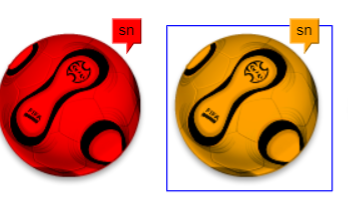
# ht style
 ht.Default.setImage('ball', 'data:image/png;base64,iVBK5CYII=');

function init(){
	var dataModel = new ht.DataModel();
	new ht.graph.GraphView(dataModel).addToDOM();

	var x = 70;
	[{ name: 'Critical', color: '#FF0000'},
	 { name: 'Indeterminate', color: '#C800FF'},
	 { name: 'Cleared', color: '#00FF00'}].forEach(function(alarmInfo){
		var node = new ht.Node();
		node.setImage('ball');
		node.setPosition(x, 100);
		// node物体颜色
		node.setStyle('body.color', alarmInfo.color);
		//选中边框颜色
		node.setStyle('select.color', 'blue');
		//设置note备注
		node.setStyle('note', alarmInfo.name);

		node.setStyle('note.color', 'black');
		node.setStyle('note.offset.x', -20);
		node.setStyle('note.offset.y', 20);
		node.setStyle('note.background', alarmInfo.color);
		dataModel.add(node);
		x += 142;
	 });

}
# ht note
标注
# ht select
GraphView的图元被选中时默认会显示一个选中边框,选中边框的效果可以通过style上的select.*相关属性控制。
# ht border
boder样式在图元的边缘绘制边框效果,用于告警或提示的作用,可通过重载GraphView.getBorderColor(data)函数自定义。
node.setStyle('border.color', alarmInfo.color);
node.setStyle('border.type', 'circle');
# ht shape
node.setStyle('shape', 'polygon');
node.setStyle('shape.polygon.side', side);
# ht label
node.setStyle('label.max', 260);
node.setStyle('label.position', 17);
node.setStyle('label.font', '55px Arial');
# ht icon
edge.addStyleIcon("arrow2", {
	position: 4,
	width: 50,
	height: 25,
	positionFixed: true,
	names: ['arrow']
});

node2.setStyle("icons", {
	flags: {
		position: 2,
		direction: 'east',
		rotation: Math.PI / 4,
		names: ['china', 'spain', 'usa']
	}
});
# HT组件
# ht.widget.*
包含通用组件相关类
- ht.widget.Toolbar
- ht.widget.BorderPane
← theejs项目问题合集 cesium1 →