# 放大镜功能
<!DOCTYPE html>
<html>
<head>
    <title>放大镜</title>
    <meta charset="utf-8">
	<style type="text/css">
        *{
            margin: 0px;
            padding: 0px;
        }
        body{
            width: 960px;
            margin:40px auto;
        }
        #small{
            width: 300px;
            height: 300px;
            border:1px solid #eee;
            border-radius: 4px;
            position: relative;
        }

        #small img{
            width: 100%;
            height: 100%;
        }

        div    {
            float: left;
            margin-right: 10px;
        }

        #big{
            width: 300px;
            height: 300px;
            overflow: hidden;
            position: relative;
            border:1px solid #eee;
            border-radius: 4px;
            display: none;
        }

        #look_girl{
            position: absolute;
            left: 0px;
            top:0px;
        }

        #move{
            width: 100px;
            height: 100px;
            background:#000;
            opacity: .5;
            position: absolute;
            display: none;
            left: 0px;
            top: 0px;
        }
    </style>

</head>
<body>
    <div id="small">
        <img src="apple.jpg">
				<!-- 选择区域 -->
        <p id="move"></p>
    </div>
    <div id="big">
        <img src="apple.jpg" id="look_girl">
    </div>
</body>
</html>
<script type="text/javascript">
    var move = document.getElementById('move');
    var small = document.getElementById('small');
    var big = document.getElementById('big');
    var look_girl = document.getElementById('look_girl');
    small.onmousemove = function(event){
        event = event || window.event;
        this.style.cursor = 'move';
        // 计算move移动块的left值
        var move_left = event.clientX - this.offsetLeft - move.offsetWidth/2;
        // 计算move移动块的top值
        var move_top = event.clientY - this.offsetTop - move.offsetHeight/2;
        // 超出左边界赋值为0
        move_left = move_left < 0 ? 0 : move_left;
        // 超出右边界赋值为盒子宽度-移动块的宽度
        move_left = move_left > this.offsetWidth - move.offsetWidth ? this.offsetWidth - move.offsetWidth : move_left;
        // 超出上边界赋值为0
        move_top = move_top < 0 ? 0 : move_top;
        // 超出下边界赋值为盒子高度-移动块高度
        move_top = move_top > this.offsetHeight - move.offsetHeight ? this.offsetHeight - move.offsetHeight : move_top;
        // 修改移动块left、top值
        move.style.left = move_left + 'px';
        move.style.top = move_top + 'px';
        /*
            计算图片需要移动的坐标

            距离左边left    图片宽度      盒子宽度          距离左边left    图片宽度           盒子宽度
            big_x/(look_girl.offsetWidth-big.offsetWidth) = move_left/(small.offsetWidth-move.offsetWidth);

            big_y/(look_girl.offsetHeight-big.offsetHeight) = move_top/(small.offsetHeight-move.offsetHeight);

        */

        var big_x = move_left/(small.offsetWidth-move.offsetWidth) * (look_girl.offsetWidth-big.offsetWidth);
        var big_y = move_top/(small.offsetHeight-move.offsetHeight) * (look_girl.offsetHeight-big.offsetHeight);
        // 修改图片定位
        look_girl.style.left = -big_x + 'px';
        look_girl.style.top = -big_y + 'px';
    }

    small.onmouseover = function(){
        move.style.display = 'block';
        big.style.display = 'block';
    }

    small.onmouseout = function(){
        move.style.display = 'none';
        big.style.display = 'none';
    }
</script>
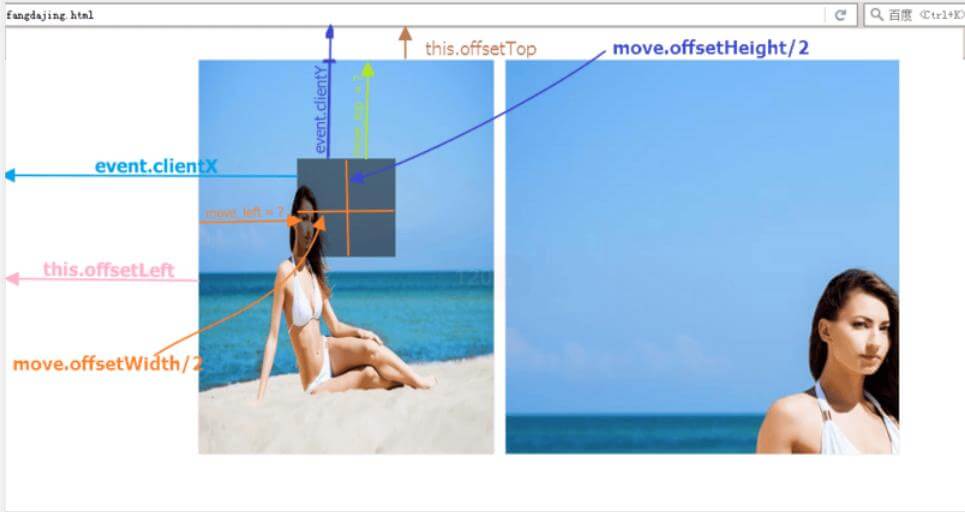
# 封装
可以封装后使用,稍微修改一下也可以支持vue、react magnifier传递四个参数,分别是包裹小图片的盒子,包裹大图片的盒子,放大区域,放大的局部图片
	function magnifier(small,big,move,bigimg){

		var move = document.getElementById(move);
		var small = document.getElementById(small);
		var big = document.getElementById(big);

		var bigimg = document.getElementById(bigimg);
		small.onmousemove = function(event){
		    event = event || window.event;

		    this.style.cursor = 'move';
		    // 计算move移动块的left值
		    var move_left = event.clientX - this.offsetLeft - move.offsetWidth/2;
		    // 计算move移动块的top值
		    var move_top = event.clientY - this.offsetTop - move.offsetHeight/2;
		    // 超出左边界赋值为0
		    move_left = move_left < 0 ? 0 : move_left;
		    // 超出右边界赋值为盒子宽度-移动块的宽度
		    move_left = move_left > this.offsetWidth - move.offsetWidth ? this.offsetWidth - move.offsetWidth : move_left;
		    // 超出上边界赋值为0
		    move_top = move_top < 0 ? 0 : move_top;
		    // 超出下边界赋值为盒子高度-移动块高度
		    move_top = move_top > this.offsetHeight - move.offsetHeight ? this.offsetHeight - move.offsetHeight : move_top;
		    // 修改移动块left、top值
		    move.style.left = move_left + 'px';
		    move.style.top = move_top + 'px';

		    var big_x = move_left/(small.offsetWidth-move.offsetWidth) * (bigimg.offsetWidth-big.offsetWidth);
		    var big_y = move_top/(small.offsetHeight-move.offsetHeight) * (bigimg.offsetHeight-big.offsetHeight);
		    // 修改图片定位
		    bigimg.style.left = -big_x + 'px';
		    bigimg.style.top = -big_y + 'px';
		}

		small.onmouseover = function(){
		    move.style.display = 'block';
		    big.style.display = 'block';
		}

		small.onmouseout = function(){
		    move.style.display = 'none';
		    big.style.display = 'none';
		}
	}

	magnifier('small','big','move','apple')
# es6规则
export function magnifier(small,big,move,bigimg){

    var move = document.getElementById(move);
    var small = document.getElementById(small);
    var big = document.getElementById(big);
    var bigimg = document.getElementById(bigimg);
    small.onmousemove = function(event){
        event = event || window.event;

        this.style.cursor = 'move';
        // 计算move移动块的left值
        var move_left = event.clientX - this.offsetLeft - move.offsetWidth/2;
        // 计算move移动块的top值
        var move_top = event.clientY - this.offsetTop - move.offsetHeight/2;
        // 超出左边界赋值为0
        move_left = move_left < 0 ? 0 : move_left;
        // 超出右边界赋值为盒子宽度-移动块的宽度
        move_left = move_left > this.offsetWidth - move.offsetWidth ? this.offsetWidth - move.offsetWidth : move_left;
        // 超出上边界赋值为0
        move_top = move_top < 0 ? 0 : move_top;
        // 超出下边界赋值为盒子高度-移动块高度
        move_top = move_top > this.offsetHeight - move.offsetHeight ? this.offsetHeight - move.offsetHeight : move_top;
        // 修改移动块left、top值
        move.style.left = move_left + 'px';
        move.style.top = move_top + 'px';

        var big_x = move_left/(small.offsetWidth-move.offsetWidth) * (bigimg.offsetWidth-big.offsetWidth);
        var big_y = move_top/(small.offsetHeight-move.offsetHeight) * (bigimg.offsetHeight-big.offsetHeight);
        // 修改图片定位
        bigimg.style.left = -big_x + 'px';
        bigimg.style.top = -big_y + 'px';
    }

    small.onmouseover = function(){
        move.style.display = 'block';
        big.style.display = 'block';
    }

    small.onmouseout = function(){
        move.style.display = 'none';
        big.style.display = 'none';
    }
}
# 引入
import {magnifier} from '../../static/js/test.js'
magnifier('small','big','move','apple')