# 小程序原理
# 小程序渲染层和逻辑层
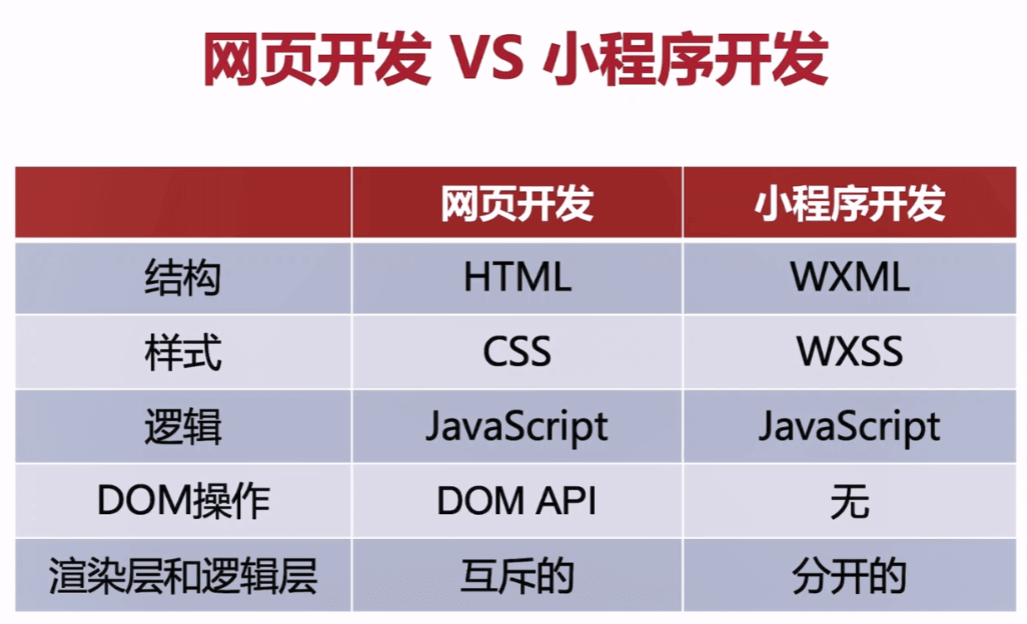
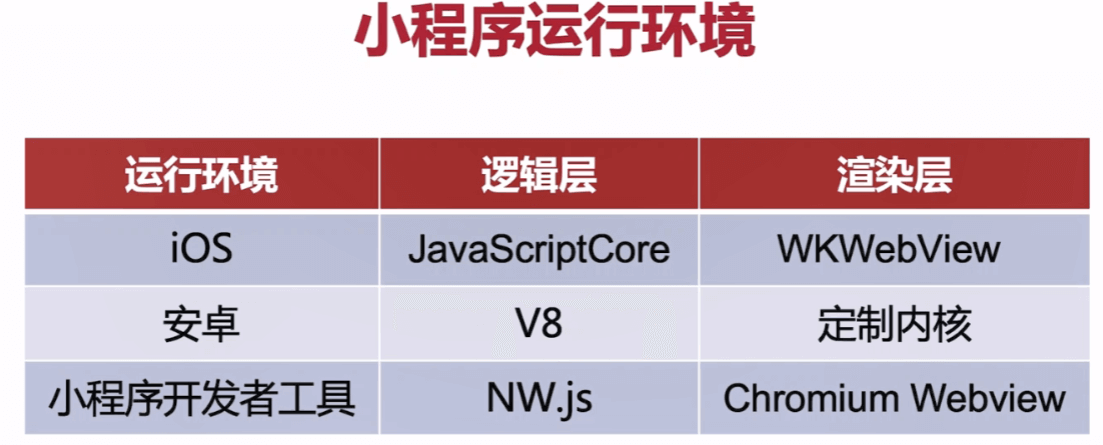
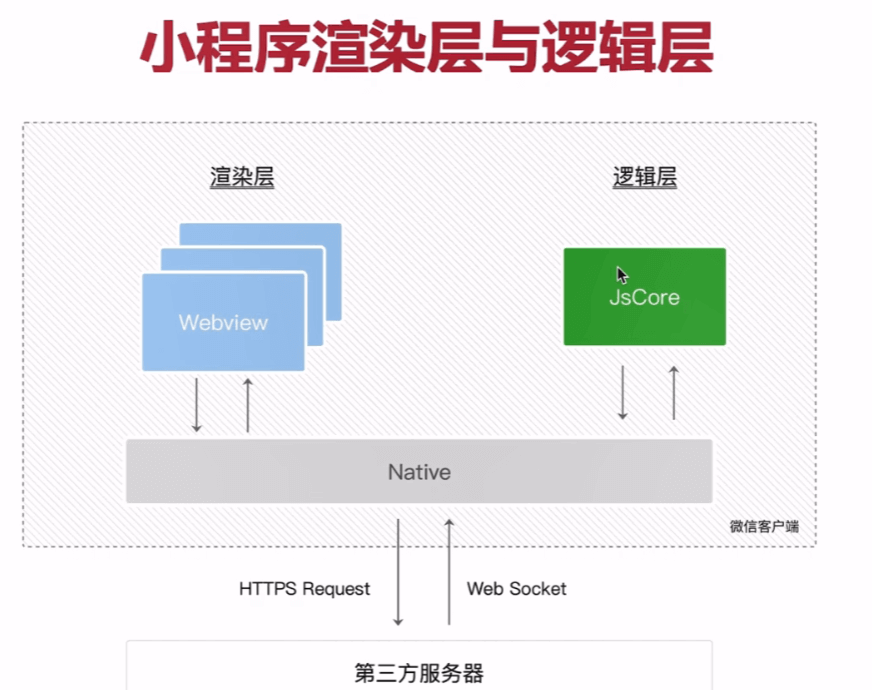
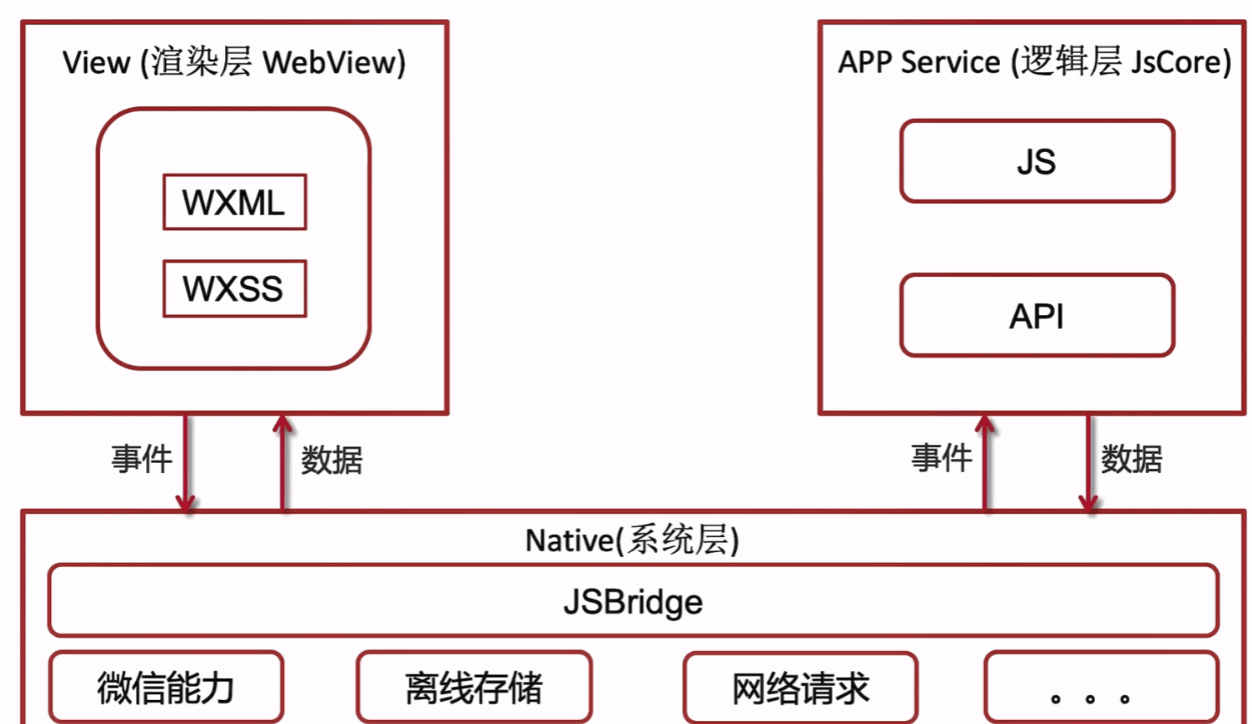
这就是为什么不频繁使用this.serData的原因,也是如果某些值不显示在界面上,就不要定义在data中
# 小程序的运行和更新
# wx.getUpdateManager
//app.js
App({
  onLaunch: function () {
    this.checkUpate()
      wx.cloud.init({
        env: 'wx-beakb',
        traceUser: true,
      })
  },
  checkUpate(){
    const updateManager = wx.getUpdateManager()
    // 检测版本更新
    updateManager.onCheckForUpdate((res)=>{
      if (res.hasUpdate){
        updateManager.onUpdateReady(()=>{
          wx.showModal({
            title: '更新提示',
            content: '新版本已经准备好,是否重启应用',
            success(res){
              if(res.confirm){
                updateManager.applyUpdate()
              }
            }
          })
        })
      }
    })
  },
})
- 小程序中定时器全局的,要记得手动回收
- 避免使用:active伪类实现点击态,可使用hover-class
# 场景值scene
记录用户行为 埋点
在appjs中的onLaunch和onshow中可以获得
# sitemap.json
配置搜索
{
  "desc": "关于本文件的更多信息,请参考文档 https://developers.weixin.qq.com/miniprogram/dev/framework/sitemap.html",
  "rules": [{
  "action": "allow",
  "page": "*"
  }]
}
# 小程序接口条用凭证 getAccessToken
const rp = require('request-promise')
const APPID = 'wx0xxxx' //小程序ID
const APPSECRET = '8xxxf6xx' //小程序秘钥

const URL = `https://api.weixin.qq.com/cgi-bin/token?grant_type=client_credential&appid=${APPID}&secret=${APPSECRET}`
const updateAccessToken = async () => {
	const resStr = await rp(URL)
	const res = JSON.parse(resStr)
	console.log(res)
}
updateAccessToken ()
 // { access_token:
 //   '32_tvjUhkhyUPurKxxxxjlAFKiAAADIN',
 //  expires_in: 7200 }
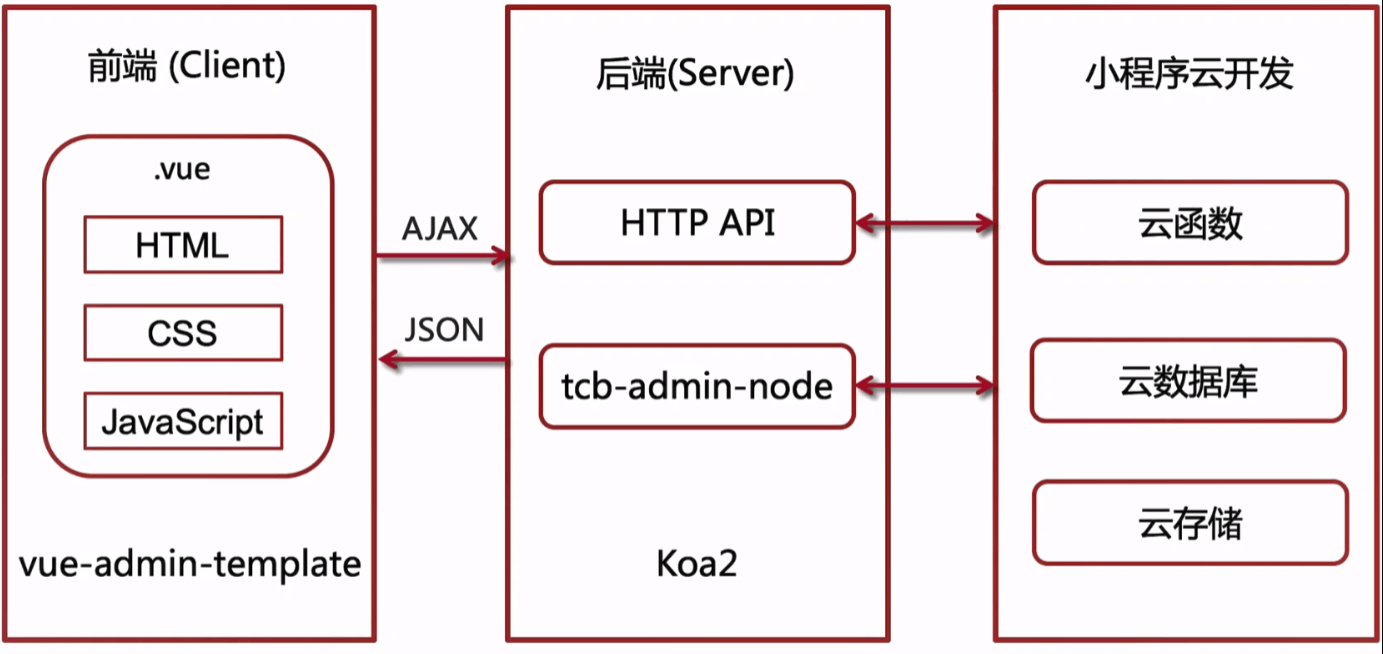
# 后台调用小程序云函数云存储云数据库
const getAccessToken = require('./getAccessToken.js')
const rp = require('request-promise')

const callCloudFn = async (ctx, fnName, params) => {
    const ACCESS_TOKEN = await getAccessToken()
	//缓存的token env云环境 fnname云函数名称
    const options = {
        method: 'POST',
        uri: `https://api.weixin.qq.com/tcb/invokecloudfunction?access_token=${ACCESS_TOKEN}&env=${ctx.state.env}&name=${fnName}`,
        body: {
            ...params
        },
        json: true // Automatically stringifies the body to JSON
    }

    return await rp(options)
        .then((res) => {
            return res
        })
        .catch(function (err) {
        })
}

module.exports = callCloudFn
const getAccessToken = require('./getAccessToken.js')
const rp = require('request-promise')

const callCloudDB = async(ctx, fnName, query = {}) => {
    const ACCESS_TOKEN = await getAccessToken()
    const options = {
        method: 'POST',
        uri: `https://api.weixin.qq.com/tcb/${fnName}?access_token=${ACCESS_TOKEN}`,
        body: {
            query,
            env: ctx.state.env,
        },
        json: true // Automatically stringifies the body to JSON
    }

    return await rp(options)
        .then((res) => {
            return res
        })
        .catch(function (err) {
            console.log(err);
        })

}

module.exports = callCloudDB
const getAccessToken = require('./getAccessToken.js')
const rp = require('request-promise')
const fs = require('fs')

const cloudStorage = {
    async download(ctx, fileList) {
        const ACCESS_TOKEN = await getAccessToken()
        const options = {
            method: 'POST',
            uri: `https://api.weixin.qq.com/tcb/batchdownloadfile?access_token=${ACCESS_TOKEN}`,
            body: {
                env: ctx.state.env,
                file_list: fileList
            },
            json: true
        }

        return await rp(options)
            .then((res) => {
                return res
            })
            .catch(function (err) {
                console.log(err);
            })

    },

    async upload(ctx) {
        // 1、请求地址
        const ACCESS_TOKEN = await getAccessToken()
        const file = ctx.request.files.file
        const path = `swiper/${Date.now()}-${Math.random()}-${file.name}`
        const options = {
            method: 'POST',
            uri: `https://api.weixin.qq.com/tcb/uploadfile?access_token=${ACCESS_TOKEN}`,
            body: {
                path,
                env: ctx.state.env,
            },
            json: true // Automatically stringifies the body to JSON
        };
        //  请求参数的
        const info = await rp(options)
            .then(function (res) {
                return res
            })
            .catch(function (err) {
            })
        console.log(info)
        // 2、上传图片
        const params = {
            method: 'POST',
            headers: {
                'content-type': 'multipart/form-data'
            },
            uri: info.url,
            formData: {
                key: path,
                Signature: info.authorization,
                'x-cos-security-token': info.token,
                'x-cos-meta-fileid': info.cos_file_id,
                file: fs.createReadStream(file.path)
            },
            json: true
        }
        await rp(params)
        return info.file_id
    },

    async delete(ctx, fileid_list) {
        const ACCESS_TOKEN = await getAccessToken()

        const options = {
            method: 'POST',
            uri: `https://api.weixin.qq.com/tcb/batchdeletefile?access_token=${ACCESS_TOKEN}`,//TOKEN
            body: {
                env: ctx.state.env,//ENV
                fileid_list: fileid_list
            },
            json: true
        }

        return await rp(options)
            .then((res) => {
                return res
            })
            .catch(function (err) {
                console.log(err);
            })
    }
}

module.exports = cloudStorage
const Router = require('koa-router')
const router = new Router()
const callCloudFn = require('../utils/callCloudFn')
const callCloudDB = require('../utils/callCloudDB.js')
// get post
router.get('/list', async (ctx, next) => {
    const query = ctx.request.query
    const res = await callCloudFn(ctx, 'music', {
        $url: 'playlist',
        start: parseInt(query.start),
        count: parseInt(query.count)
    })
    let data = []
    if (res.resp_data) {
        data = JSON.parse(res.resp_data).data
    }
    ctx.body = {
        data,
        code: 20000,
    }
})

router.get('/getById', async(ctx, next)=>{
    const query = `db.collection('playlist').doc('${ctx.request.query.id}').get()`
    const res = await callCloudDB(ctx, 'databasequery', query)
    ctx.body = {
        code: 20000,
        data: JSON.parse(res.data)
    }
})

router.post('/updatePlaylist', async(ctx, next)=>{
    const params = ctx.request.body
    const query = `
        db.collection('playlist').doc('${params._id}').update({
            data: {
                name: '${params.name}',
                copywriter: '${params.copywriter}'
            }
        })
    `
    const res = await callCloudDB(ctx, 'databaseupdate', query)
    ctx.body = {
        code: 20000,
        data: res
    }
})

router.get('/del', async(ctx, next)=>{
    const params = ctx.request.query
    const query = `db.collection('playlist').doc('${params.id}').remove()`
    const res = await callCloudDB(ctx, 'databasedelete', query)
    ctx.body = {
        code: 20000,
        data: res
    }
})

module.exports = router
router.post('/upload', async(ctx, next)=>{
   const fileid =  await cloudStorage.upload(ctx)
   console.log("-------------------------")
   console.log(fileid)
   // 写数据库
    const query = `
        db.collection('swiper').add({
            data: {
                fileid: '${fileid}'
            }
        })
    `
   const res = await callCloudDB(ctx, 'databaseadd', query)
   ctx.body = {
       code: 20000,
       id_list: res.id_list
   }
}