# git小乌龟使用
链接 (opens new window) 代码回滚 (opens new window)
# Git操作失败并提示Another git process seems to be running in this......
Git操作的过程中突然显示Another git process semms to be running in this repository, e.g. an editor opened by ‘git commit’. Please make sure all processes are terminated then try again. If it still fails, a git process remove the file manually to continue… 翻译过来就是git被另外一个程序占用,重启机器也不能够解决。
原因在于Git在使用过程中遭遇了奔溃,部分被上锁资源没有被释放导致的。
解决方案:进入项目文件夹下的 .git文件中(显示隐藏文件夹或rm .git/index.lock)删除index.lock文件即可。
# git校验避开提交
git add .
git commit -m '乌龟' --no-verify
git push
# git hooks => husky
cnpm i husky --save-dev
  "husky":{
    "hooks":{
      "pre-commit":"npm run lint && npm run test"
    }
  },
  "scripts": {
    "start": "egg-scripts start --daemon --title=egg-server-server",
    "stop": "egg-scripts stop --title=egg-server-server",
    "dev": "egg-bin dev",
    "debug": "egg-bin debug",
    "test": "npm run lint -- --fix && npm run test-local",
    "test-local": "egg-bin test",
    "cov": "egg-bin cov",
    "lint": "eslint .",
    "ci": "npm run lint && npm run cov",
    "autod": "autod"
  },
# git代码提交规范
# commitizen
用指令提交时使用。
cnpm install -g commitizen
commitizen init cz-conventional-changelog --save-dev --save-exact
git add .
git cz
# husky 结合 commitlint 校验
cnpm install husky --save-dev
检测提交 commit 提交记录是否符合规范需要 commitlint
npm install -D @commitlint/config-conventional @commitlint/cli
检测提交暂存区的代码是否合规需要 lint-staged
npm install -D lint-staged
# 配置
- lint-staged 在 package.json 文件中添加相关配置
"lint-staged": {
  "*.{js,ts}": "eslint --fix"
}
- commitlint 在项目下新建文件 commitlint.config.js 文件写入配置
module.exports = {
  extends: ["@commitlint/config-conventional"],
};
也可以添加自定义配置规则,相关文档 commitlint rules (opens new window)
- husky 上面已经配置好了相关依赖,需要使用 husky 与实际操作关联起来。
有部分命令像是 husky add 只能使用 yarn 执行成功,所以操作不成功可以采取手动添加的方式。
在 package.json 中添加新的 scripts (对应命令:npm set-script prepare "husky install")
"scripts": {
  "prepare": "husky install"
}
prepare 是 NPM 操作生命周期中的一环,在执行 install 的时候会按生命周期顺序执行相应钩子: NPM7: preinstall -> install -> postinstall -> prepublish -> preprepare -> prepare -> postprepare 文档 npm7 scripts NPM6: preinstall -> install -> postinstall,同时也会触发 prepublish、prepare 文档 npm6 scripts 执行 npm run prepare ,在项目下会生成一个 .husky 文件夹,用户可以在其中配置相关 git hooks。
在 .husky 下添加一个文件,名称为相关 git hooks 的名称。
添加 pre-commit 文件,写入配置(对应命令:npx husky add .husky/pre-commit "npx lint-staged --allow-empty $1")
#!/bin/sh
. "$(dirname "$0")/_/husky.sh"

npx lint-staged --allow-empty $1
这样就与 lint-staged 关联起来了,在提交代码的时候就会按 lint-staged 配置去检测文件。
添加 commit-msg 文件,写入配置(对应命令:npx husky add .husky/commit-msg "npx commitlint --edit $1")
这样在提交时会检查 commit 信息是否符合开发规范
git hooks中,提交时的钩子有:pre-commit 提交之前执行(git commit --no-verify 可以跳过此阶段) -> prepare-commit-msg 启动提交信息编辑之前 -> commit-msg 填写提交信息之后 -> post-commit 提交过程结束最后。
# git 合并回退处理
- 本地合并分支后发现合并有问题,回退到合并前的索引
使用git log 查看提交记录,找到合并前的索引
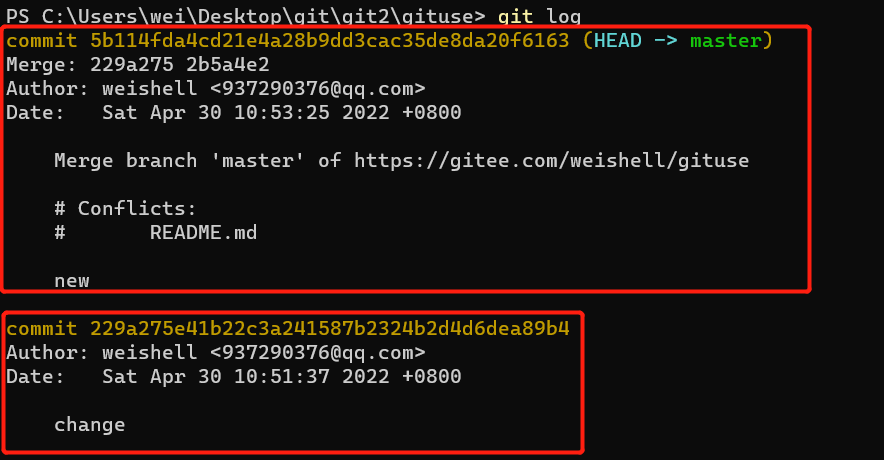
git reset --hard 229a275e41b22c3a241587b2324b2d4d6dea89b4
# 线上回滚
本地选择回退到对应的版本
git push origin HEAD --force # 强制提交一次,之前错误的提交就从远程仓库删除
其他的更新记录就丢失了,慎用
# revert
使用 git revert <commit id> 即可,git 会生成一个新的 commit,将指定的 commit 内容从当前分支上撤除。