# arkts鸿蒙学习
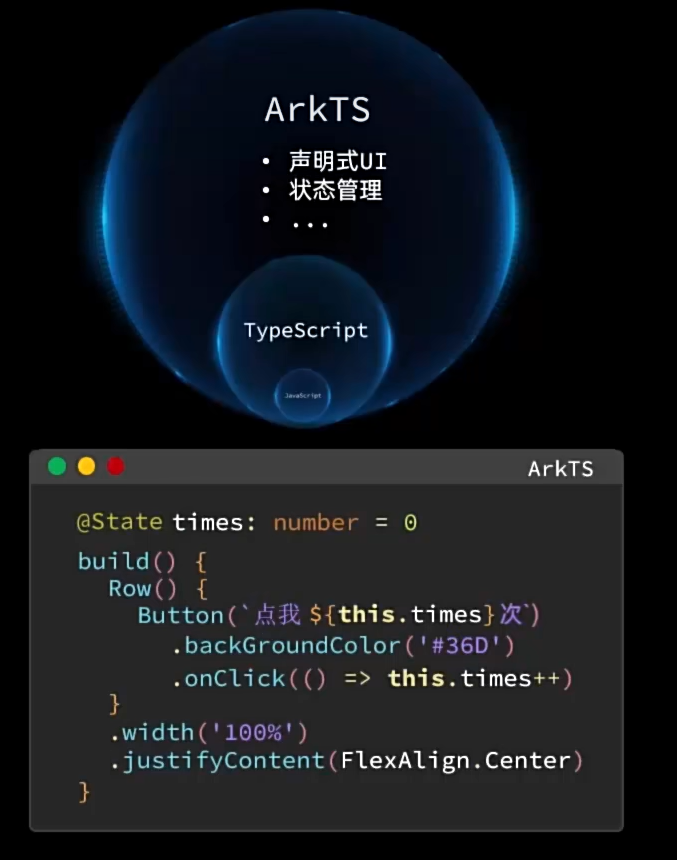
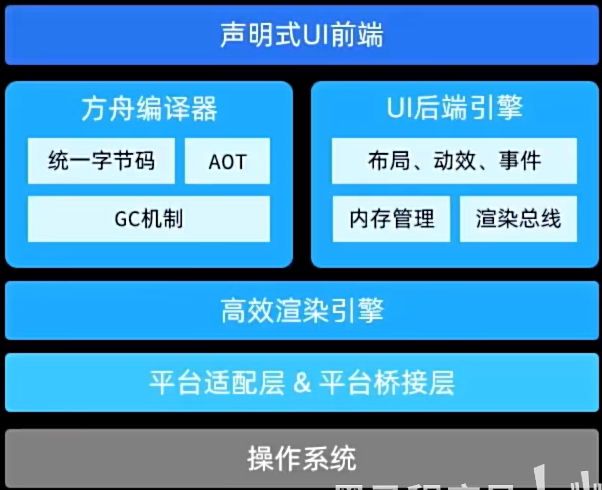
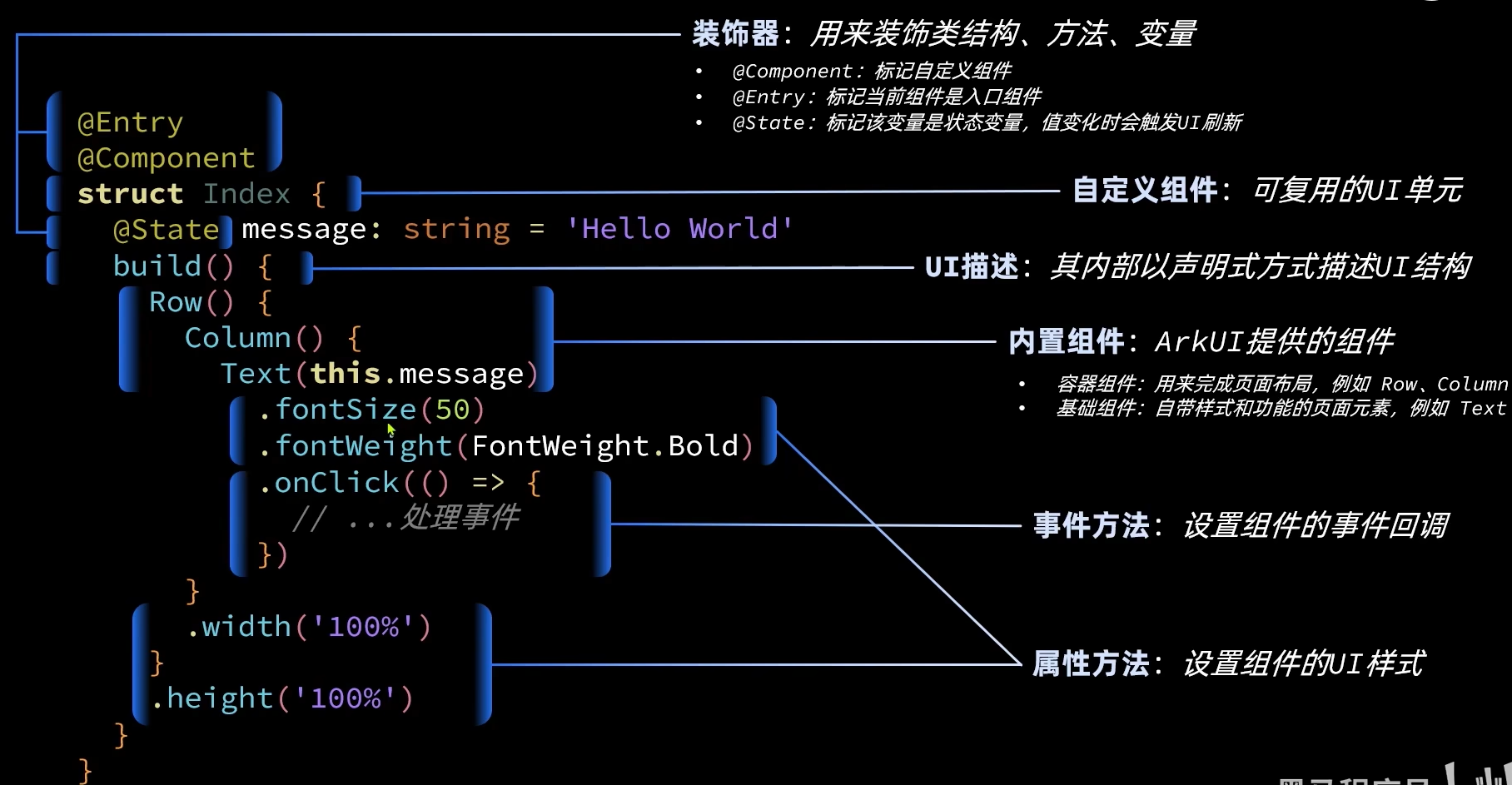
# arkts组件
# Image
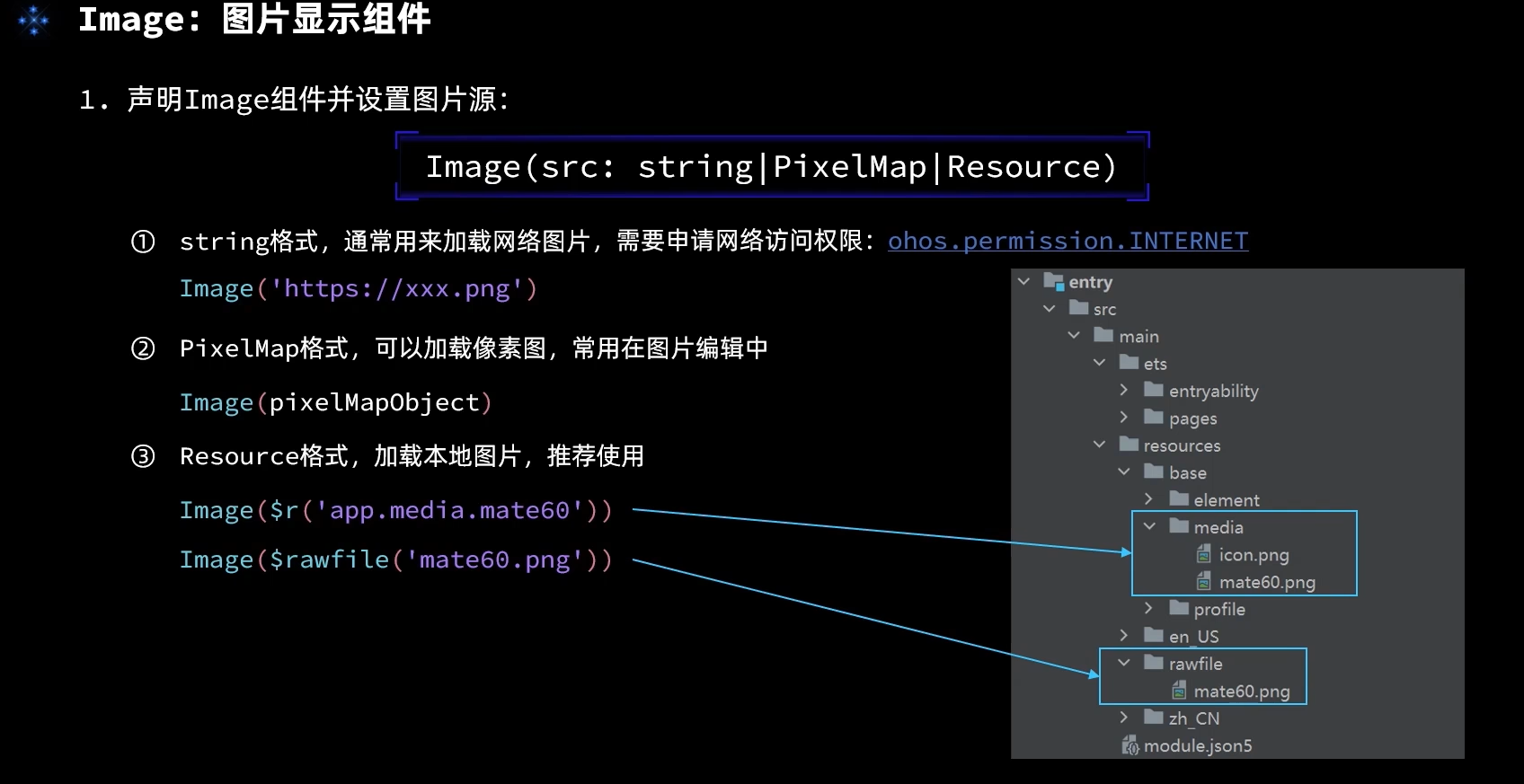
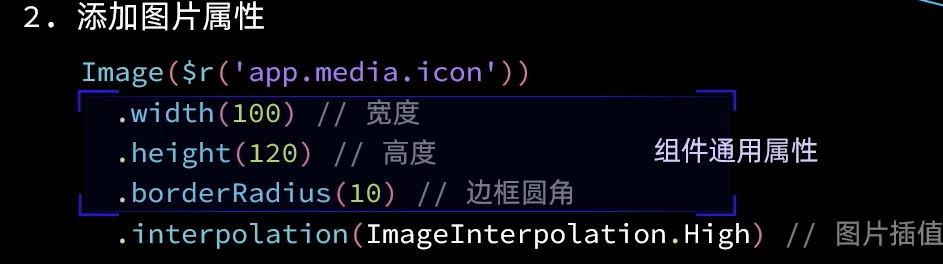
图片需要再module.json5下面配置权限
{
  "module": {
    "requestPermissions": [
      {
        "name": "ohos.permission.INTERNET"
      }
    ]
  }
}
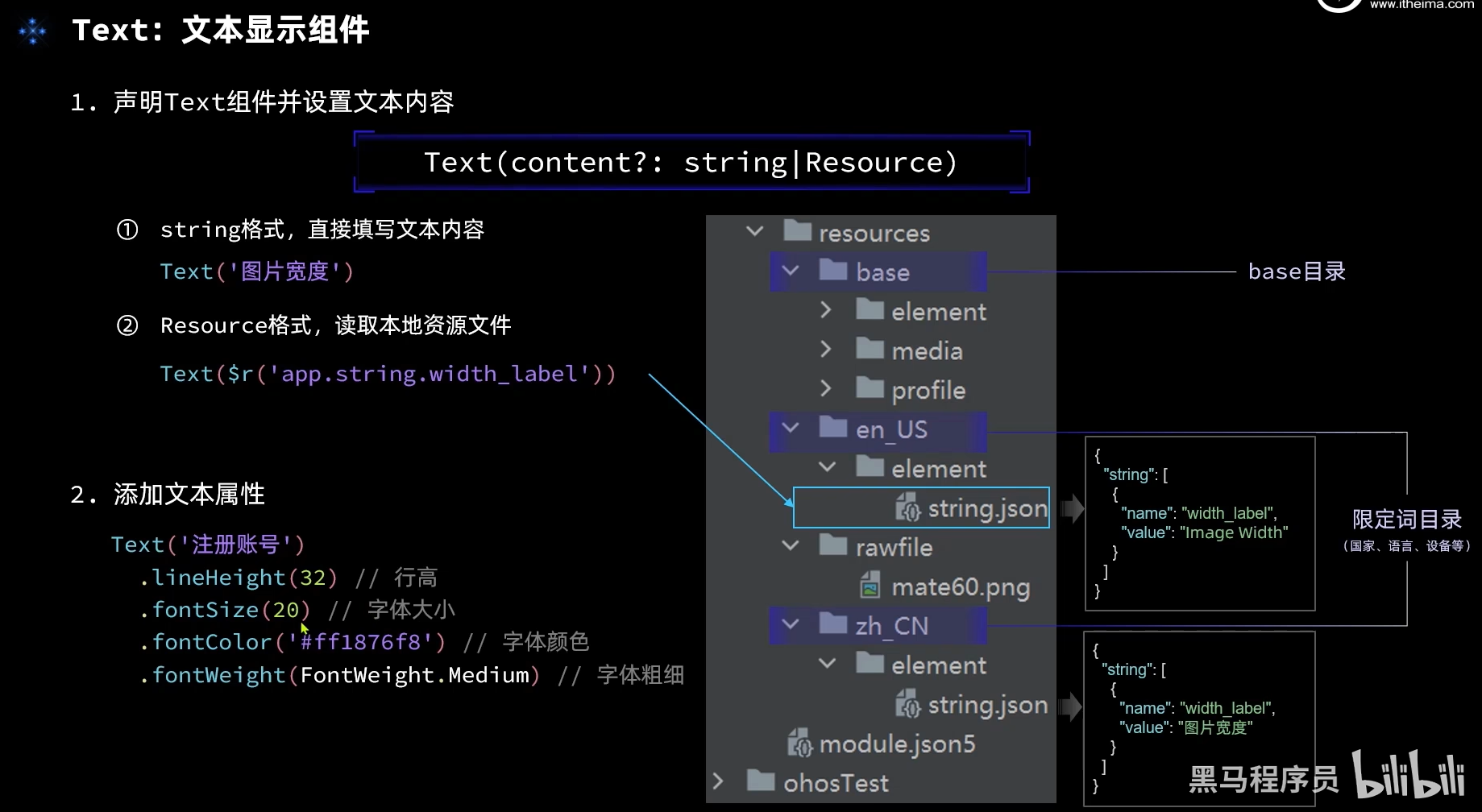
# Text
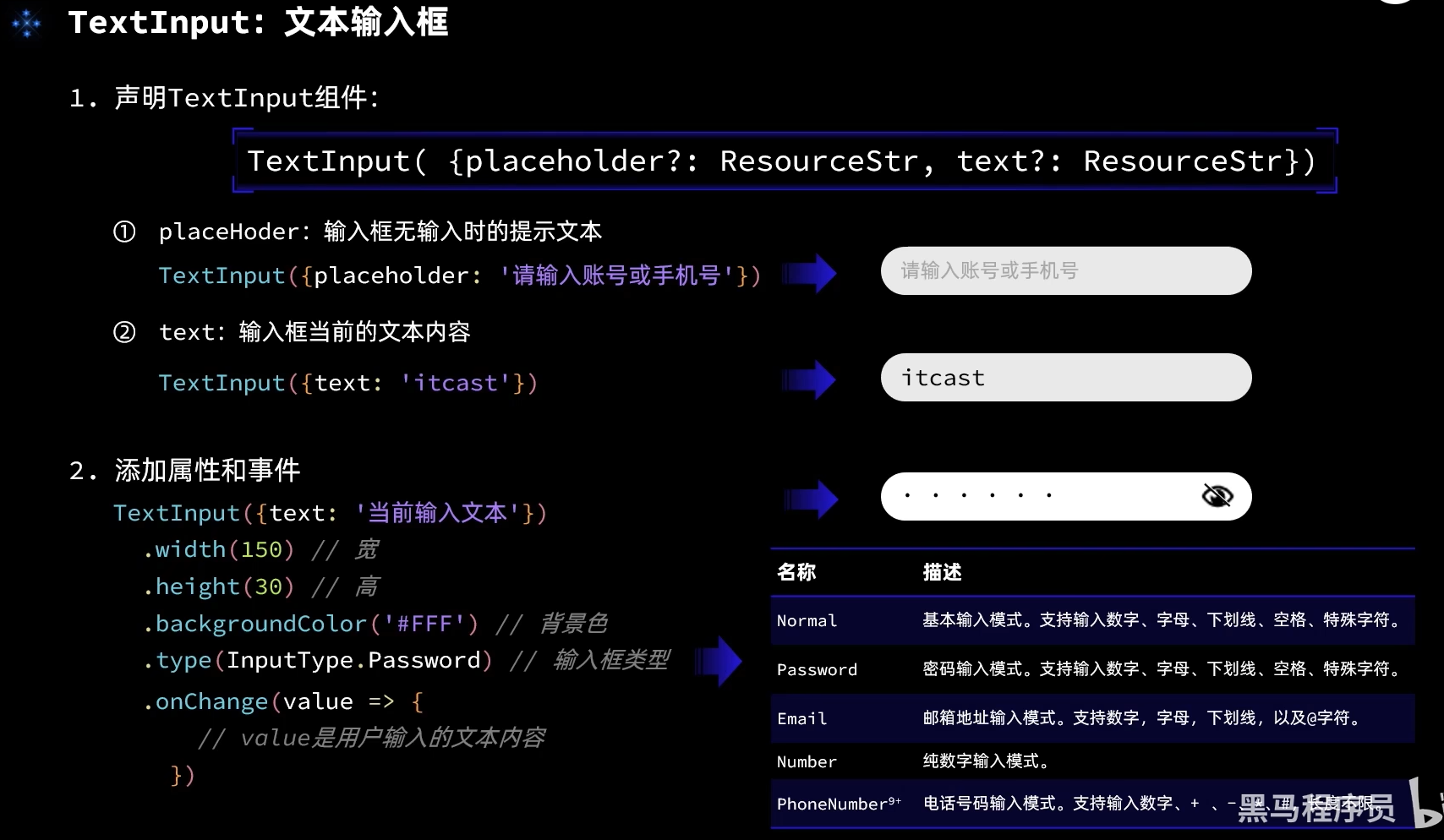
# TextInput
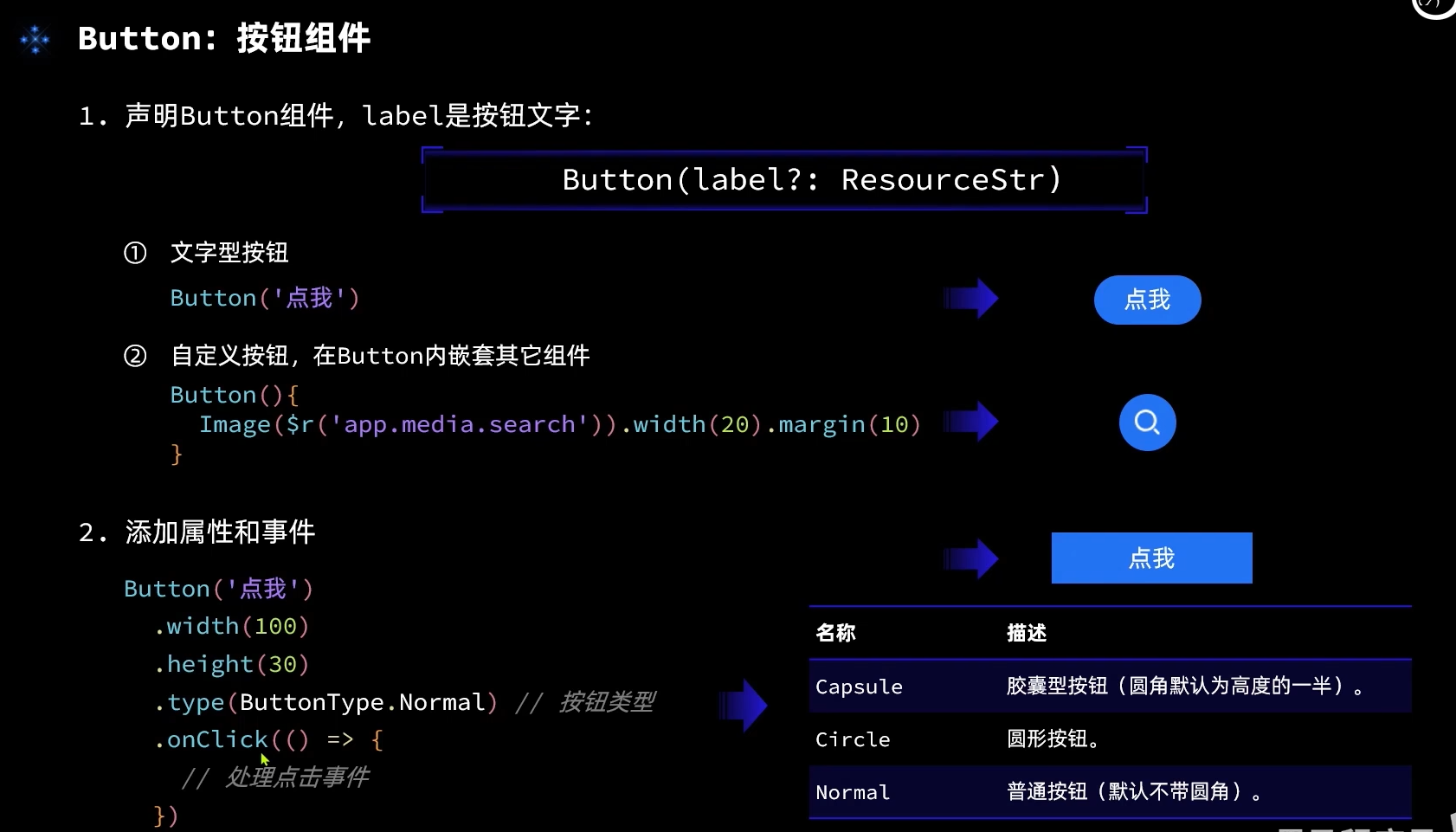
# Button
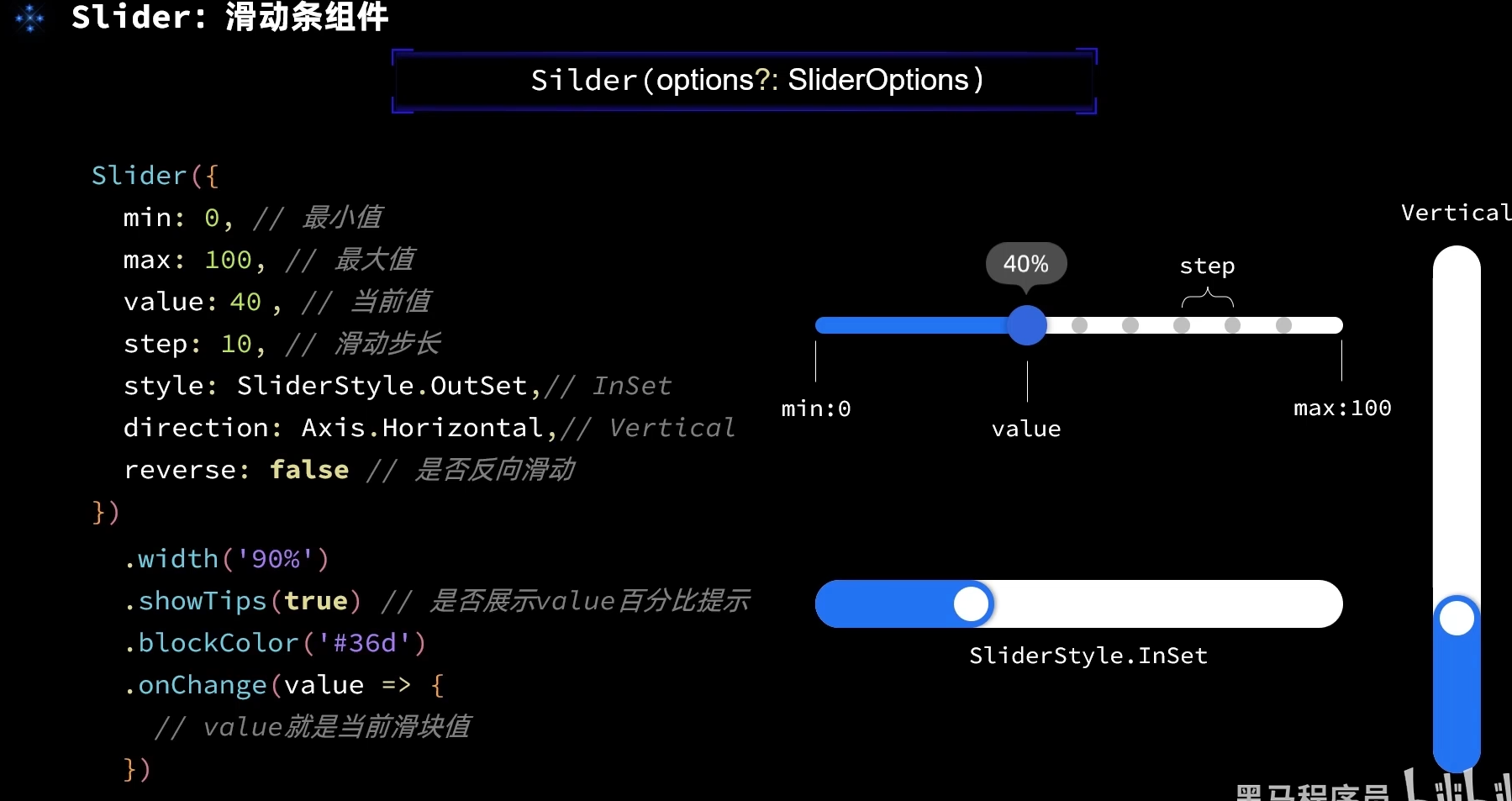
# Slider
# arkts 布局
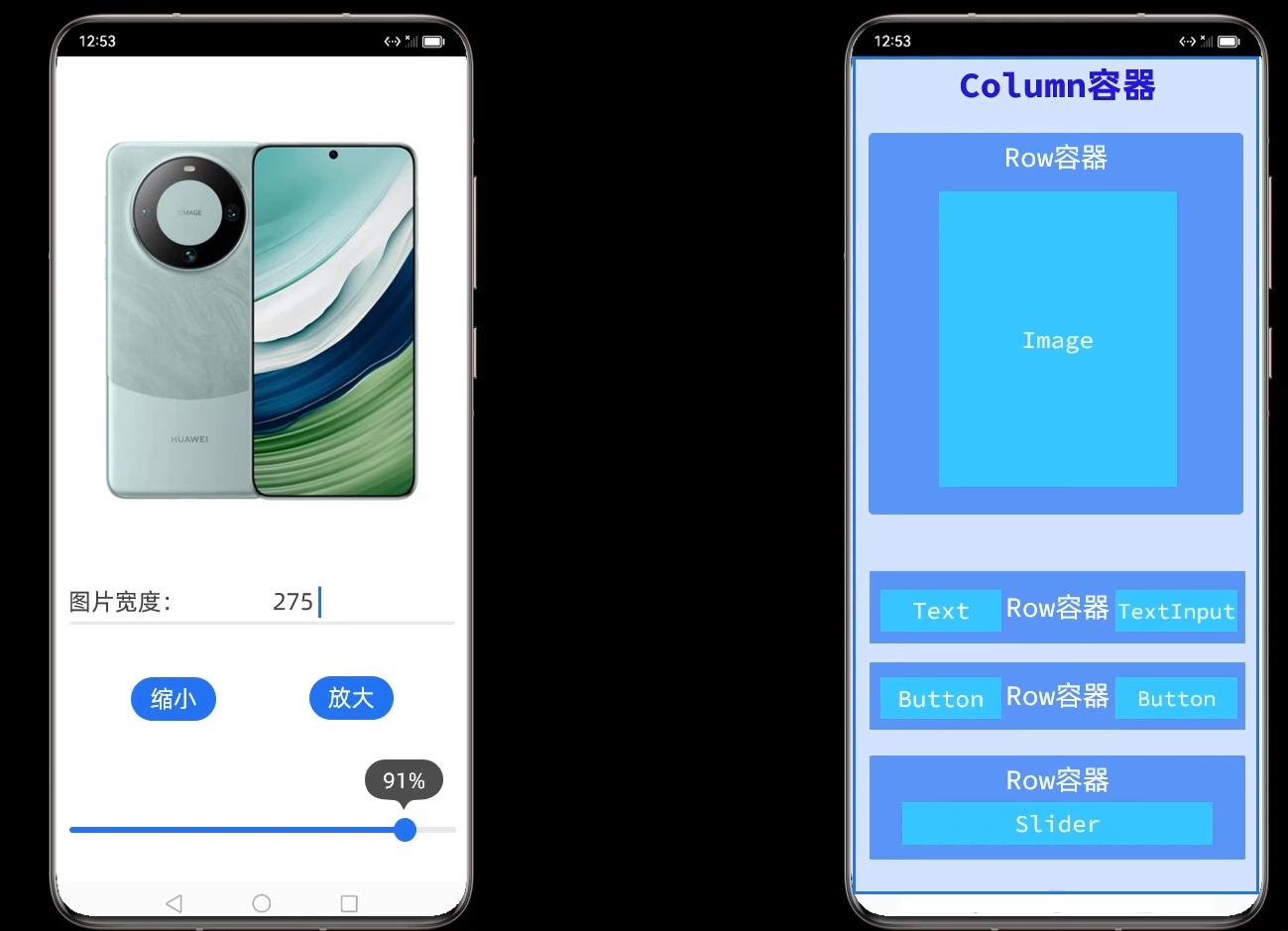
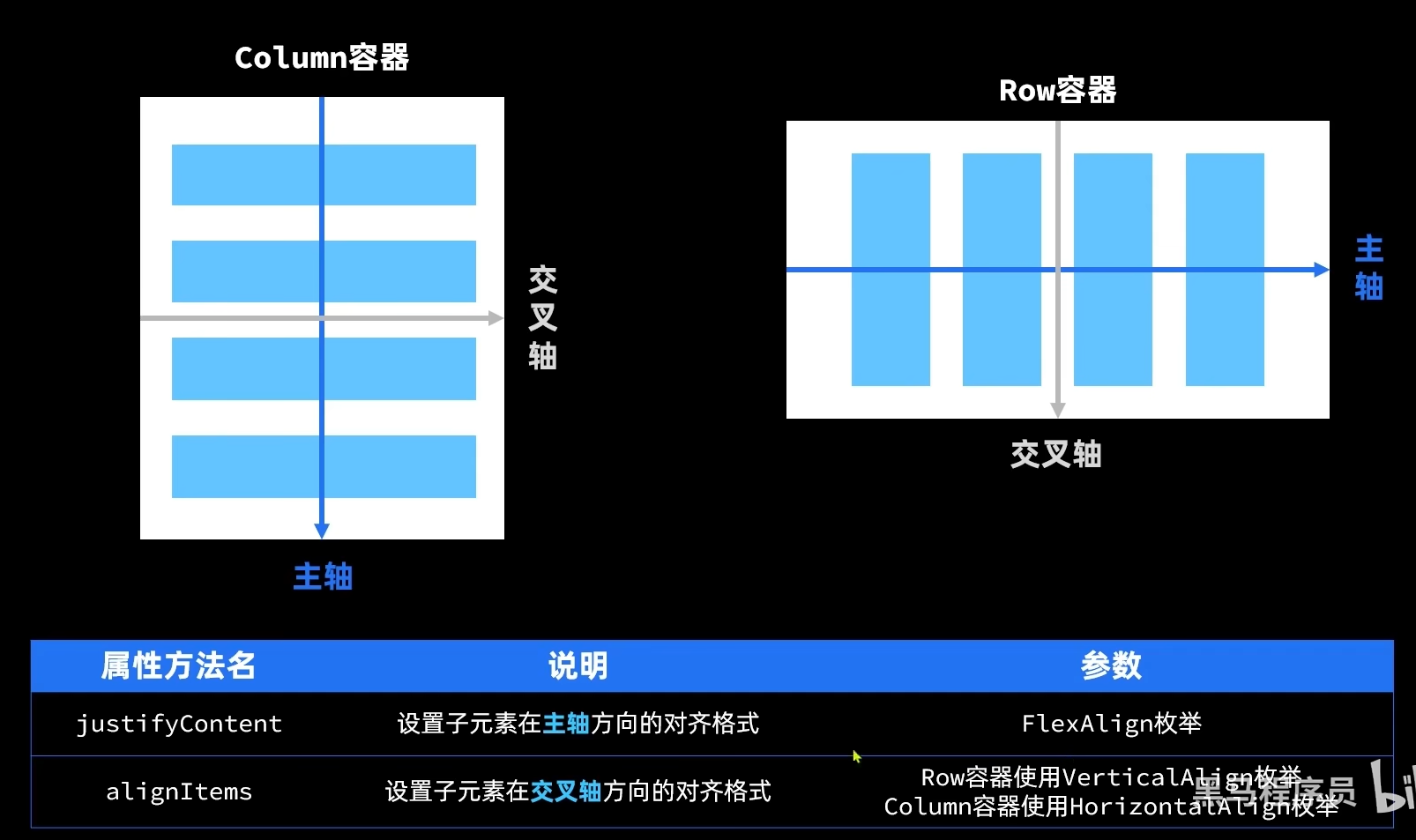
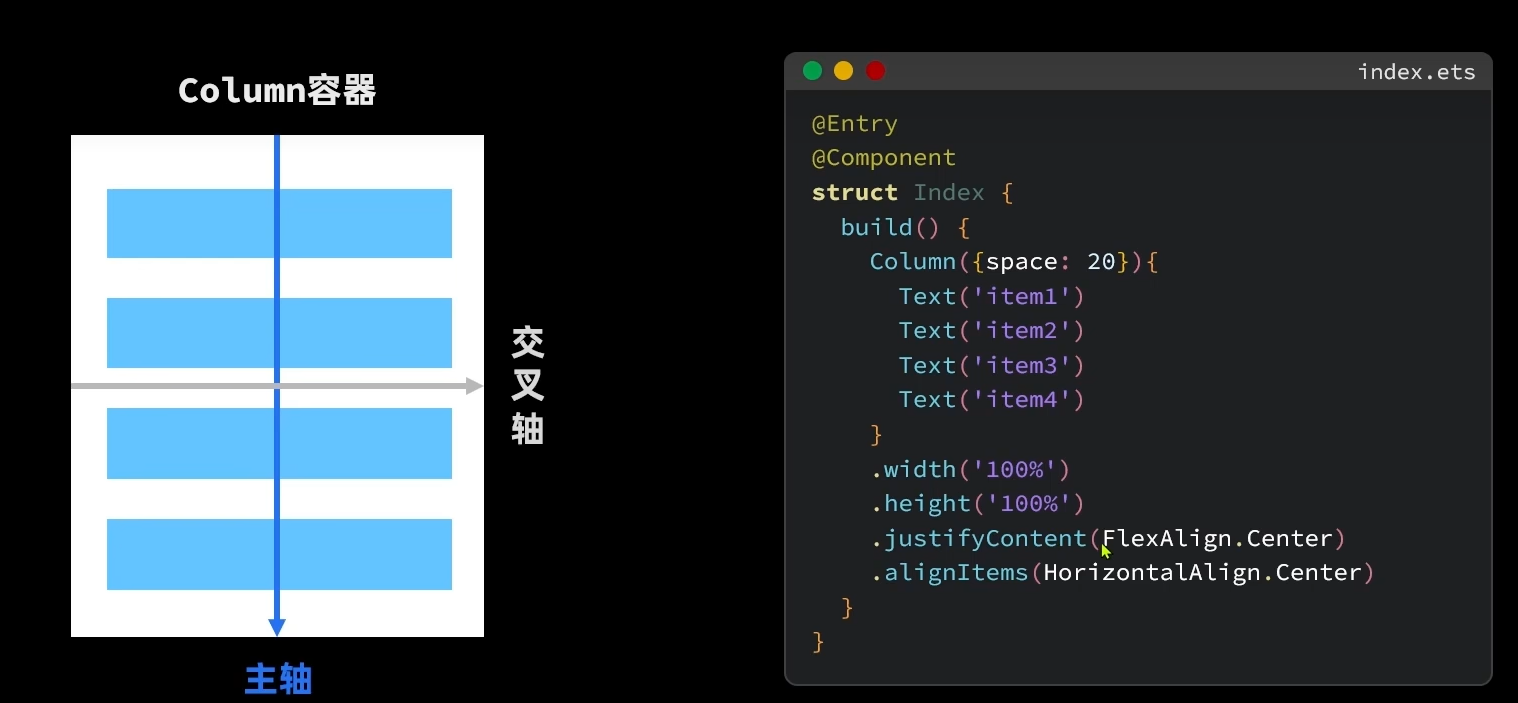
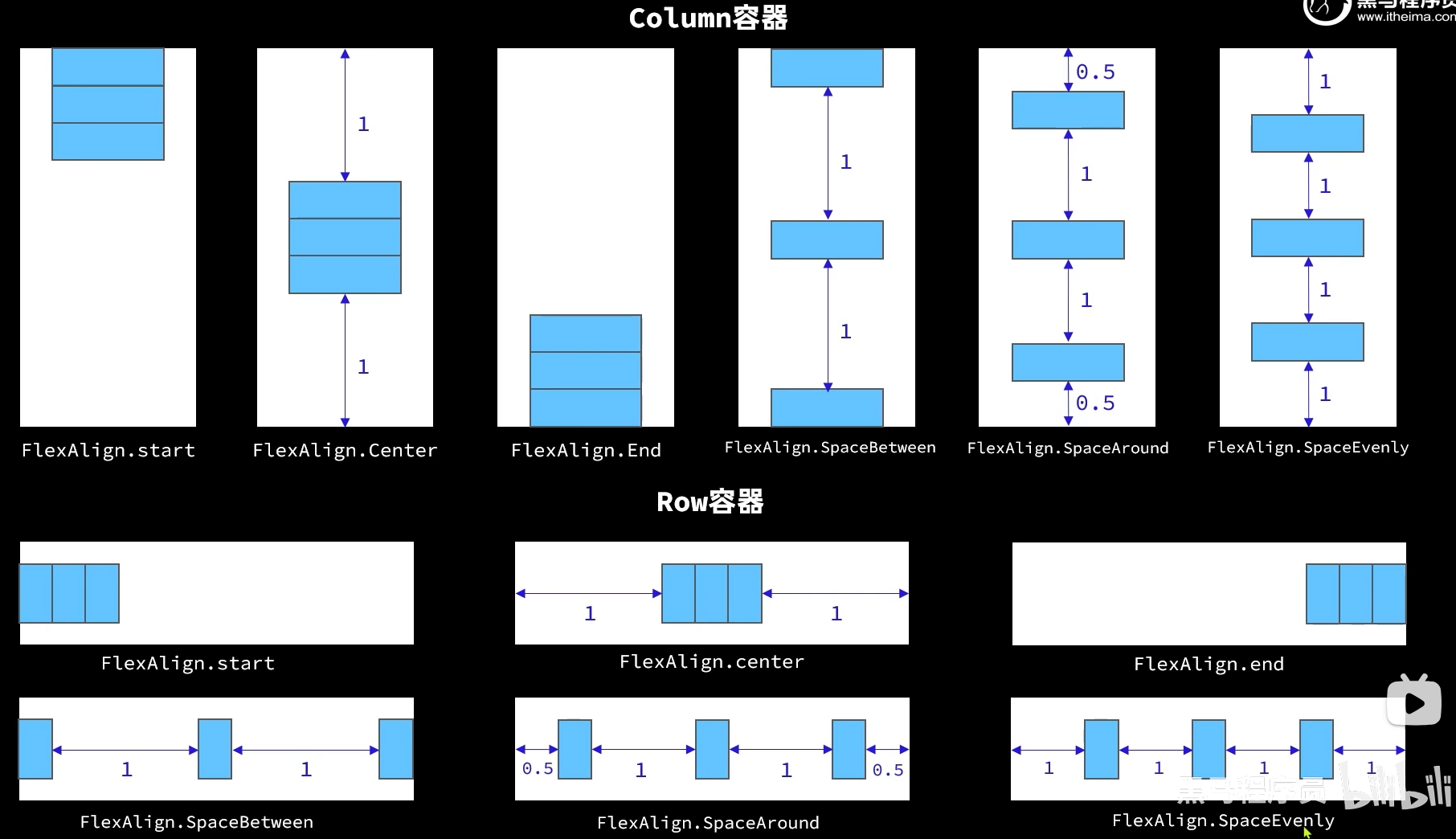
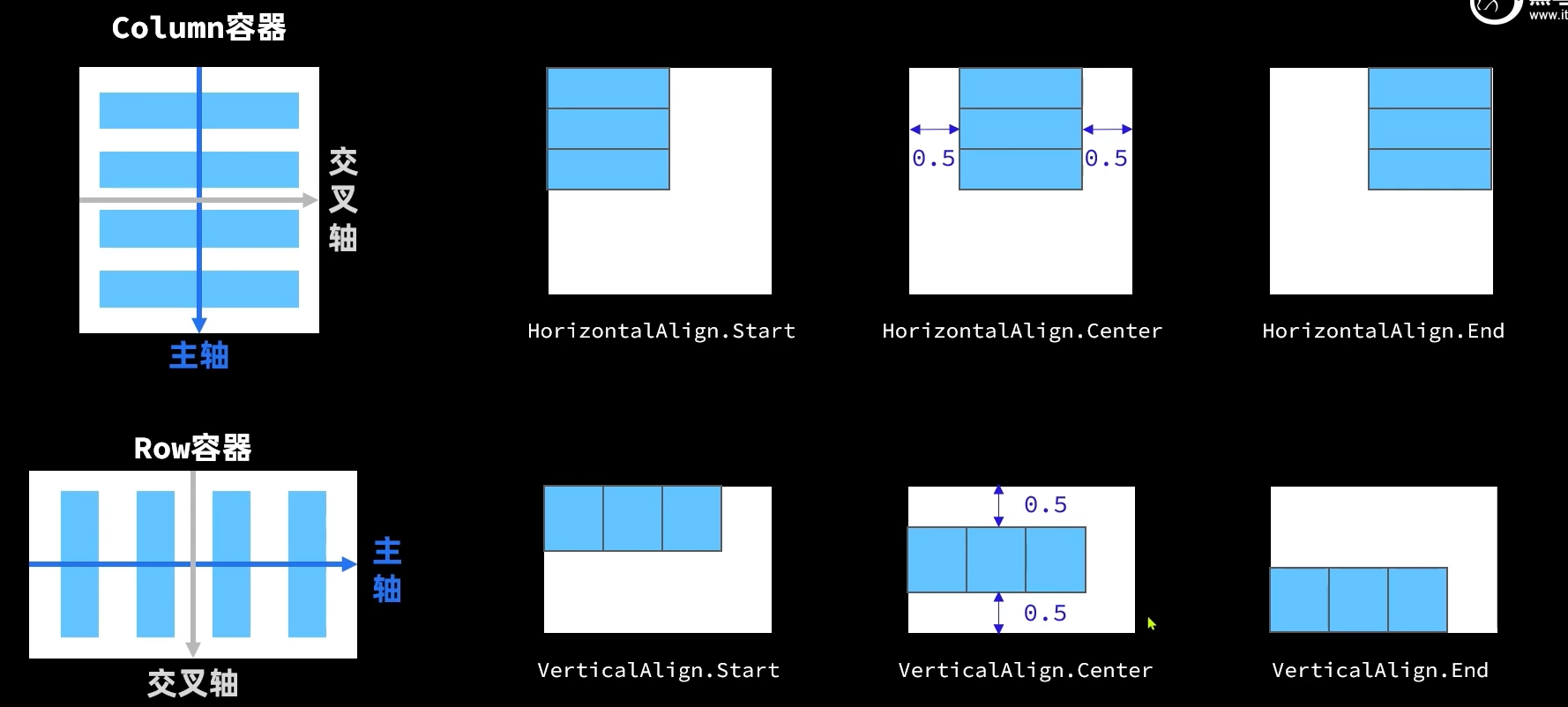
  Row(){
        Image($r('app.media.icon'))
        .width(this.imgWidth)
        .interpolation(ImageInterpolation.High)

    }.justifyContent(FlexAlign.Start)
    .height(220)
    // .width("100%")
给了width后图片居左,但是没给width图片居中,为什么?
# arkts 其他组件
- Blank 空白
- Stack 堆叠
  Stack(){
      Progress({
        value: this.stat.finishTask,
        total: this.stat.totalTask,
        type: ProgressType.Ring
      })
        .width(100)
      Row(){
        Text(this.stat.finishTask.toString())
          .fontSize(24)
          .fontColor('#36D')
        Text(' / ' + this.stat.totalTask.toString())
          .fontSize(24)
      }
    }
# arkts ForEach和ifelse
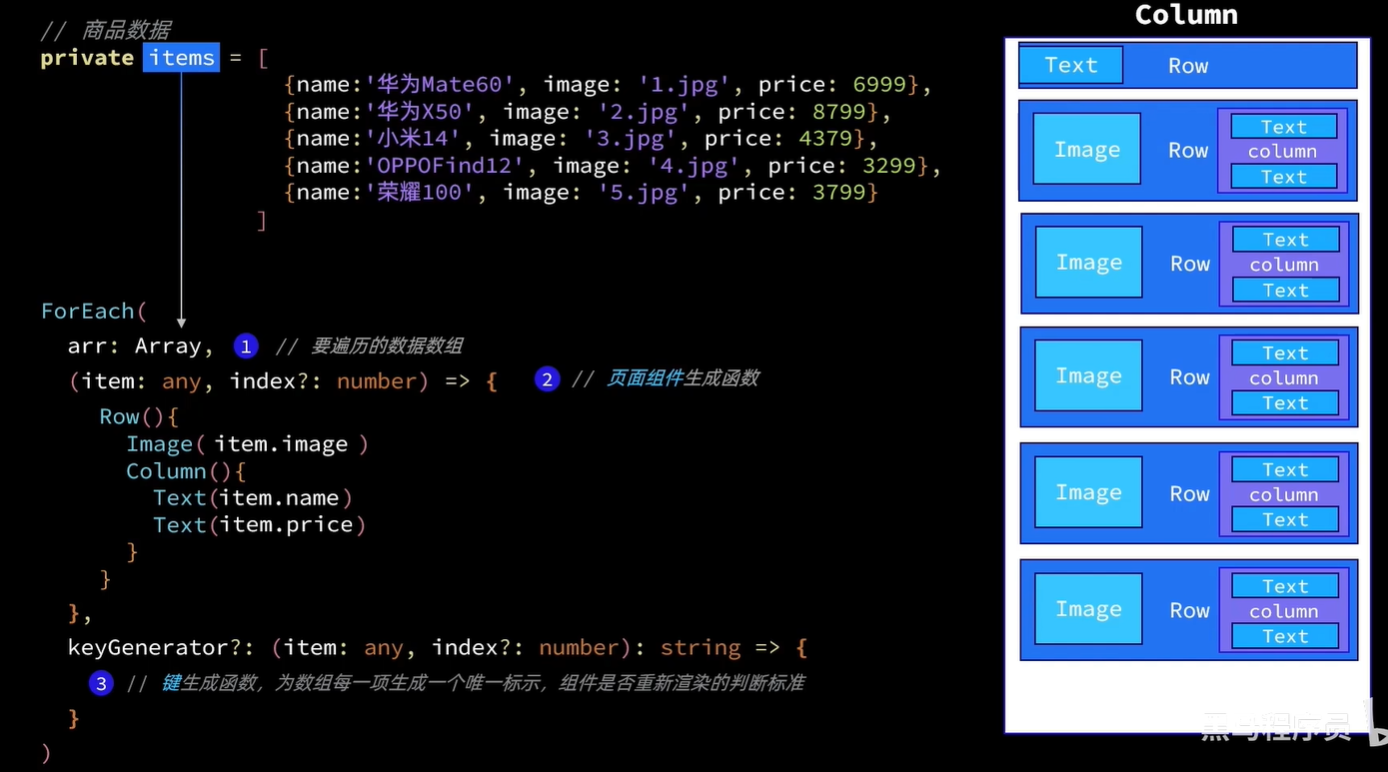
class Item {
  name: string
  image: ResourceStr
  price: number
  discount: number

  constructor(name: string, image: string, price: number, discount: number = 0) {
    this.name = name
    this.image = image
    this.price = price
    this.discount = discount
  }
}

@Entry
@Component
struct Items {

  // 商品数据
  private items: Array<Item> = [
    {name:'z',image:"f",price:1,discount:2},
    new Item('华为Mate60', 'meta60',6999, 500),
    new Item('MateBookProX', "mateBookProX",13999),
    new Item('WatchGT4', 'watchGT4',1438),
  ]

  build() {
    Column() {
      ForEach(this.items,(item:Item)=>{
        Row(){
          Button(item.name)
          Text(item.price+'')
          if(item.discount){
            Button('y')
          }else{
            Button("x")
          }
        }.height(100).width("100%")
      })
    }
    .width('100%')
    .height('100%')
  }
}
# arkts List ListItem
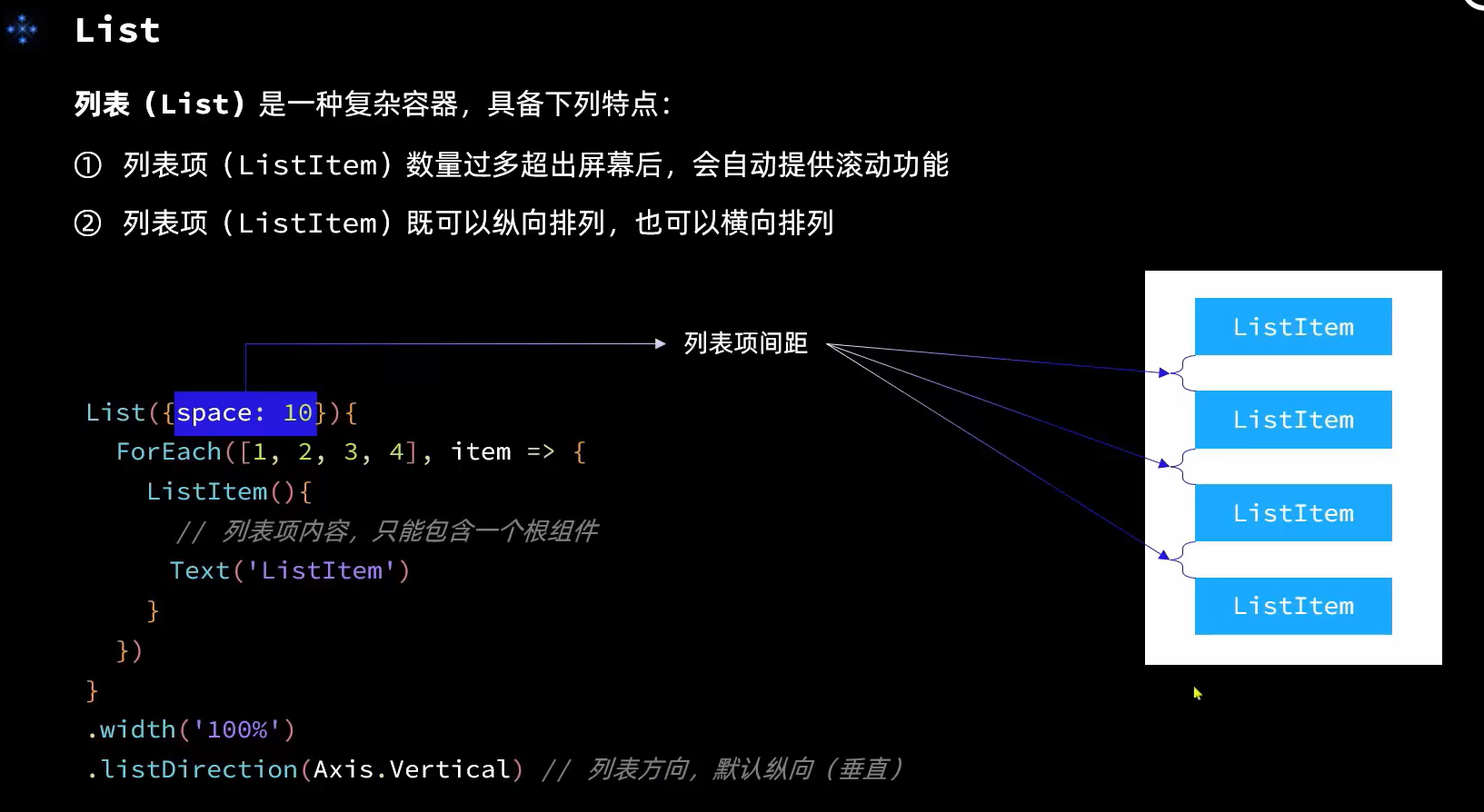
List区域可滑动,需要用ListItem包裹,layoutWeight类似flex
    Column() {
      Row(){
        Text('標題')
      }.height(50).width("100%")
      // 商品列表部分
      List({space: 8}){
        ForEach(
          this.items,
          (item: Item) => {
            ListItem(){
              Row(){
                Button(item.name)
                Text(item.price+'')
                if(item.discount){
                  Button('y')
                }else{
                  Button("x")
                }
              }.height(100).width("100%")
            }
          }
        )
      }
      .width('100%')
      .layoutWeight(1)
    }
    .width('100%')
    .height('100%')
// 滑动
List({space: 10}){
        ForEach(
          this.tasks,
          (item: Task, index) => {
            ListItem(){
              TaskItem({item: item, onTaskChange: this.handleTaskChange.bind(this)})
            }
            .swipeAction({end: this.DeleteButton(index)})
          }
        )
      }
# arkts 代码复用
- @Component
- @Builder
- @Styles
- @Extends
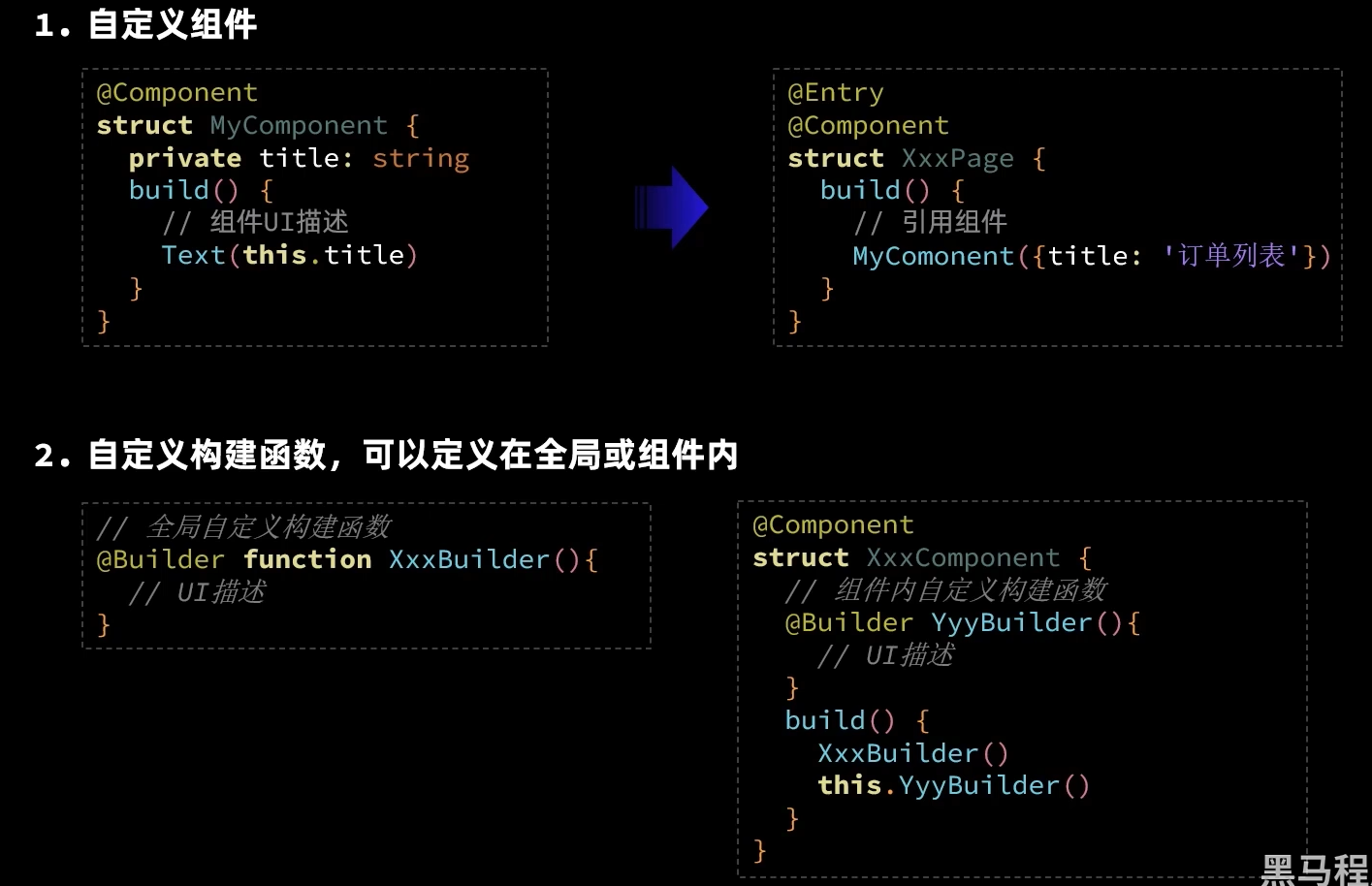
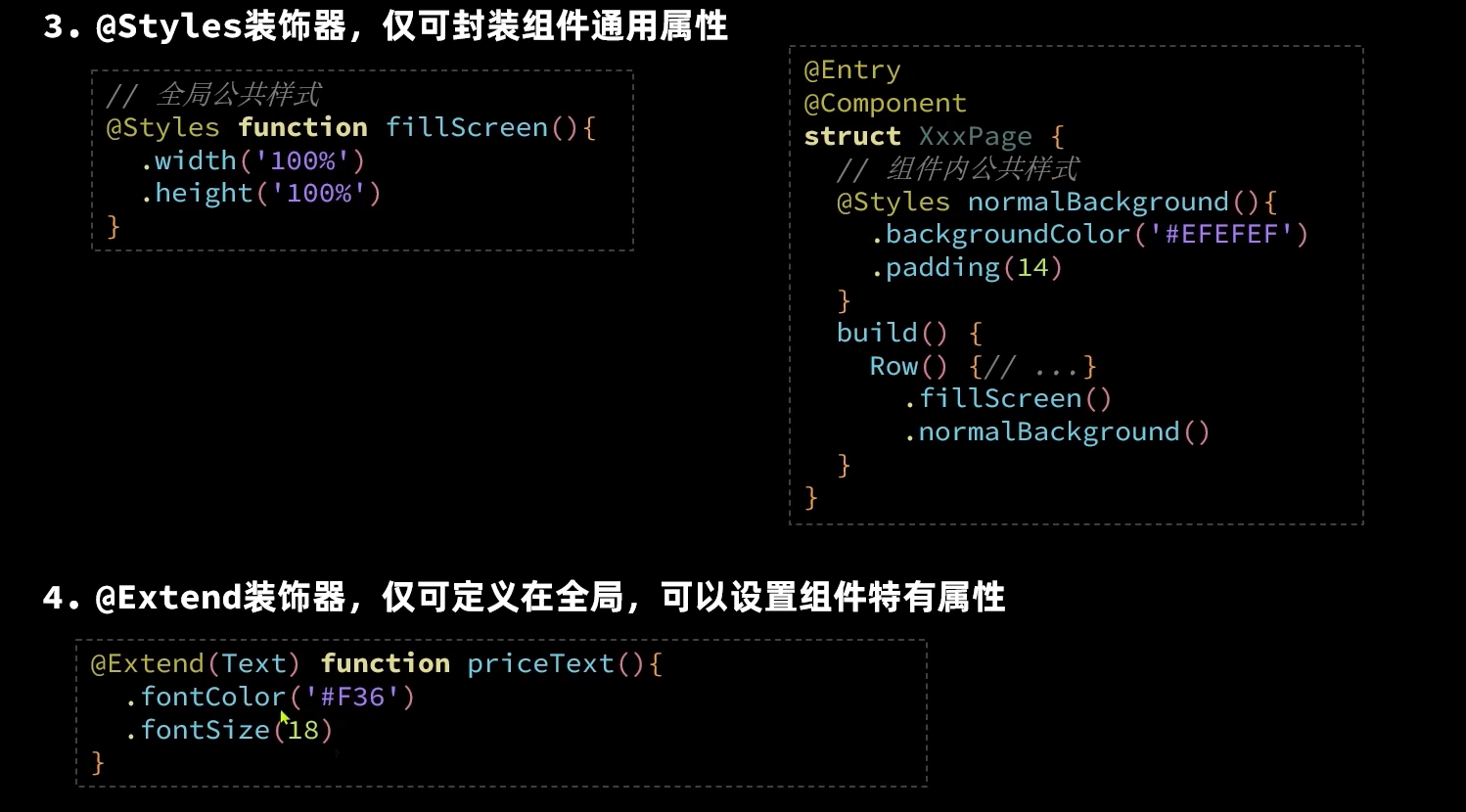
  @Builder DeleteButton(index: number){
    Button(){
      Image($r('app.media.ic_public_delete_filled'))
        .fillColor(Color.White)
        .width(20)
    }
    .width(40)
    .height(40)
    .type(ButtonType.Circle)
    .backgroundColor(Color.Red)
    .margin(5)
    .onClick(() => {
      this.tasks.splice(index, 1)
      this.handleTaskChange()
    })
  }
}
# arkts 状态管理
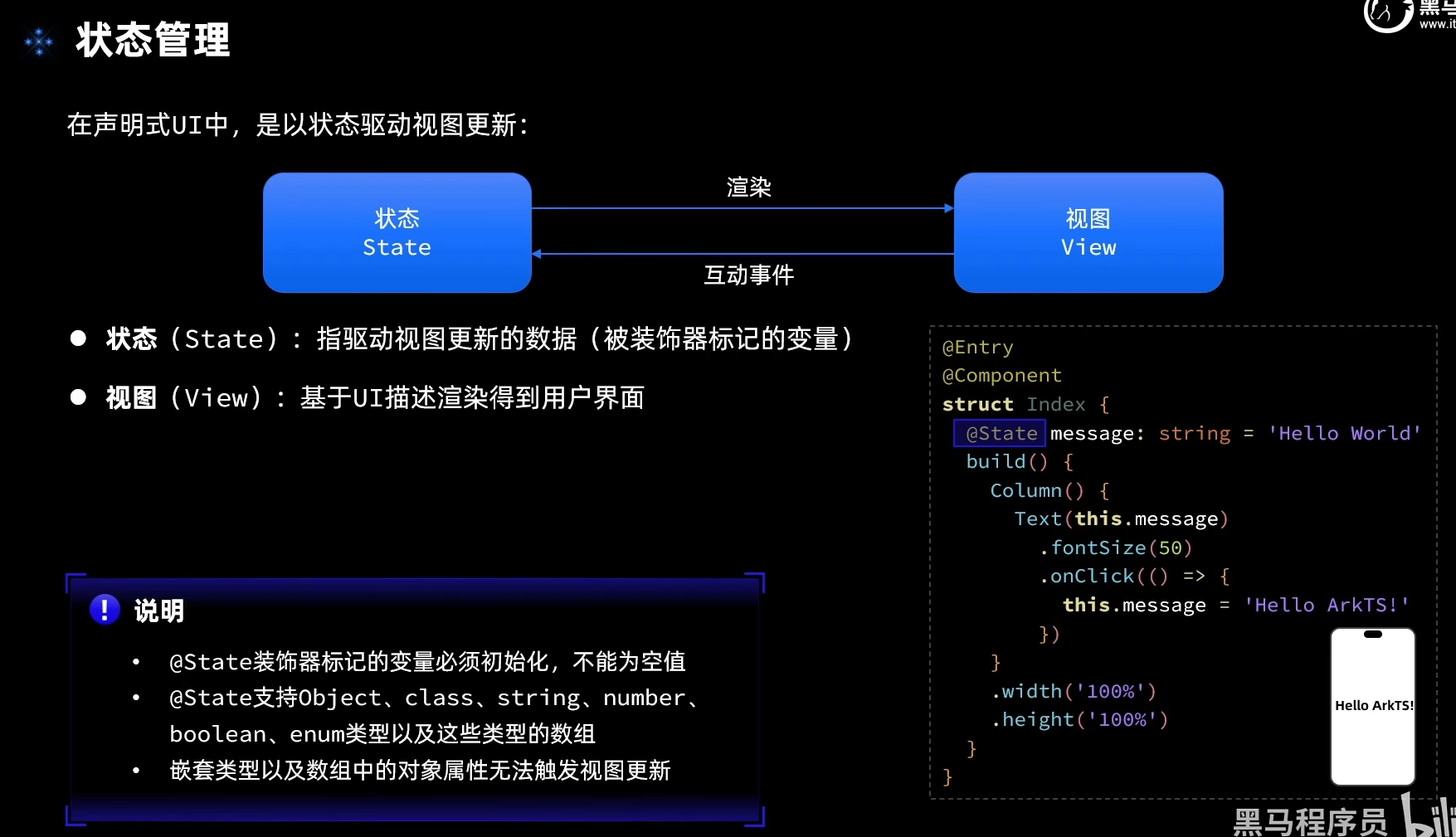
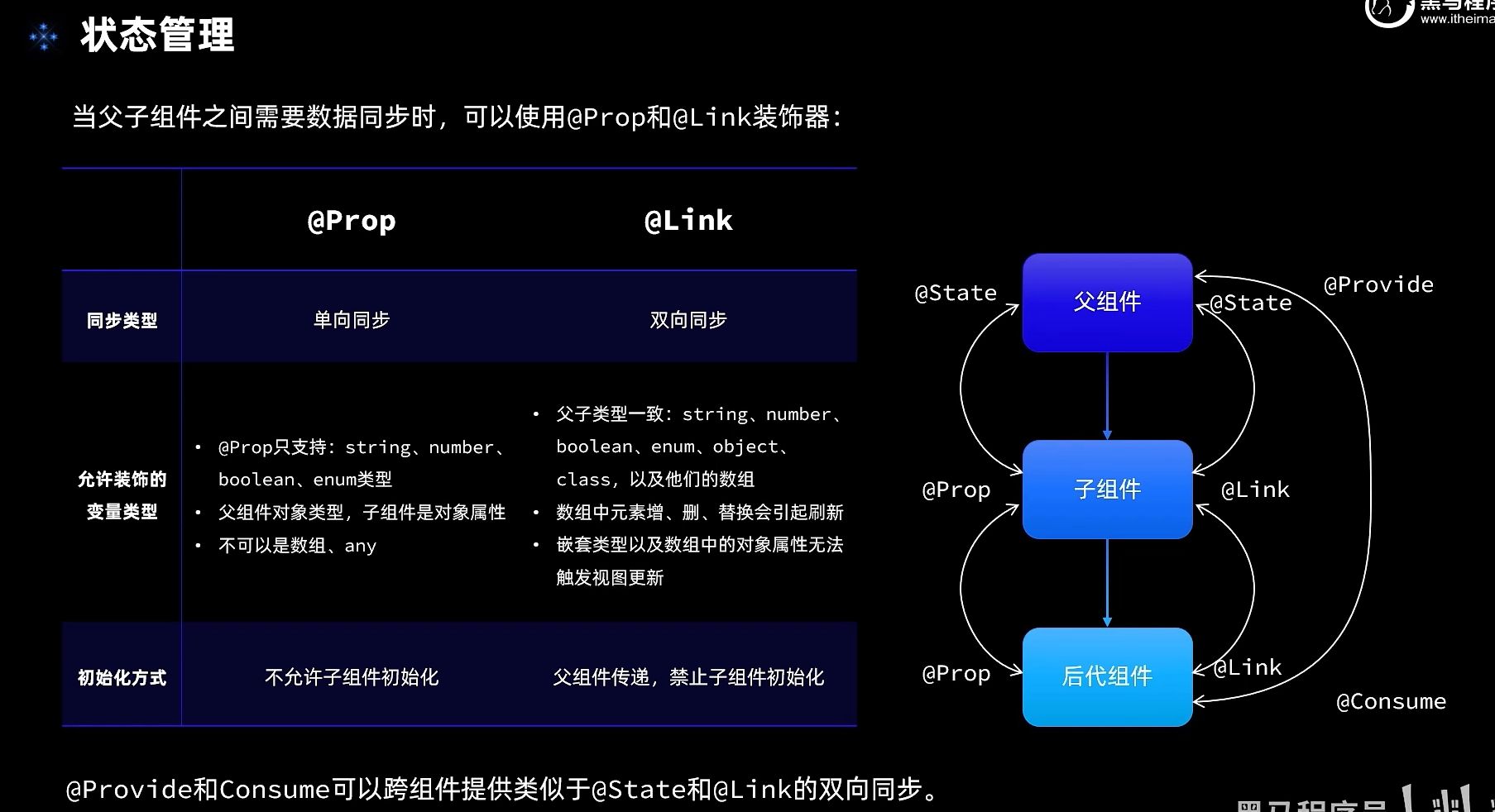
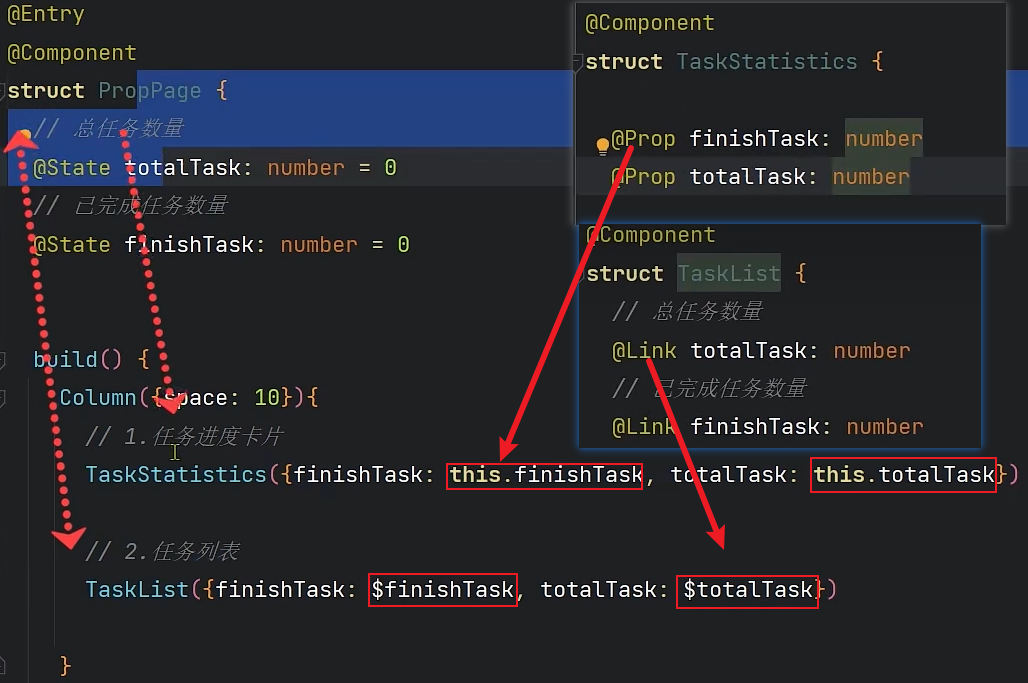
@Entry
@Component
struct PropPage {
  // 统计信息
  @Provide stat: StatInfo = new StatInfo()

  build() {
    Column({space: 10}){
      Header()

      // 1.任务进度卡片
      TaskStatistics()

      // 2.任务列表
      TaskList()
    }
    .width('100%')
    .height('100%')
    .backgroundColor('#F1F2F3')
  }
}
@Component
struct TaskStatistics {
  @Consume stat: StatInfo

  build() {
    Row(){
      Text('任务进度:')
        .fontSize(30)
        .fontWeight(FontWeight.Bold)
      Stack(){
        Progress({
          value: this.stat.finishTask,
          total: this.stat.totalTask,
          type: ProgressType.Ring
        })
          .width(100)
        Row(){
          Text(this.stat.finishTask.toString())
            .fontSize(24)
            .fontColor('#22FF33')
          Text(' / ' + this.stat.totalTask.toString())
            .fontSize(24)
        }
      }
    }
    .card()
    .margin({top: 5, bottom: 10})
    .justifyContent(FlexAlign.SpaceEvenly)
  }
}
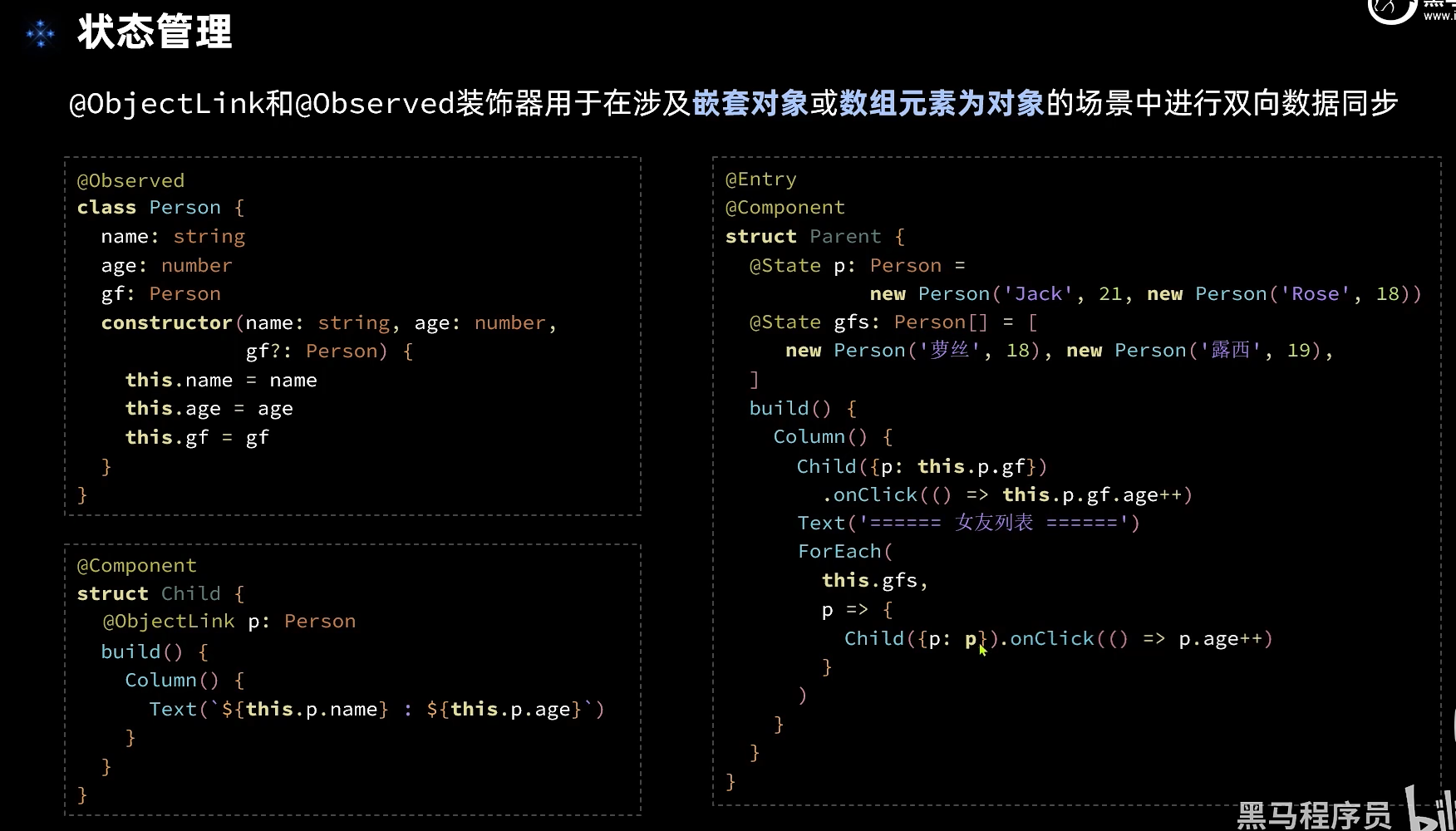
@Observed
class Task{
  static id: number = 1
  // 任务名称
  name: string = `任务${Task.id++}`
  // 任务状态:是否完成
  finished: boolean = false
}
// TaskItem
@Component
struct TaskItem {
  // 获取深度的状态
  @ObjectLink item: Task
  // 获取方法
  onTaskChange: () => void

  build() {
    Row(){
      if(this.item.finished){
        Text(this.item.name)
          .finishedTask()
      }else{
        Text(this.item.name)
      }
      Checkbox()
        .select(this.item.finished)
        .onChange(val => {
          // 1.更新当前任务状态
          this.item.finished = val
          // 2.更新已完成任务数量
          this.onTaskChange()
        })
    }
    .card()
    .justifyContent(FlexAlign.SpaceBetween)
  }
}
// TaskList
@Component
struct TaskList {
  // 总任务数量
  @Consume stat: StatInfo
  // 任务数组
  @State tasks: Task[] = []

  handleTaskChange(){
    // 1.更新任务总数量
    this.stat.totalTask = this.tasks.length
    // 2.更新已完成任务数量
    this.stat.finishTask = this.tasks.filter(item => item.finished).length
  }

  build() {
    Column(){
      // 2.新增任务按钮
      Button('新增任务')
        .width(200)
        .margin({bottom: 10})
        .onClick(() => {
          // 1.新增任务数据
          this.tasks.push(new Task())
          // 2.更新任务总数量
          this.handleTaskChange()
        })

      // 3.任务列表
      List({space: 10}){
        ForEach(
          this.tasks,
          (item: Task, index) => {
            ListItem(){
              // 方法传给子组件,注意要this绑定
              TaskItem({item: item, onTaskChange: this.handleTaskChange.bind(this)})
            }
            .swipeAction({end: this.DeleteButton(index)})
          }
        )
      }
      .width('100%')
      .layoutWeight(1)
      .alignListItem(ListItemAlign.Center)
    }
  }

  @Builder DeleteButton(index: number){
    Button(){
      Image($r('app.media.ic_public_delete_filled'))
        .fillColor(Color.White)
        .width(20)
    }
    .width(40)
    .height(40)
    .type(ButtonType.Circle)
    .backgroundColor(Color.Red)
    .margin(5)
    .onClick(() => {
      this.tasks.splice(index, 1)
      this.handleTaskChange()
    })
  }

}
# arkts 路由
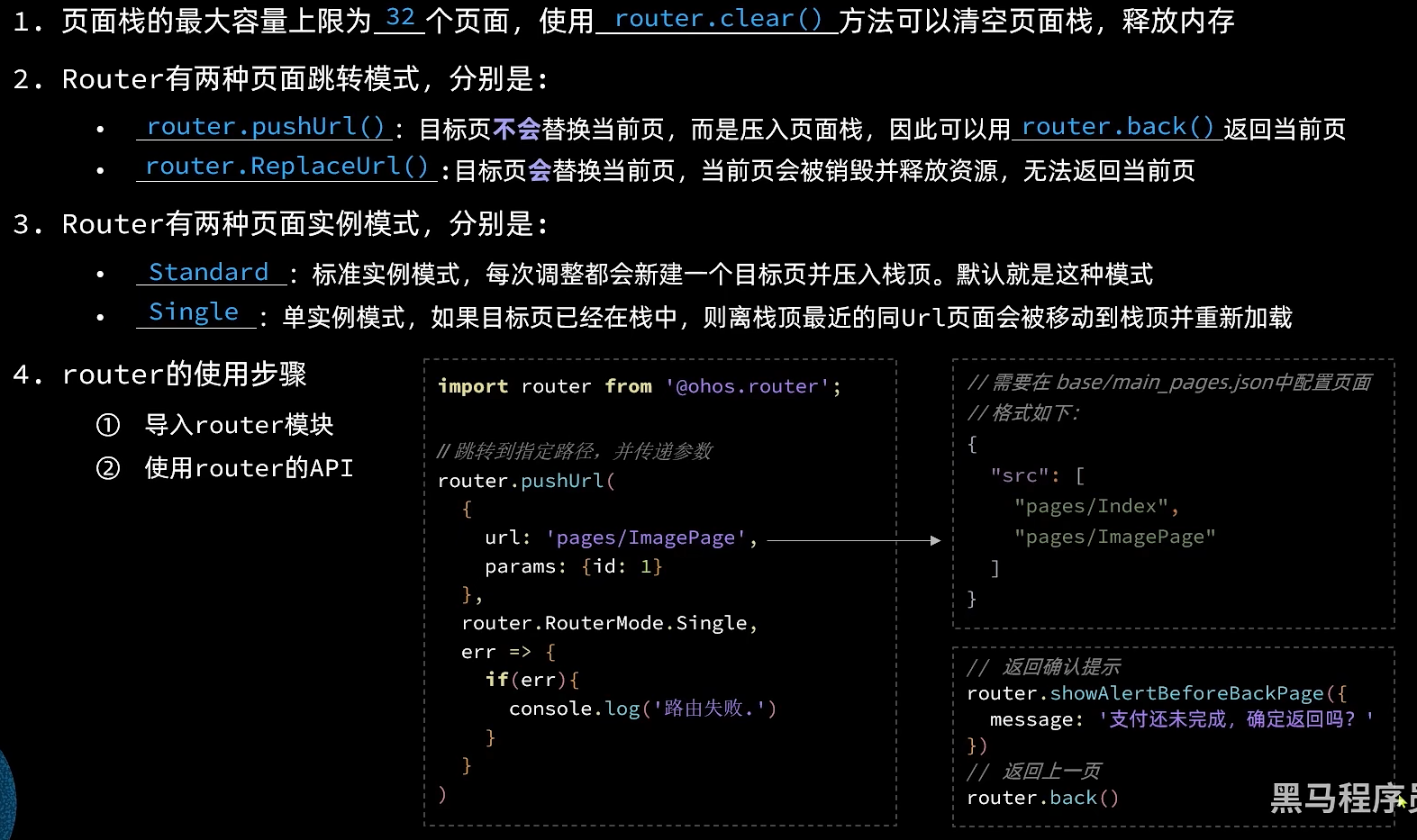
export default class RouterInfo{
  // 页面路径
  url: string
  // 页面标题
  title: string

  constructor(url: string, title: string) {
    this.url = url;
    this.title = title
  }
}

const routers: RouterInfo[] = [
  new RouterInfo('pages/ImagePage', '图片查看案例'),
  new RouterInfo('pages/ItemPage', '商品列表案例'),
  new RouterInfo('pages/StatePage', 'Jack和他的女友案例'),
  new RouterInfo('pages/PropPage', '任务列表案例'),
]
import router from '@ohos.router'
import RouterInfo from '../viewmodel/RouterInfo'

@Component
export default struct RouterItem{
  r: RouterInfo
  i: number
  @Consume fontSize: number

  build(){
    Row(){
      Text(this.i + '.')
        .fontSize(this.fontSize)
        .fontColor(Color.White)
      Blank()
      Text(this.r.title)
        .fontSize(this.fontSize)
        .fontColor(Color.White)
    }
    .width('90%')
    .padding(12)
    .backgroundColor('#38f')
    .borderRadius(20)
    .shadow({radius: 6, color: '#4F000000', offsetX: 2, offsetY: 4})
    .onClick(() => {
      // router跳转
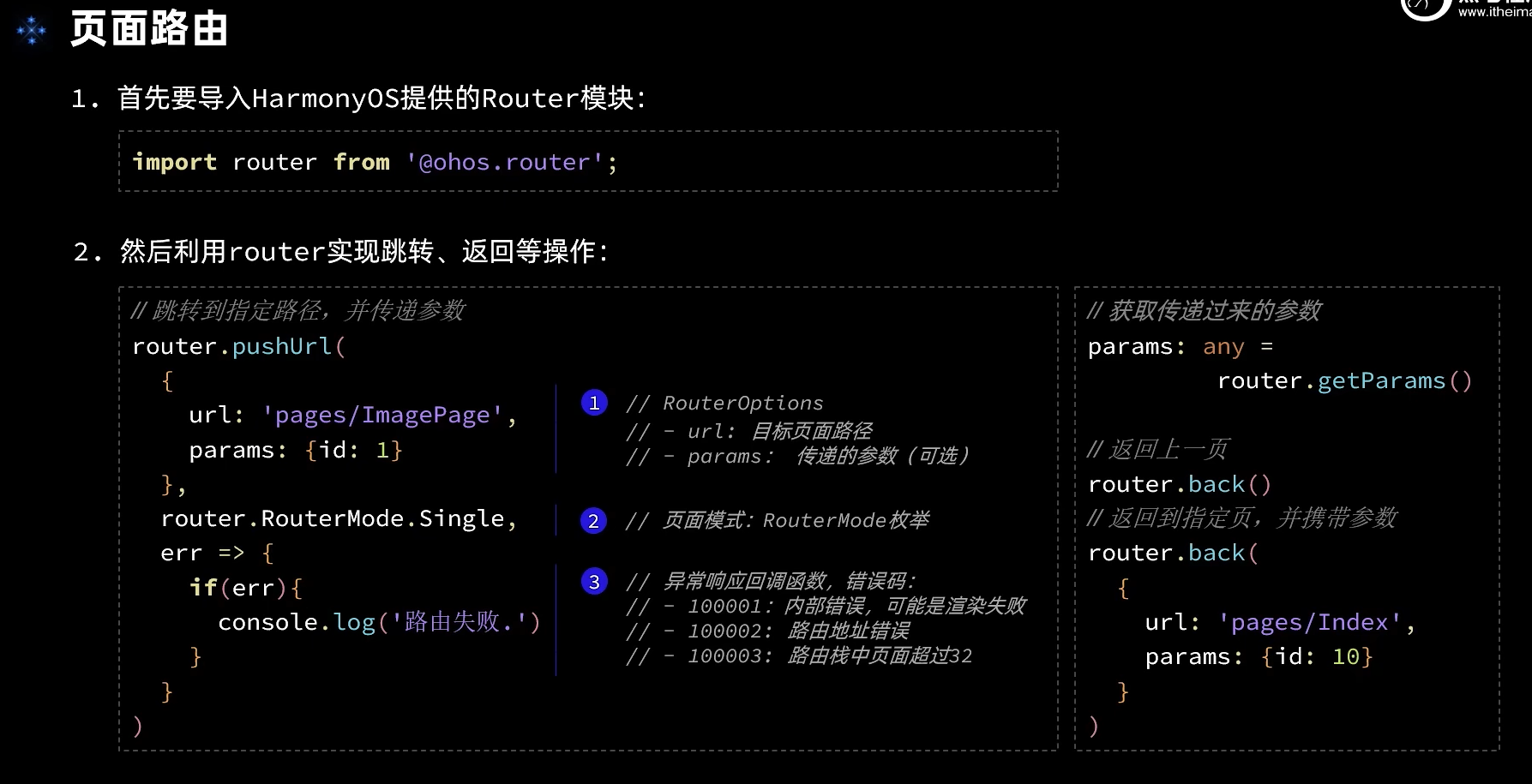
      router.pushUrl(
        {
          url: this.r.url,
          params: {id: this.i}
        },
        router.RouterMode.Single,
        err => {
          if(err){
            console.log(`路由失败,errCode: ${err.code} errMsg:${err.message}`)
          }
        }
      )
    })
  }
}
# arkts 动画
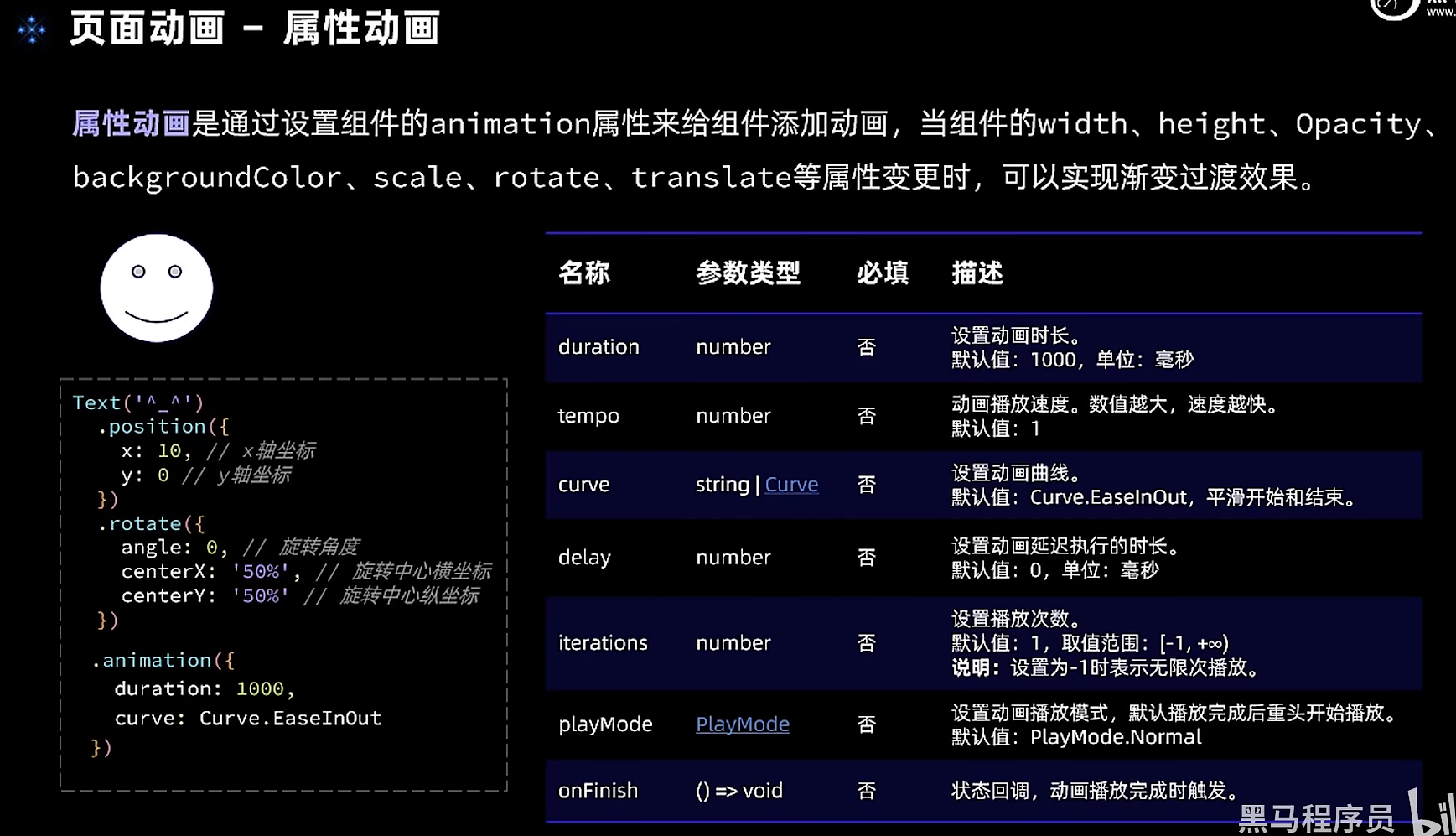
属性动画
Image(this.src)
          .position({x: this.fishX - 20, y: this.fishY - 20})
          .rotate({angle:this.angle, centerX: '50%', centerY: '50%'})
          .width(40)
          .height(40)
          .animation({duration: 500, curve: Curve.Smooth})
 Button('←').backgroundColor('#20101010')
            .onClick(() => {
               this.fishX -= 20
               this.src = $r('app.media.fish_rev')
            })
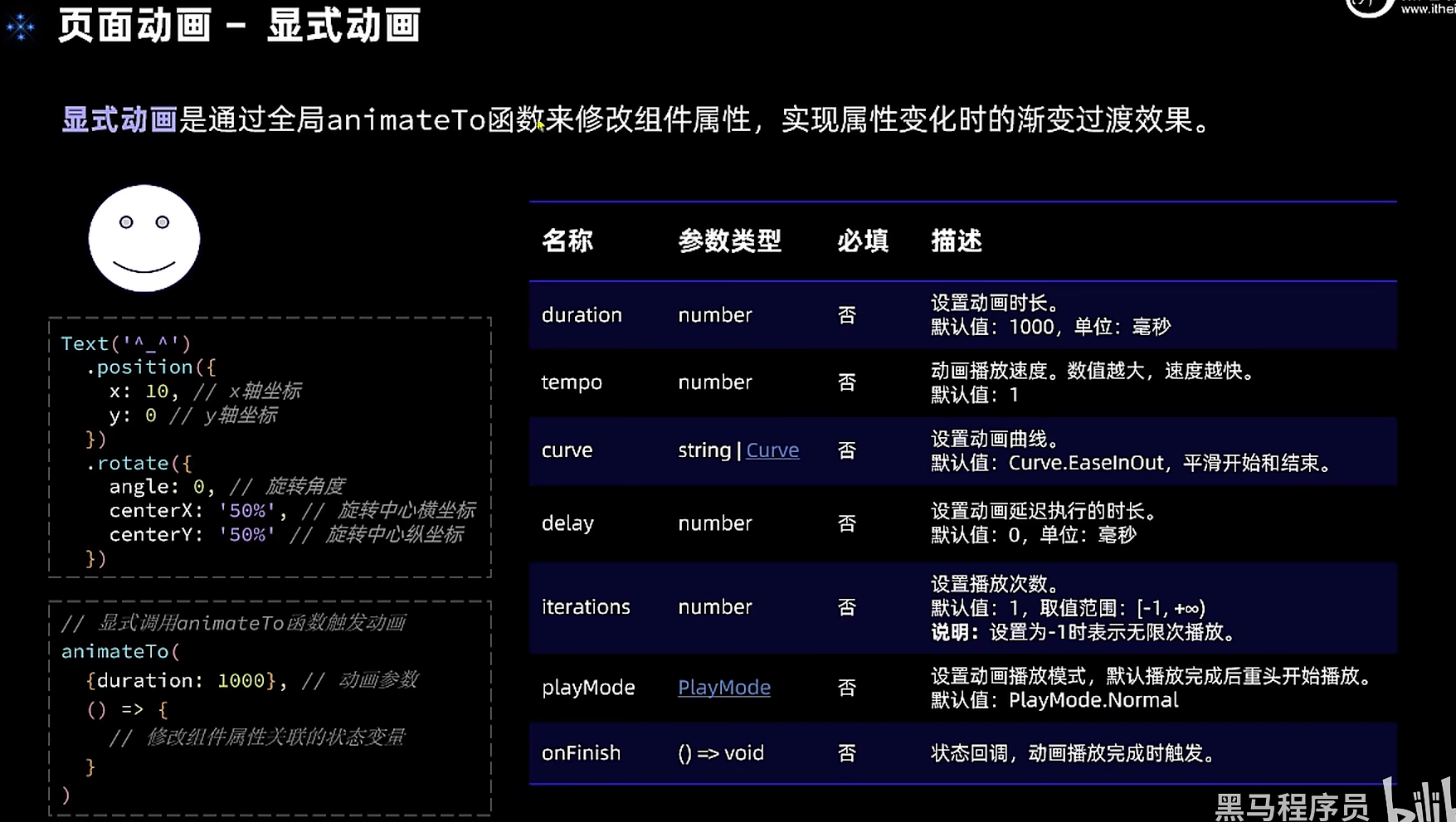
显式动画
  // .animation({duration: 500, curve: Curve.Smooth})
 Button('←').backgroundColor('#20101010')
      .onClick(() => {
        animateTo(
          {duration: 500},
          () => {
            this.fishX -= 20
            this.src = $r('app.media.fish_rev')
          }
        )
      })
      Button('开始游戏')
            .onClick(() => {
              animateTo(
                {duration: 1000},
                () => {
                  // 点击后显示小鱼
                  this.isBegin = true
                }
              )
            })
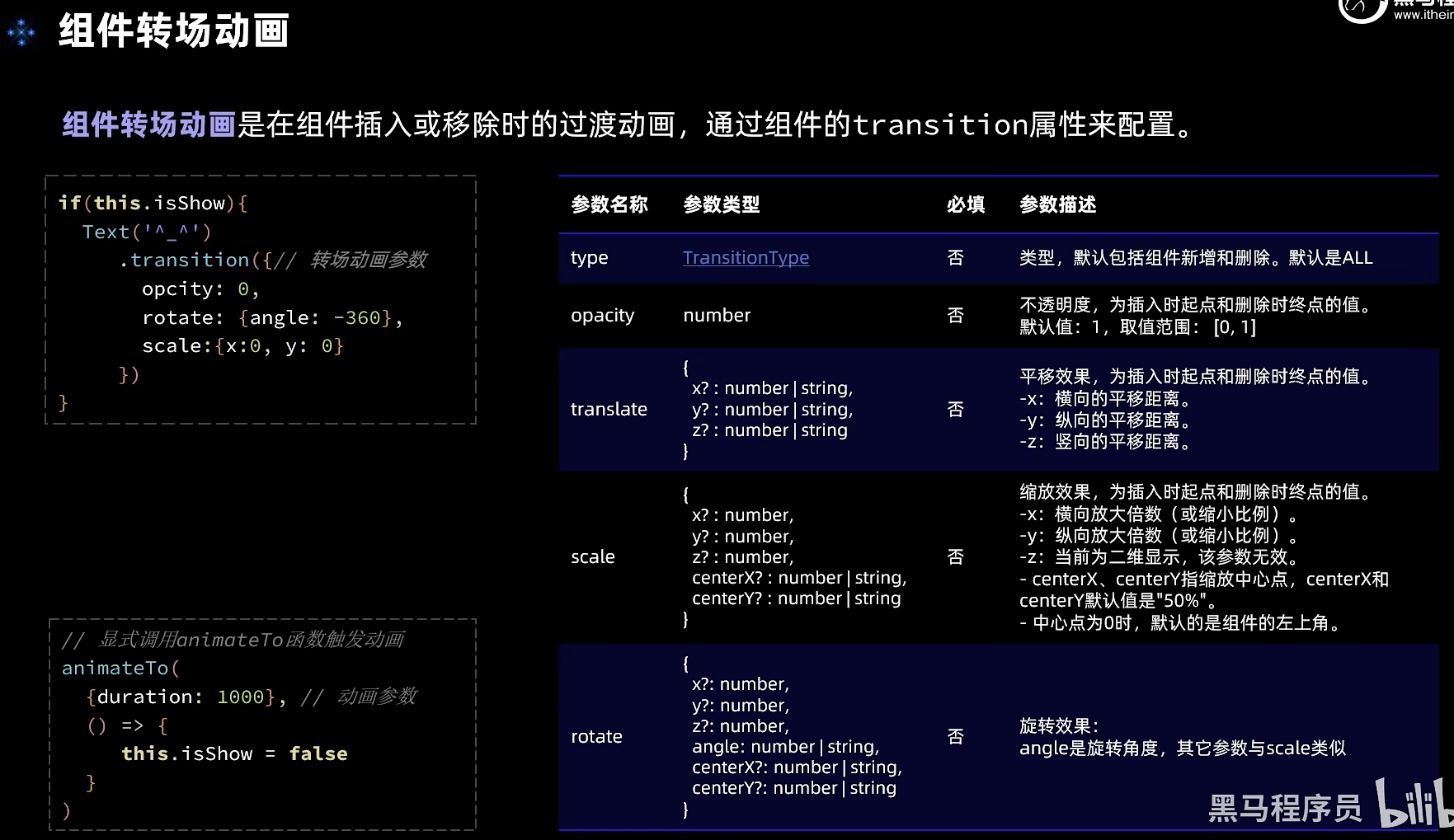
        }else{
          // 小鱼图片
          Image(this.src)
            .position({x: this.fishX - 20, y: this.fishY - 20})
            .rotate({angle:this.angle, centerX: '50%', centerY: '50%'})
            .width(40)
            .height(40)
            //.animation({duration: 500, curve: Curve.Smooth})
            .transition({
              type: TransitionType.Insert,
              opacity: 0,
              translate: {x: -250}
            })
        }
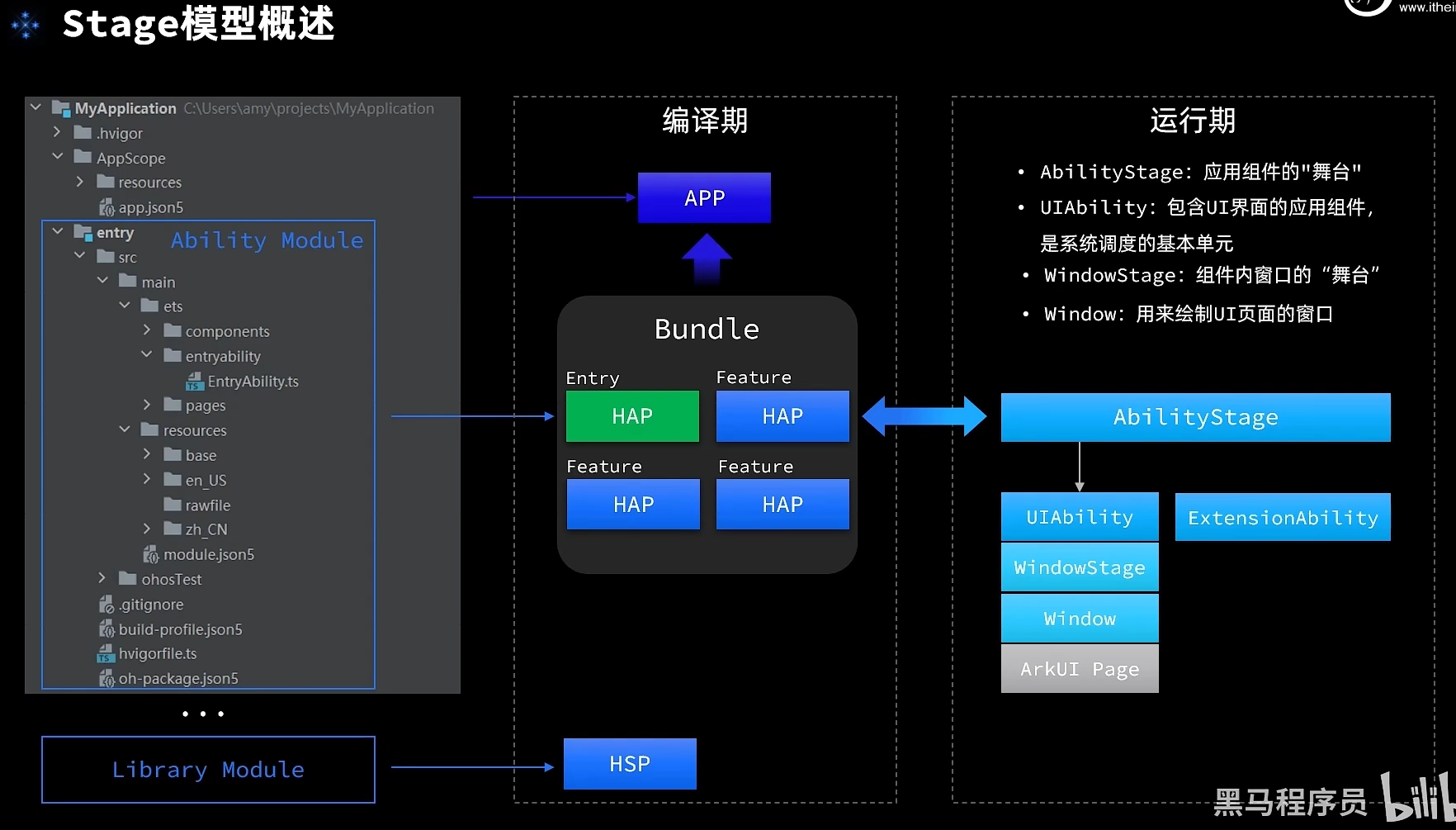
# stage模型
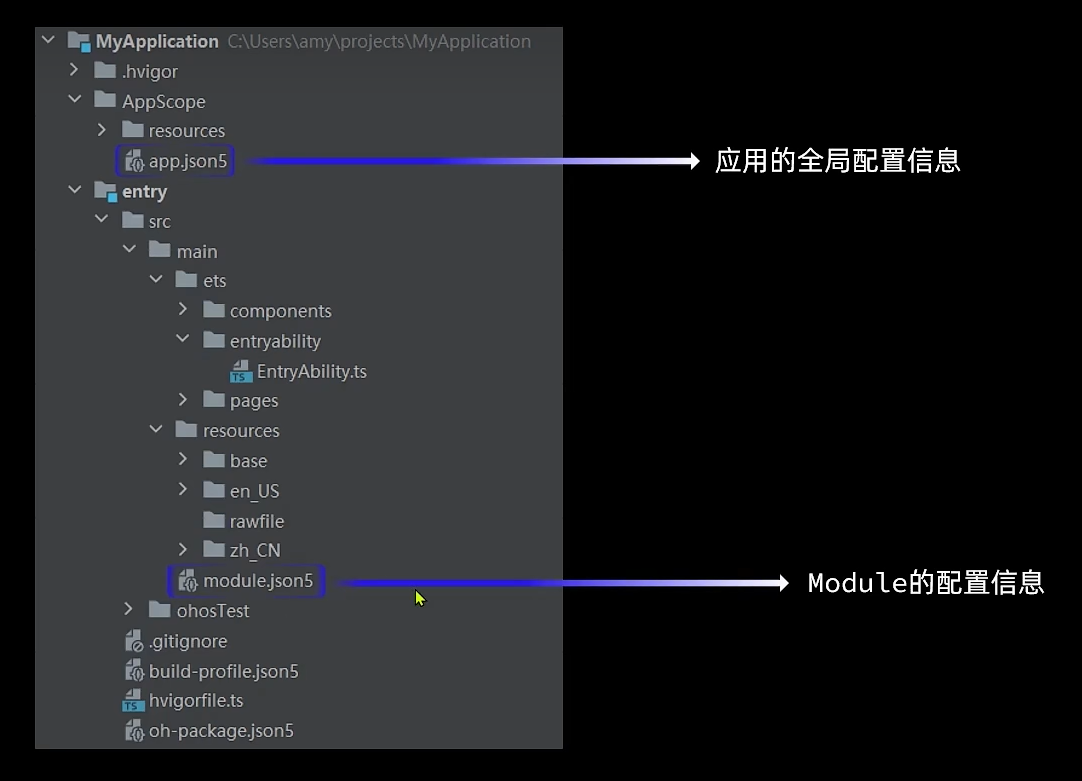
应用配置文件
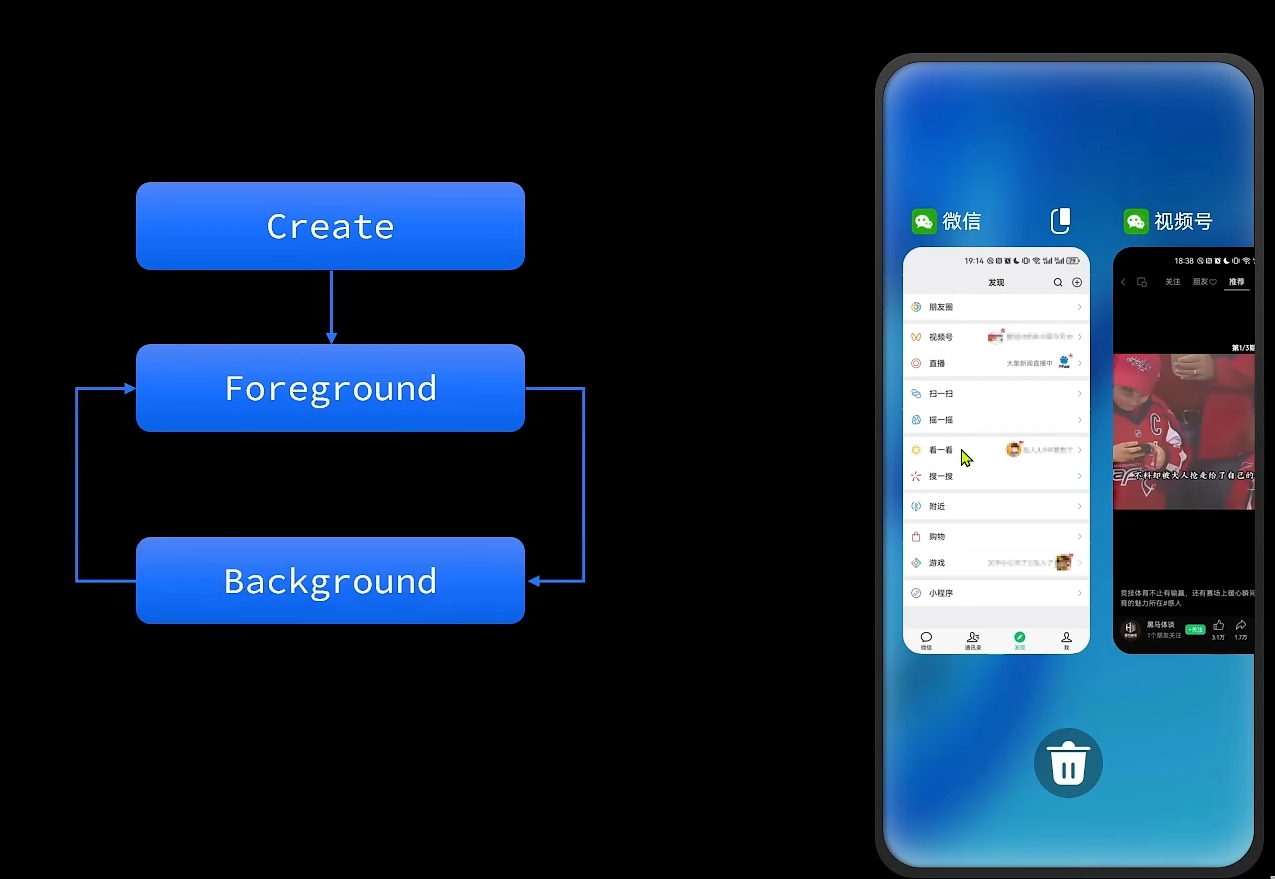
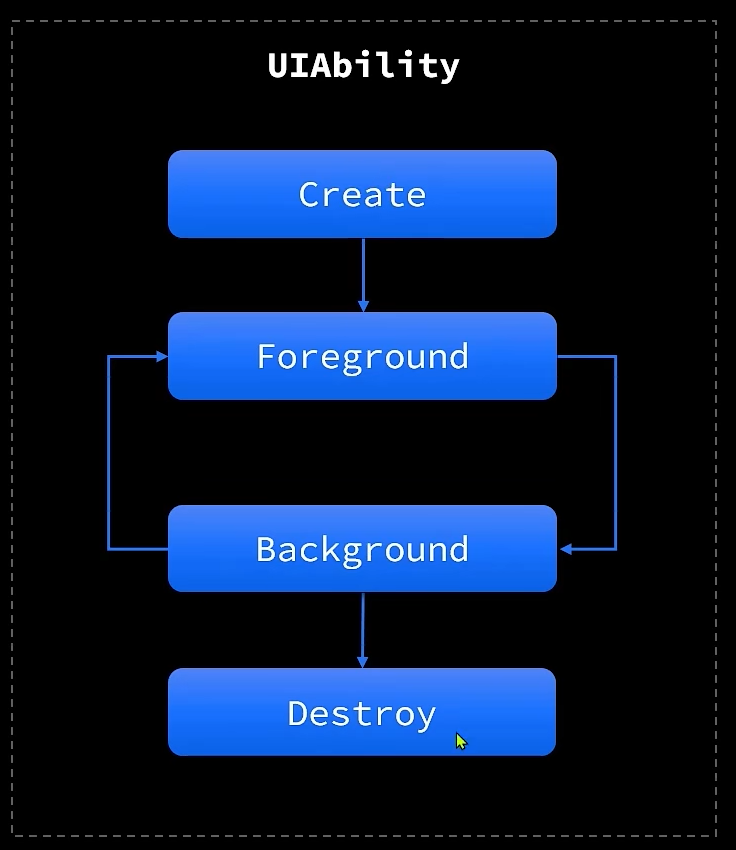
# UIAbility生命周期
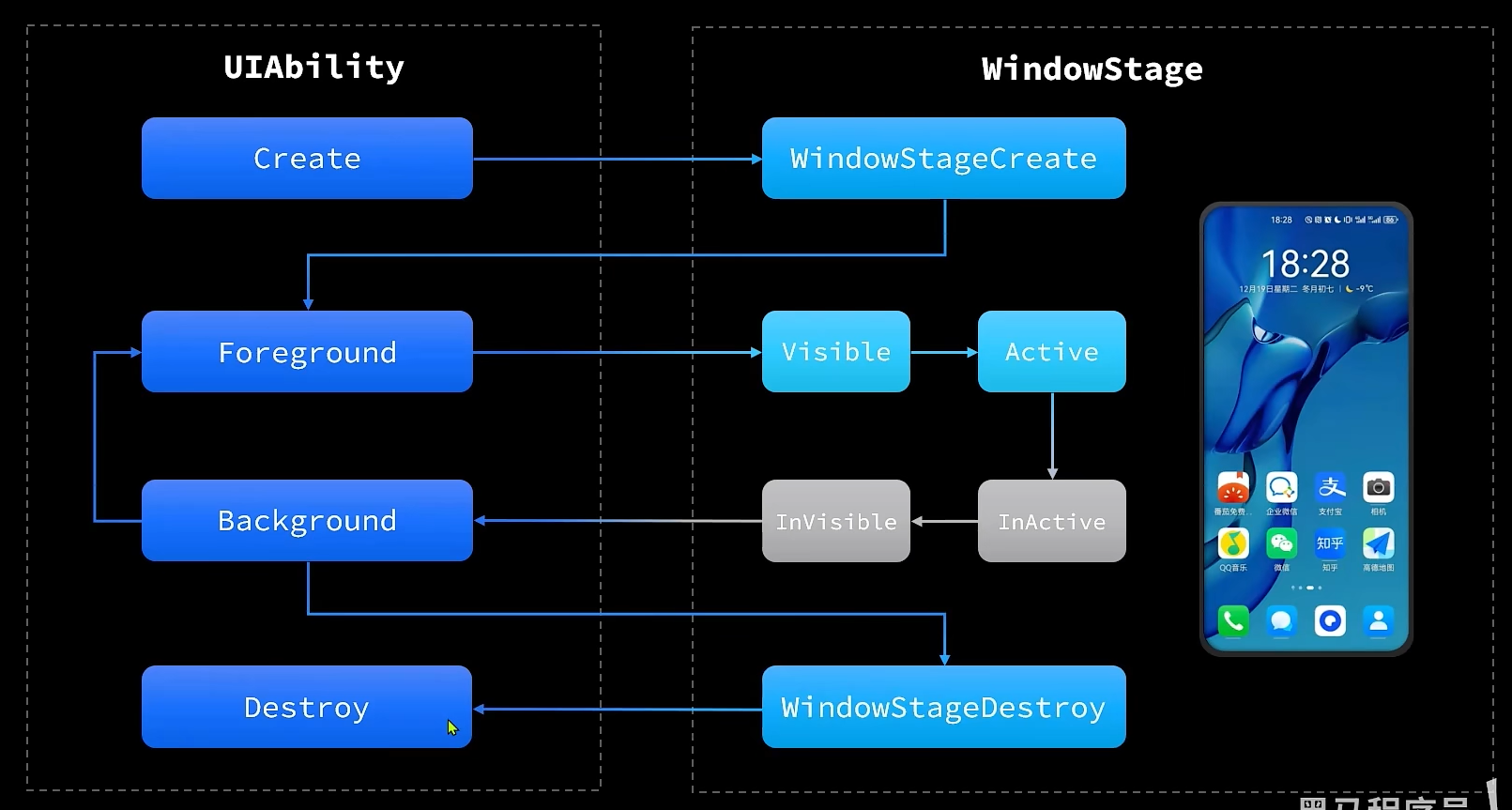
# arkts页面及组件生命周期
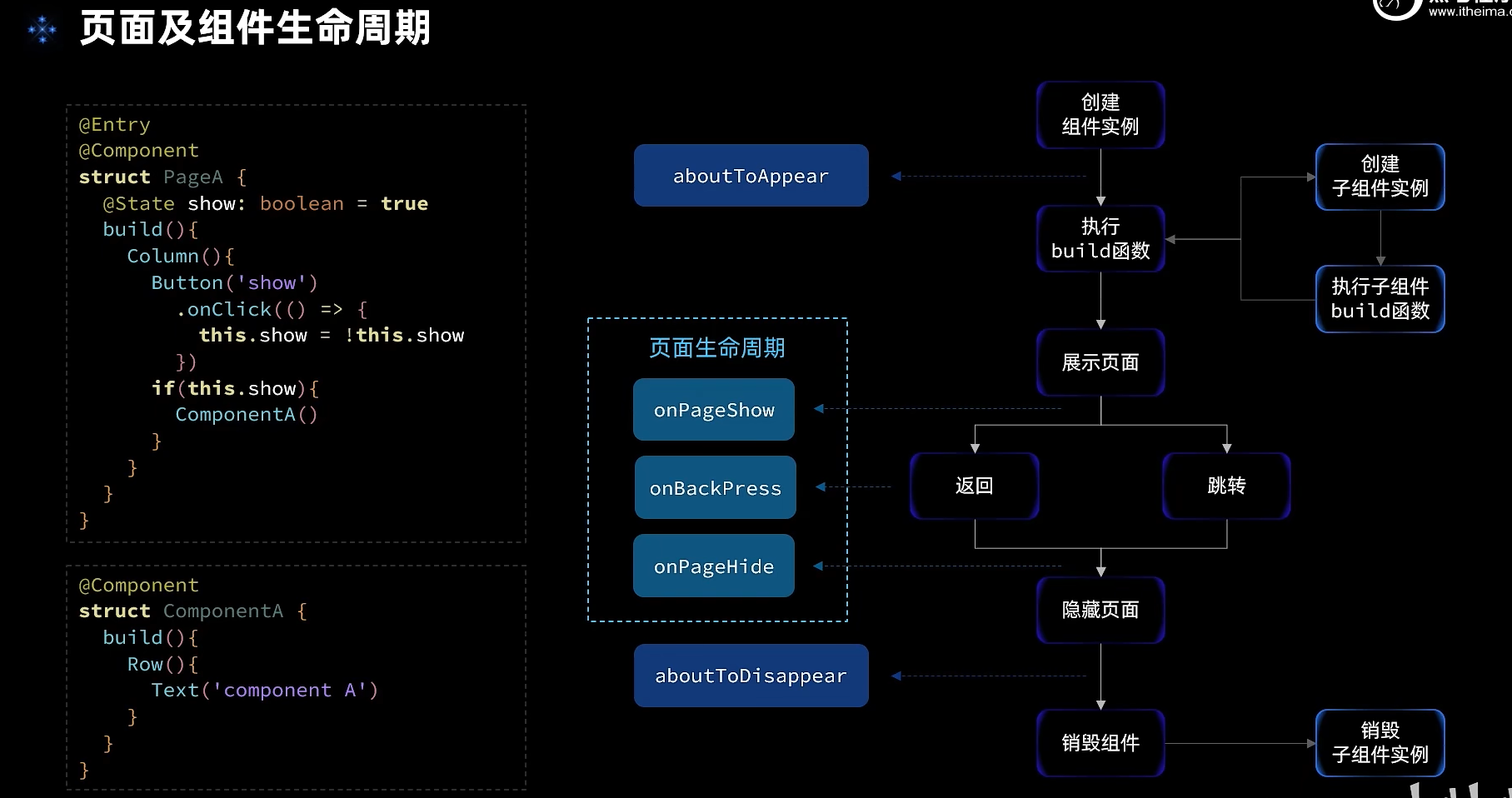
三个页面周期钩子只在@entry修饰的类才生效
import { Header } from '../common/components/CommonComponents'

@Entry
@Component
struct LifeCircle {
  @State show: boolean = false
  @State arr: string[] = []


  tag: string = 'Life Circle Page 1'

  aboutToAppear(){
    console.log(this.tag, 'about to appear')
  }

  onPageShow(){
    console.log(this.tag, 'on page show')
  }

  onBackPress(){
    console.log(this.tag, 'on back press')
  }

  onPageHide(){
    console.log(this.tag, 'on page hide')
  }

  aboutToDisappear(){
    console.log(this.tag, 'about to disappear')
  }

  build() {
    Column({space: 20}) {
      // 顶部标题
      Header({ title: '测试组件生命周期' })

      // 按钮
      Button('切换显示')
        .onClick(() => this.show = !this.show)

      Row(){
        if(this.show){
          MyText({message: 'Hello World!'})
        }
      }
      .height(30)

      // 新增按钮
      Button('新增数据')
        .onClick(() => this.arr.push('user_' + this.arr.length))
      ForEach(this.arr, (item, index) => {
        MyText({message: item, index: index, delete: this.delete.bind(this)})
      })
    }
    .width('100%')
    .height('100%')
  }

  delete(index: number = -1){
    if(index > -1){
      this.arr.splice(index, 1)
    }
  }
}

@Component
struct MyText {
  message: string
  index?: number
  delete?: (index: number) => void


  tag: string = 'MyText Page'

  aboutToAppear(){
    console.log(this.tag, 'about to appear')
  }

  onPageShow(){
    // 不会执行
    console.log(this.tag, 'on page show')
  }

  onBackPress(){
    // 不会执行
    console.log(this.tag, 'on back press')
  }

  onPageHide(){
    // 不会执行
    console.log(this.tag, 'on page hide')
  }

  aboutToDisappear(){
    console.log(this.tag, 'about to disappear')
  }


  build() {
    Row(){
      Text(this.message)
        .fontSize(20)
      if(this.delete){
        Image($r('app.media.ic_public_delete'))
          .width(20)
          .onClick(() => this.delete(this.index))
      }
    }
    .width('100%')
    .justifyContent(FlexAlign.SpaceAround)
  }
}
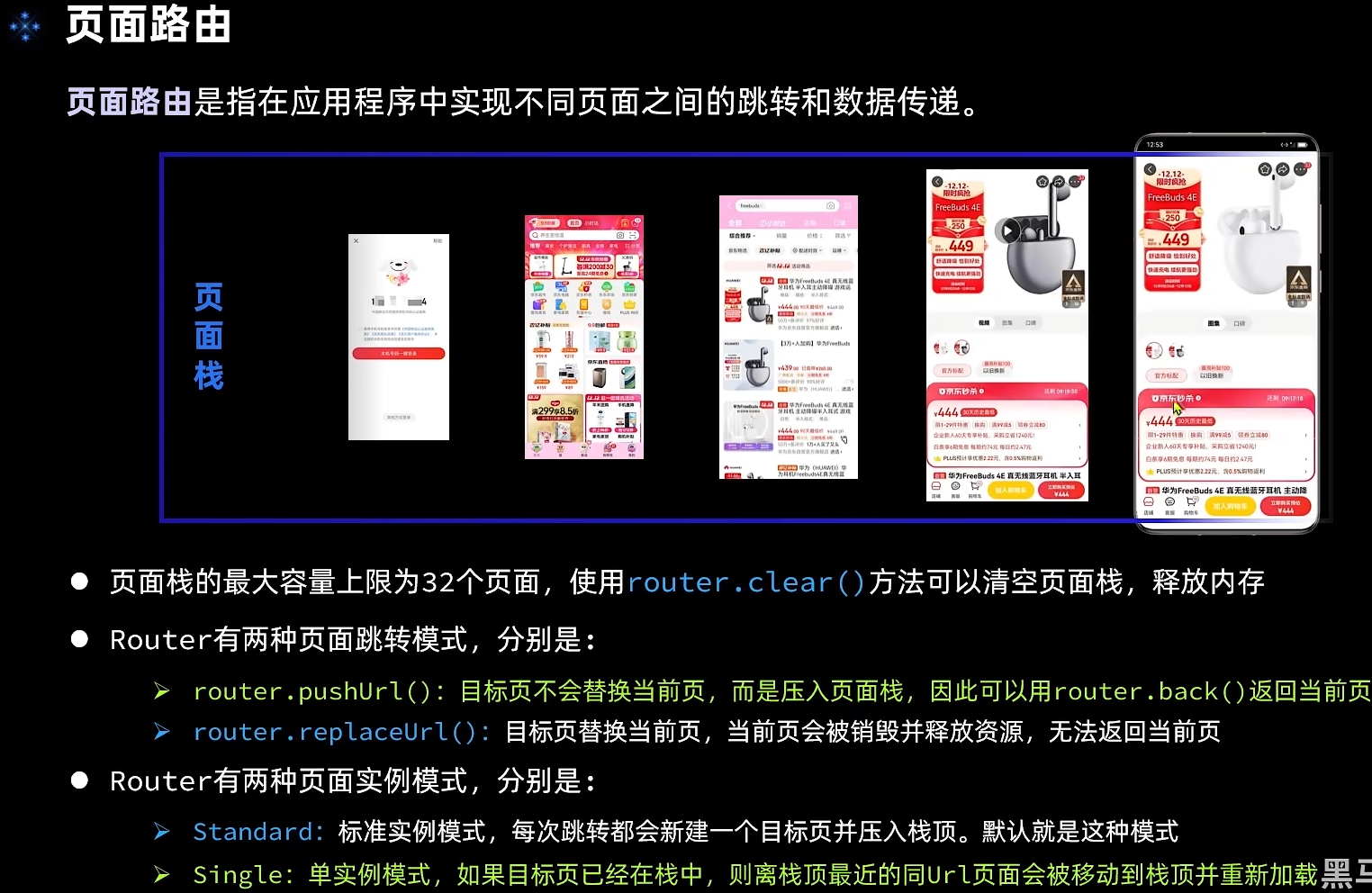
push和replace走的生命周期钩子是不同的,push是会隐藏,而replace则直接销毁
import router from '@ohos.router'
@Entry
@Component
struct TestPage1 {
  @State show: boolean = false
  tag: string = 'TestPage1'

  aboutToAppear(){
    console.log(this.tag, 'about to appear')
  }

  onPageShow(){
    console.log(this.tag, 'on page show')
  }

  onBackPress(){
    console.log(this.tag, 'on back press')
  }

  onPageHide(){
    console.log(this.tag, 'on page hide')
  }

  aboutToDisappear(){
    console.log(this.tag, 'about to disappear')
  }

  build() {
    Row() {
      Column({space: 20}) {
        Text(this.tag)
          .fontSize(50)
          .fontWeight(FontWeight.Bold)

        Row(){
          Button('push page2')
            .onClick(() => {
              router.pushUrl({
                url: 'pages/TestPage2'
              })
            })
          Button('replace page2')
            .onClick(() => {
              router.replaceUrl({
                url: 'pages/TestPage2'
              })
            })
        }
        .width('100%')
        .justifyContent(FlexAlign.SpaceAround)
      }
      .width('100%')
    }
    .height('100%')
  }
}
# arkts 启动模式
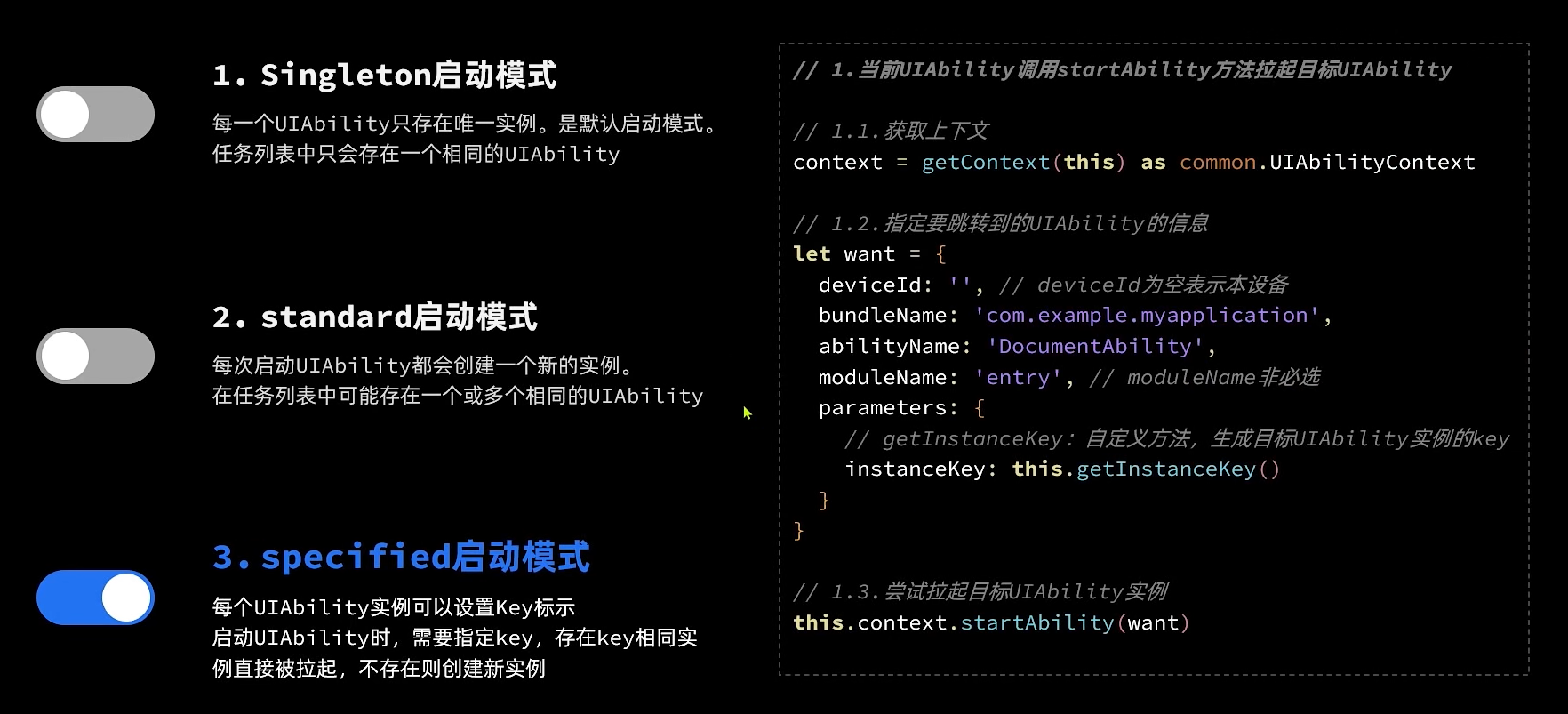
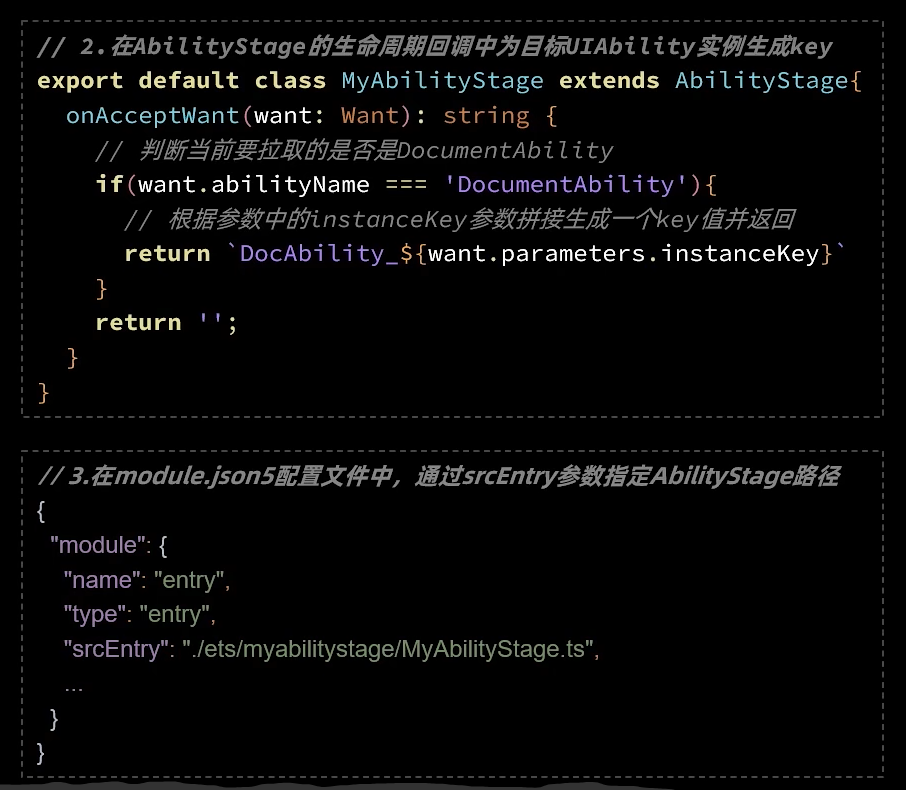
创建新的ability,注意windowStage.loadContent的地址
import UIAbility from '@ohos.app.ability.UIAbility';
import hilog from '@ohos.hilog';
import window from '@ohos.window';

export default class DocumentAbility extends UIAbility {
  onCreate(want, launchParam) {
    hilog.info(0x0000, 'testTag', '%{public}s', 'Ability onCreate');
  }

  onDestroy() {
  }

  onWindowStageCreate(windowStage: window.WindowStage) {
    // Main window is created, set main page for this ability
    hilog.info(0x0000, 'testTag', '%{public}s', 'Ability onWindowStageCreate');

    windowStage.loadContent('pages/DocumentPage', (err, data) => {
      if (err.code) {
        hilog.error(0x0000, 'testTag', 'Failed to load the content. Cause: %{public}s', JSON.stringify(err) ?? '');
        return;
      }
      hilog.info(0x0000, 'testTag', 'Succeeded in loading the content. Data: %{public}s', JSON.stringify(data) ?? '');
    });
  }

  onWindowStageDestroy() {
    // Main window is destroyed, release UI related resources
  }

  onForeground() {
    // Ability has brought to foreground
  }

  onBackground() {
    // Ability has back to background
  }
}
// DocumentListPage.ets
import common from '@ohos.app.ability.common'
import Want from '@ohos.app.ability.Want'
import { Header } from '../common/components/CommonComponents'
@Entry
@Component
struct DocumentListPage {
  private index: number = 1
  @State docs: number[] = []

  private context = getContext(this) as common.UIAbilityContext

  build() {
    Row() {
      Column({space: 10}) {
        Header({title: '文档列表'})
        Divider()
        Button('新建文档')
          .onClick(() => {
            // 添加文档
            this.docs.push(this.index)
            // 跳转到文档编辑的 UIAbility

            // 跳转的目的地want
            let want: Want = {
              deviceId: '',
              bundleName: 'com.example.myapplication',
              moduleName: 'entry',
              abilityName: 'DocumentAbility',// 执行要跳转的ability的name
              parameters: {
                instanceKey: 'idx_' + this.index++
              }
            }
            // 跳转
            this.context.startAbility(want)
          })
        ForEach(this.docs, id => {
          Row({space:10}){
            Image($r('app.media.ic_files_doc'))
              .width(20)
            Text(`文档${id}`)
              .fontSize(18)
              .onClick(() => {
                // 跳转到文档编辑的 UIAbility

                // 跳转的目的地want
                let want: Want = {
                  deviceId: '',
                  bundleName: 'com.example.myapplication',
                  moduleName: 'entry',
                  abilityName: 'DocumentAbility',
                  parameters: {
                    instanceKey: 'idx_' + id
                  }
                }
                // 跳转
                this.context.startAbility(want)
              })
          }
          .width('100%')
        })
      }
      .width('100%')
      .height('100%')
      .padding(20)
    }
  }
}
// DocumentPage.ets
import common from '@ohos.app.ability.common'
import Want from '@ohos.app.ability.Want'

@Entry
@Component
struct DocumentPage {
  private context = getContext(this) as common.UIAbilityContext
  @State editTitle: boolean = true
  @State title: string = '标题'
  @State content: string = ''

  build() {
    Row() {
      Column({ space: 10 }) {
        Row({ space: 10 }) {
          Image($r('app.media.ic_public_back'))
            .width(30)
            .onClick(() => {
              // 跳转到文档列表的 UIAbility
              let want: Want = {
                deviceId: '',
                bundleName: 'com.example.myapplication',
                moduleName: 'entry',
                abilityName: 'EntryAbility'
              }
              // 跳转
              this.context.startAbility(want)
            })
          if (!this.editTitle) {
            Text(this.title)
              .fontSize(30)
              .fontWeight(FontWeight.Bold)
              .onClick(() => this.editTitle = true)
          } else {
            TextInput({
              placeholder: '请输入标题',
              text: this.title
            })
              .layoutWeight(1)
              .onChange(val => this.title = val)
            Button('确定')
              .onClick(() => this.editTitle = false)
          }
        }
        .width('100%')

        Divider()
        TextArea({
          placeholder: '请输入文档内容',
          text: this.content
        })
          .layoutWeight(1)
          .onChange(val => this.content = val)
      }
      .padding(10)
      .width('100%')
      .height('100%')
    }
  }
}
want跳转需要一个新stage,在目录下创建一个新的自定义stage
// entry\src\main\ets\myabilitystage\MyAbilityStage.ts
import AbilityStage from '@ohos.app.ability.AbilityStage';
import Want from '@ohos.app.ability.Want';

export default class MyAbilityStage extends AbilityStage {
  onAcceptWant(want: Want): string {
    if(want.abilityName === 'DocumentAbility'){
      return `DocAbilityInstance_${want.parameters.instanceKey}`
    }
    return ''
  }
}
module.json5:新创建的ability会自动导入,但是新建的stage需要配置srcEntry,需要手动导入
{
  "module": {
    "requestPermissions": [
      {
        "name": "ohos.permission.INTERNET"
      }
    ],
    "name": "entry",
    "type": "entry",
    // 导入新的stage
    "srcEntry": './ets/myabilitystage/MyAbilityStage.ts',
    "description": "$string:module_desc",
    "mainElement": "EntryAbility",
    "deviceTypes": [
      "phone",
      "tablet"
    ],
    "deliveryWithInstall": true,
    "installationFree": false,
    "pages": "$profile:main_pages",
    "abilities": [
      {
        "name": "EntryAbility",
        "srcEntry": "./ets/entryability/EntryAbility.ets",
        "description": "$string:EntryAbility_desc",
        "icon": "$media:ic_main",
        "label": "$string:EntryAbility_label",
        "startWindowIcon": "$media:icon",
        "startWindowBackground": "$color:start_window_background",
        "exported": true,
        "launchType": "standard",
        "skills": [
          {
            "entities": [
              "entity.system.home"
            ],
            "actions": [
              "action.system.home"
            ]
          }
        ]
      },
      // 新的ability的配置
      {
        "name": "DocumentAbility",
        "srcEntry": "./ets/documentability/DocumentAbility.ts",
        "description": "$string:DocumentAbility_desc",
        "icon": "$media:icon",
        "label": "$string:DocumentAbility_label",
        "startWindowIcon": "$media:icon",
        "startWindowBackground": "$color:start_window_background",
        "launchType": "specified"// 启动模式字段
      }
    ]
  }
}
# arkts 网络请求
可用原生http也可以使用第三方库axios
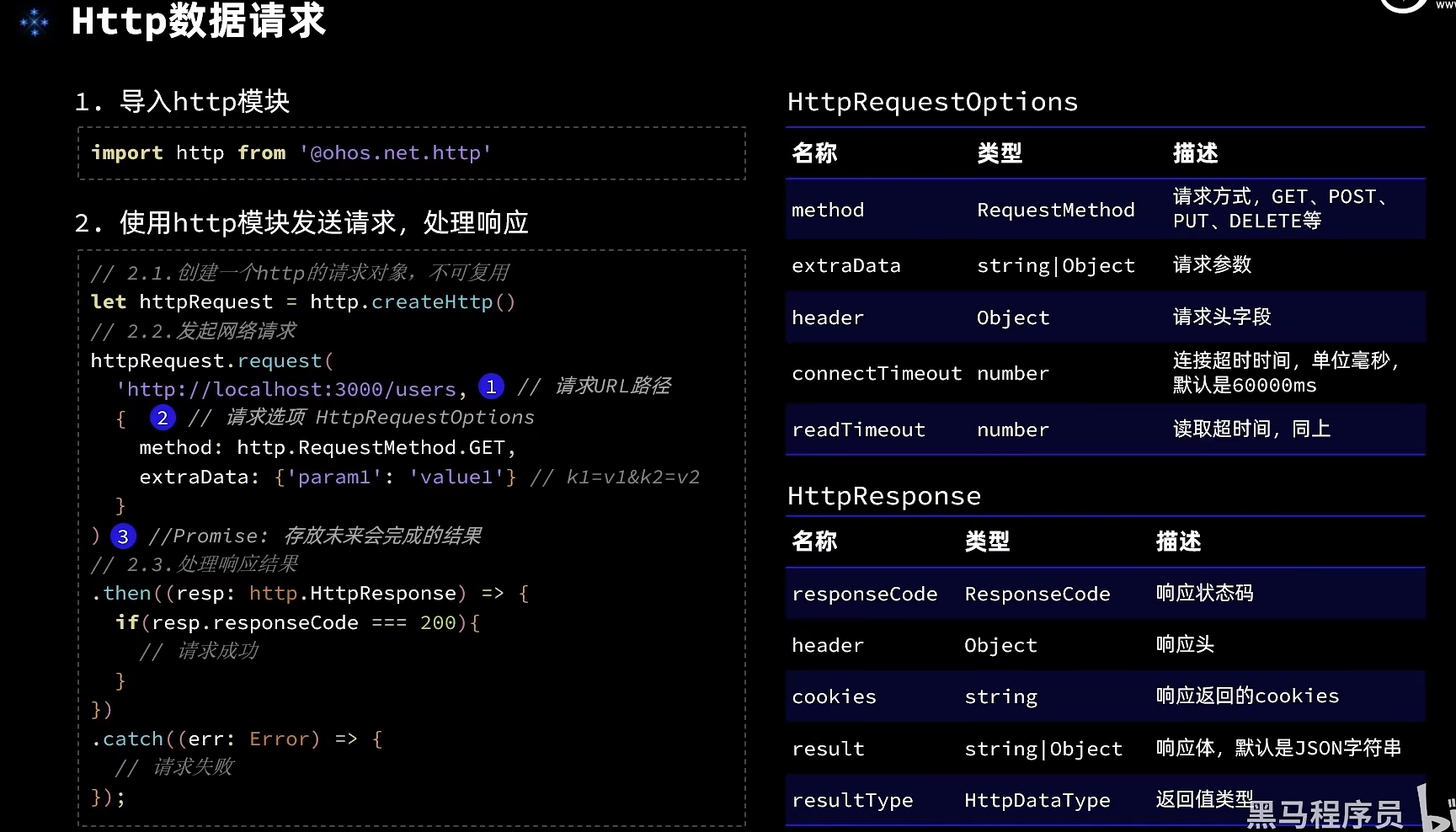
// import http from '@ohos.net.http';
import ShopInfo from '../viewmodel/ShopInfo';
import axios from '@ohos/axios'

class ShopModel{
  baseURL: string = 'http://localhost:3000'
  pageNo: number = 1

  getShopList(): Promise<ShopInfo[]>{
    return new Promise((resolve, reject) => {
      axios.get(
        `${this.baseURL}/shops`,
        {
          params: {pageNo: this.pageNo, pageSize: 3}
        }
      )
        .then(resp => {
          if(resp.status === 200){
            // 查询成功
            console.log('查询商铺成功!', JSON.stringify(resp.data))
            resolve(resp.data)
          }else{
            console.log('查询商铺信息失败!error:', JSON.stringify(resp))
            reject('查询商铺失败')
          }
        })
        .catch(error => {
          console.log('查询商铺信息失败!error:', JSON.stringify(error))
          reject('查询商铺失败')
        })
    })
  }

  /*getShopList(): Promise<ShopInfo[]>{
    return new Promise((resolve, reject) => {
      // 1.创建http的请求对象
      let httpRequest = http.createHttp()
      // 2.发送请求
      httpRequest.request(
        `${this.baseURL}/shops?pageNo=${this.pageNo}&pageSize=3`,
        {
          method: http.RequestMethod.GET
        }
      )
        .then(resp => {
          if(resp.responseCode === 200){
            // 查询成功
            console.log('查询商铺成功!', resp.result)
            resolve(JSON.parse(resp.result.toString()))
          }else{
            console.log('查询商铺信息失败!error:', JSON.stringify(resp))
            reject('查询商铺失败')
          }
        })
        .catch(error => {
          console.log('查询商铺信息失败!error:', JSON.stringify(error))
          reject('查询商铺失败')
        })
    })
  }*/
}

const shopModel = new ShopModel();

export default shopModel as ShopModel;
# arkts中使用axios
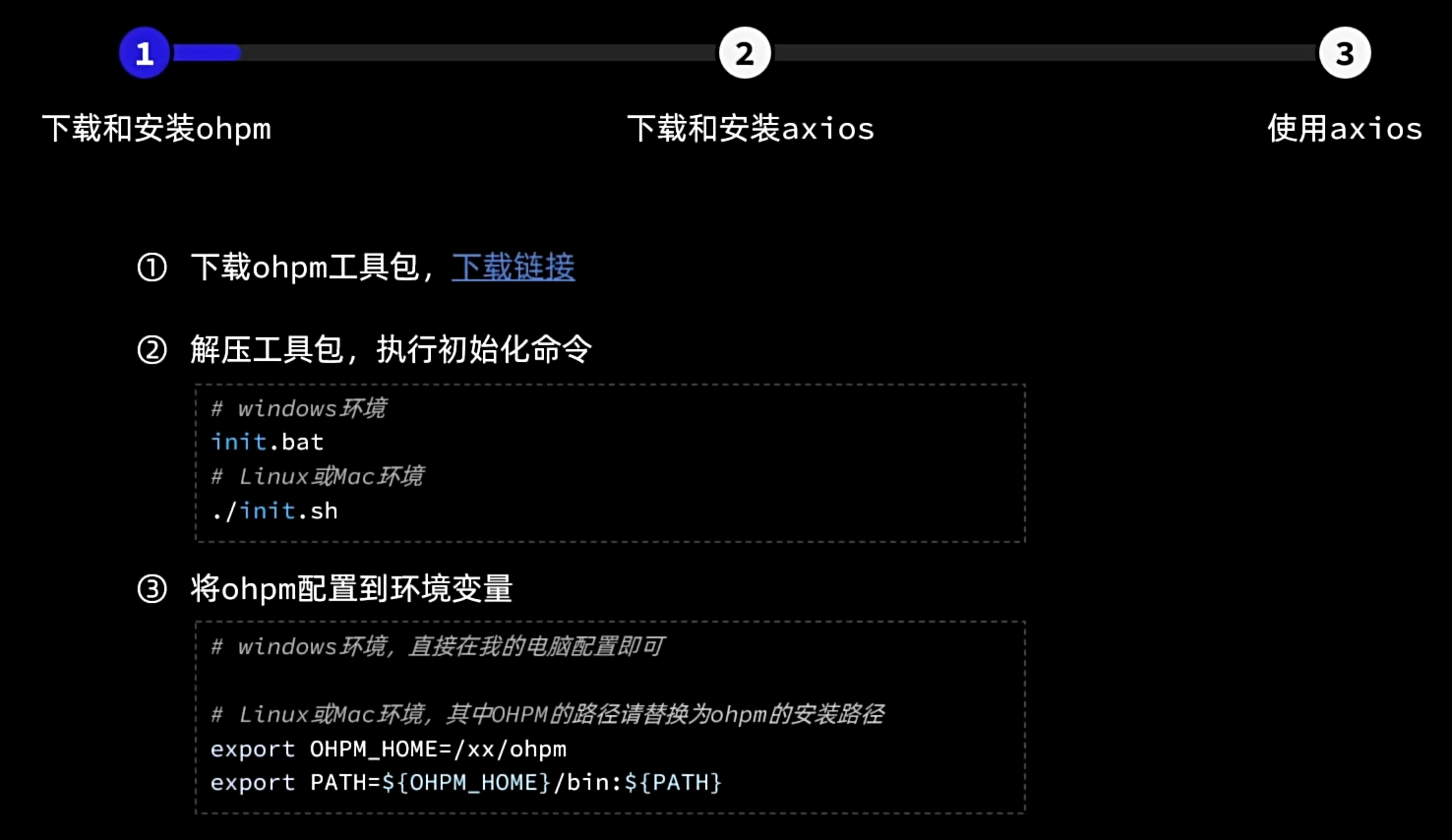
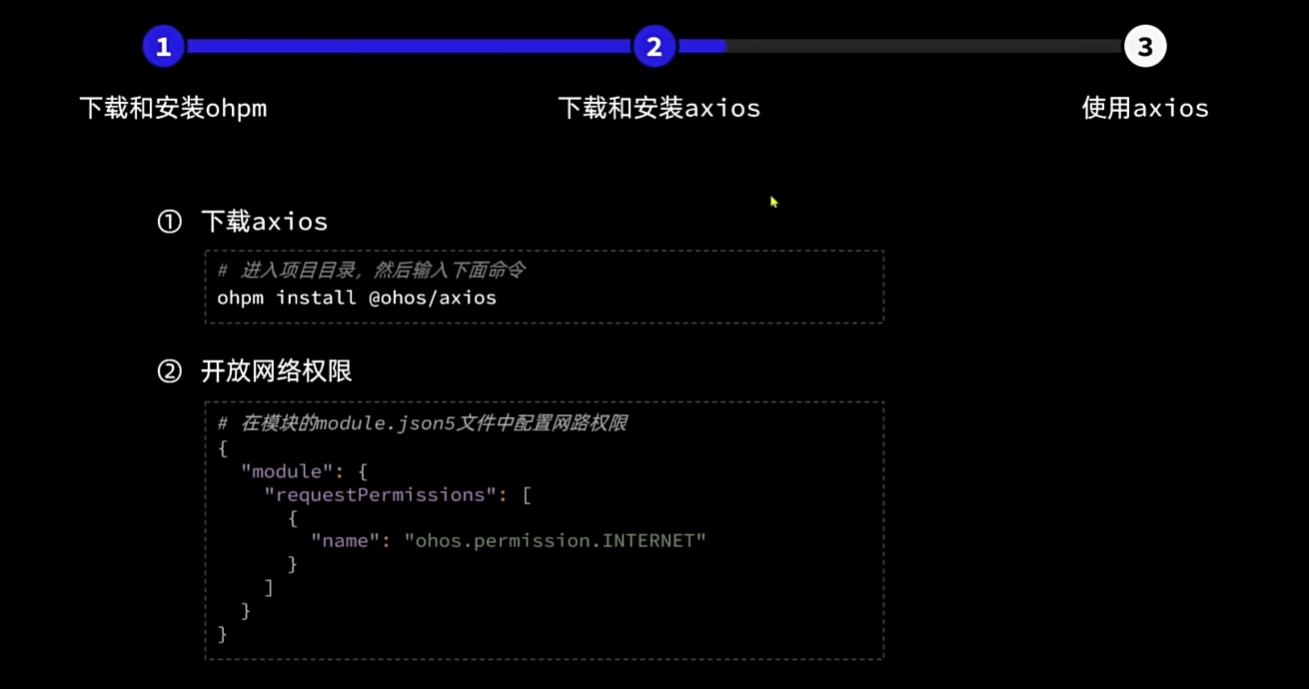
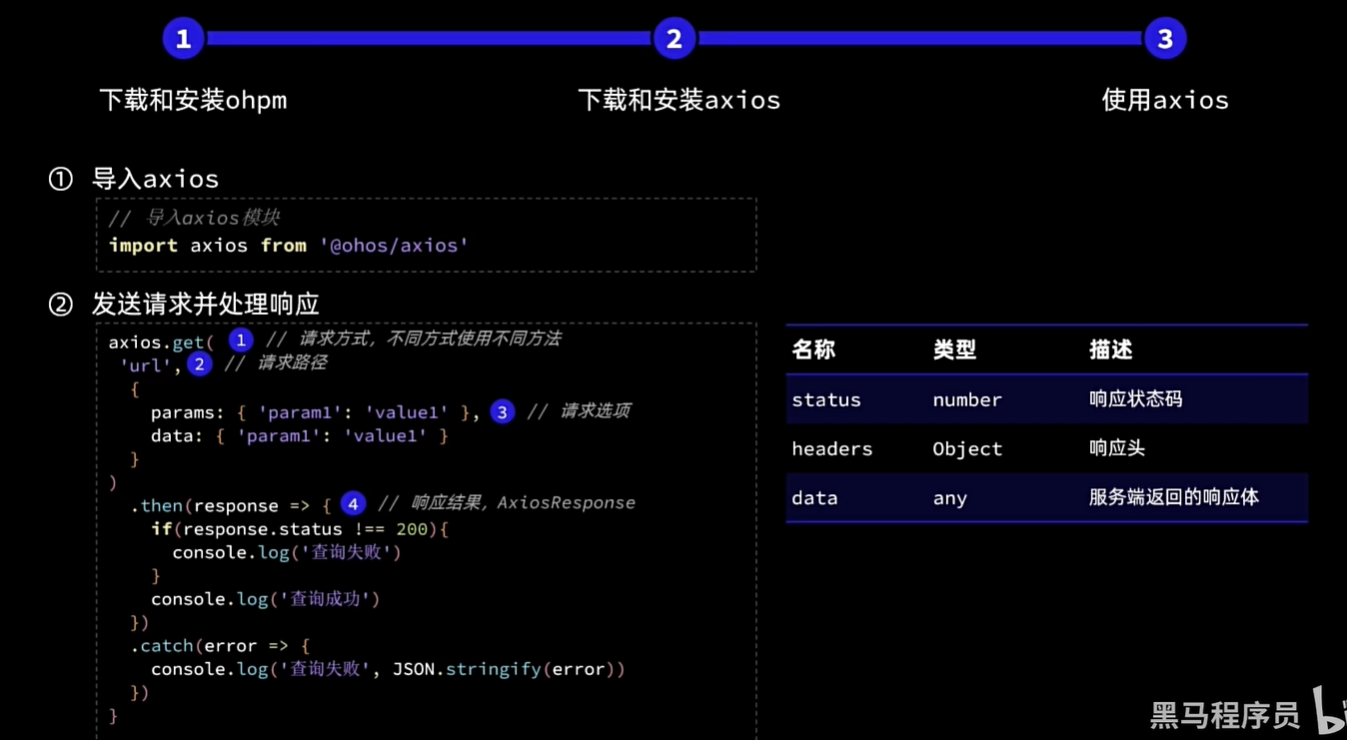
# ohpm
在官网或者编译器自行安装
OHPM_HOME:对应目录(C:\Users\wei\AppData\Local\Huawei\ohpm)
path:%OHPM_HOME%\bin
C:\Users\wei\AppData\Local\Huawei\ohpm\bin
执行./init.bat
重启cmd
查看 ohmp -v
# 数据持久化之preferences首选项配置
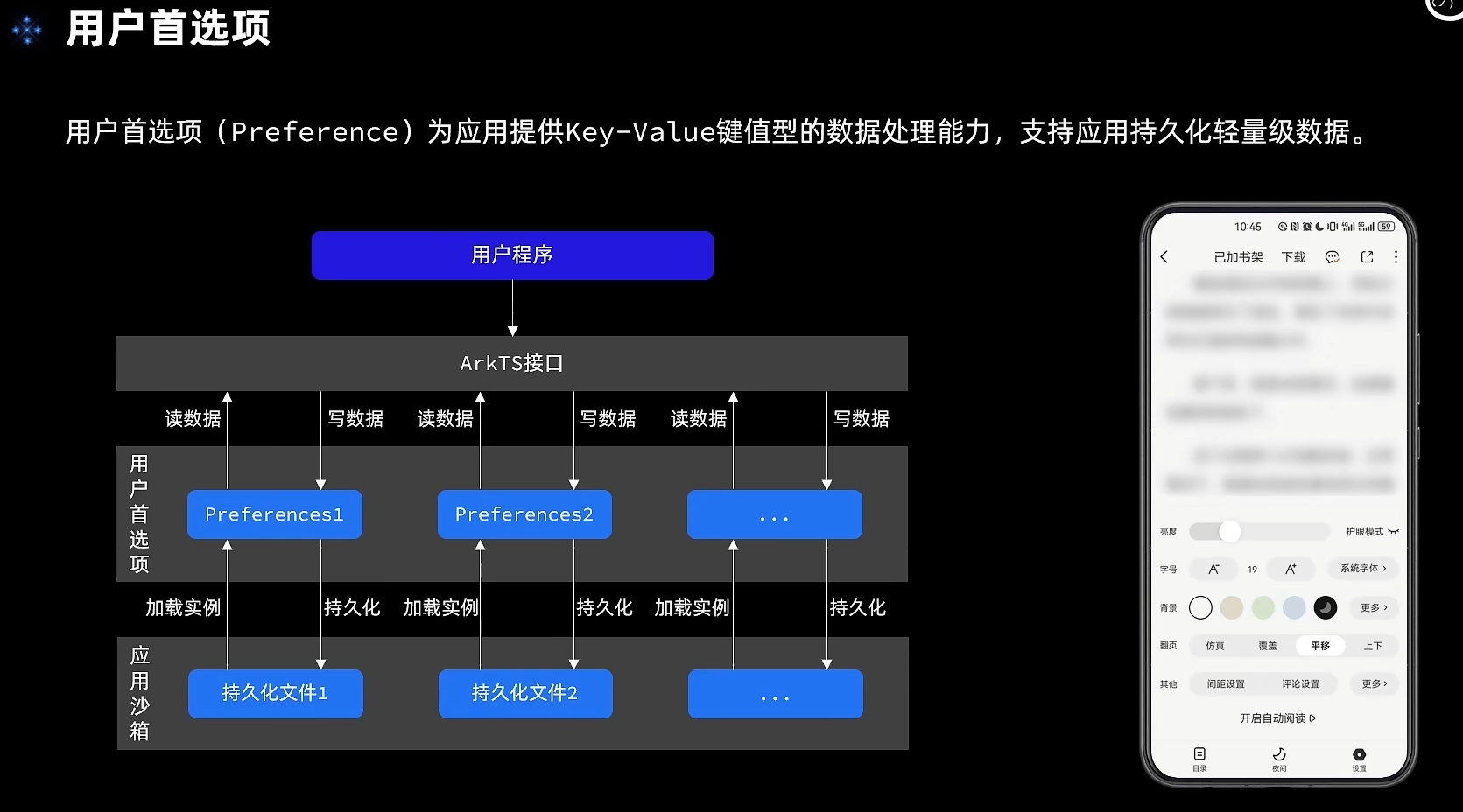
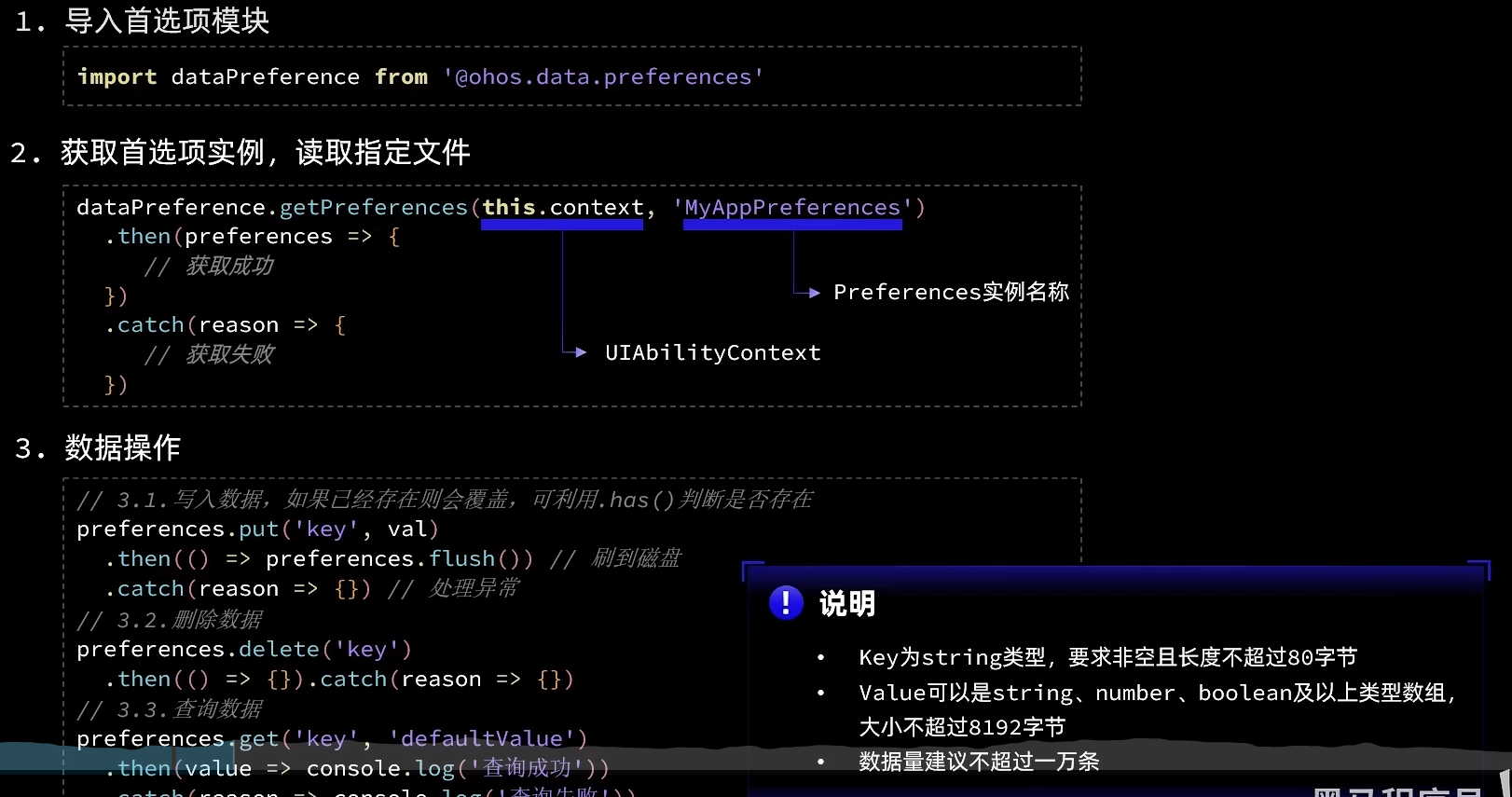
// 处理数据持久化,首选项类配置
import preferences from '@ohos.data.preferences';

class PreferencesUtil{

  prefMap: Map<string, preferences.Preferences> = new Map()

  async loadPreference(context, name: string){
    try { // 加载preferences
      let pref = await preferences.getPreferences(context, name)
      this.prefMap.set(name, pref)
      console.log('testTag', `加载Preferences[${name}]成功`)
    } catch (e) {
      console.log('testTag', `加载Preferences[${name}]失败`, JSON.stringify(e))
    }
  }

  async putPreferenceValue(name: string, key: string, value: preferences.ValueType){
    if (!this.prefMap.has(name)) {
      console.log('testTag', `Preferences[${name}]尚未初始化!`)
      return
    }
    try {
      let pref = this.prefMap.get(name)
      // 写入数据
      await pref.put(key, value)
      // 刷盘
      await pref.flush()
      console.log('testTag', `保存Preferences[${name}.${key} = ${value}]成功`)
    } catch (e) {
      console.log('testTag', `保存Preferences[${name}.${key} = ${value}]失败`, JSON.stringify(e))
    }
  }

  async getPreferenceValue(name: string, key: string, defaultValue: preferences.ValueType){
    if (!this.prefMap.has(name)) {
      console.log('testTag', `Preferences[${name}]尚未初始化!`)
      return
    }
    try {
      let pref = this.prefMap.get(name)
      // 读数据
      let value = await pref.get(key, defaultValue)
      console.log('testTag', `读取Preferences[${name}.${key} = ${value}]成功`)
      return value
    } catch (e) {
      console.log('testTag', `读取Preferences[${name}.${key} ]失败`, JSON.stringify(e))
    }
  }
}

const preferencesUtil = new PreferencesUtil()

export default preferencesUtil as PreferencesUtil
// EntryAbility
import UIAbility from '@ohos.app.ability.UIAbility';
import hilog from '@ohos.hilog';
import window from '@ohos.window';;
import PreferencesUtil from '../common/util/PreferencesUtil'
import TaskModel from '../model/TaskModel'

export default class EntryAbility extends UIAbility {
  async onCreate(want, launchParam) {
    hilog.info(0x0000, 'testTag', '%{public}s', 'Ability onCreate running');
    // 加载Preferences
    await PreferencesUtil.loadPreference(this.context, 'MyPreferences')
    // 初始化任务表
    TaskModel.initTaskDB(this.context)
  }
  onWindowStageCreate(windowStage: window.WindowStage) {
    // Main window is created, set main page for this ability
    hilog.info(0x0000, 'testTag', '%{public}s', 'Ability onWindowStageCreate');
    windowStage.on('windowStageEvent', () =>{})
    windowStage.loadContent('pages/Index', (err, data) => {
      if (err.code) {
        hilog.error(0x0000, 'testTag', 'Failed to load the content. Cause: %{public}s', JSON.stringify(err) ?? '');
        return;
      }
      hilog.info(0x0000, 'testTag', 'Succeeded in loading the content. Data: %{public}s', JSON.stringify(data) ?? '');
    });
  }
}
 // 写入Preferences
  PreferencesUtil.putPreferenceValue('MyPreferences', 'IndexFontSize', val)
 // 获取
  async aboutToAppear(){
    this.fontSize = await PreferencesUtil.getPreferenceValue('MyPreferences', 'IndexFontSize', 16) as number
  }
# arkts数据持久化之关系型数据库
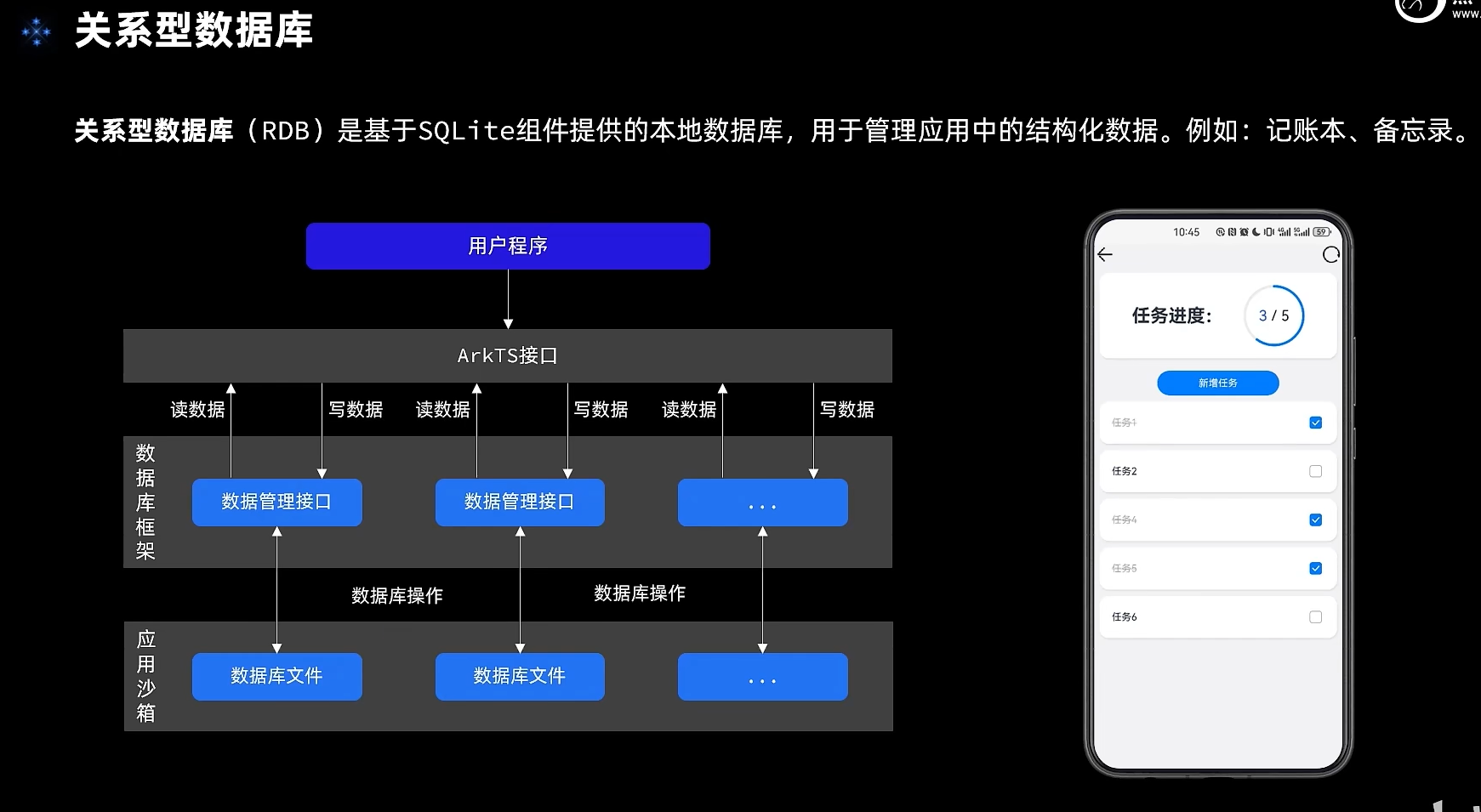
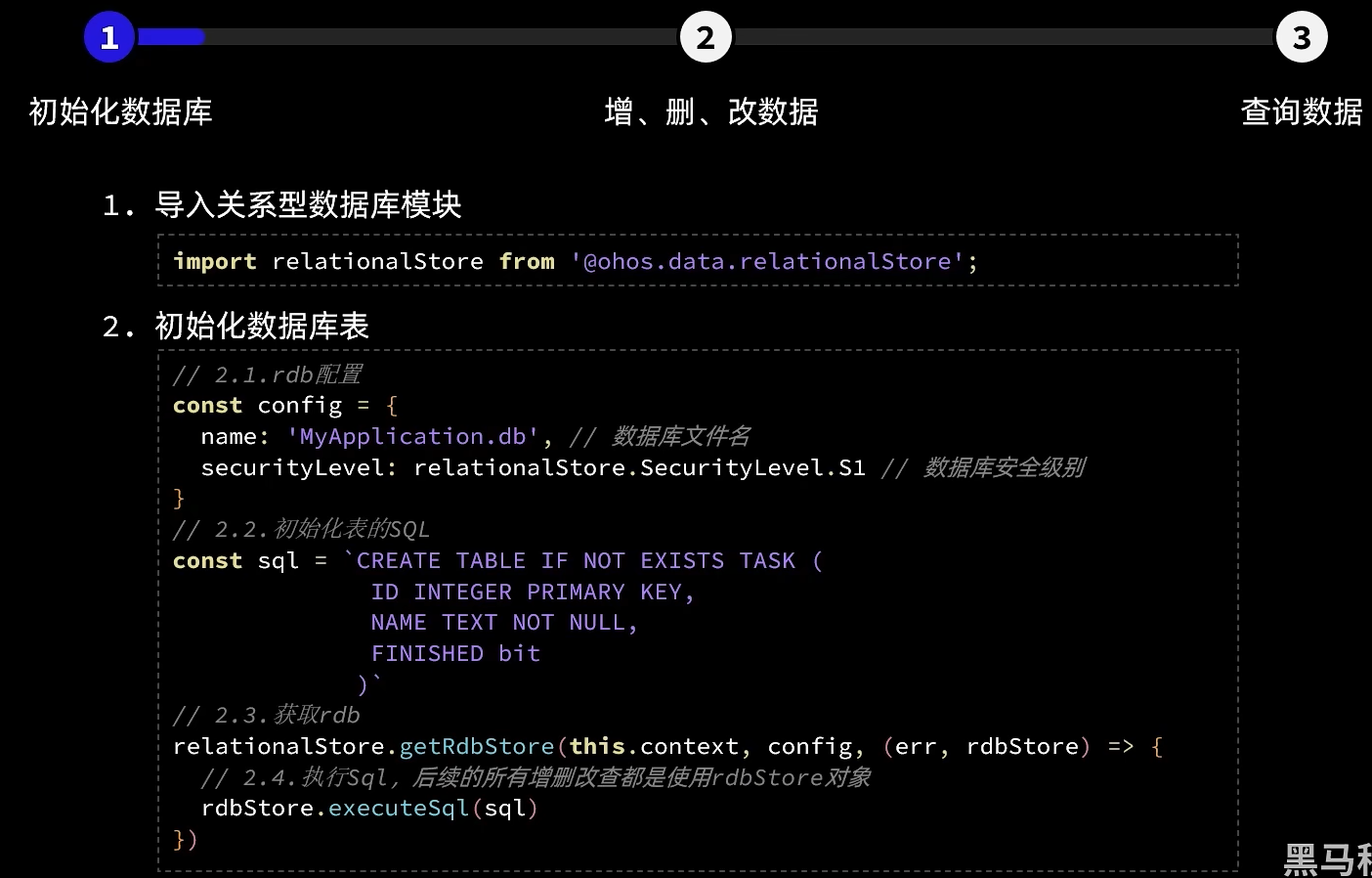
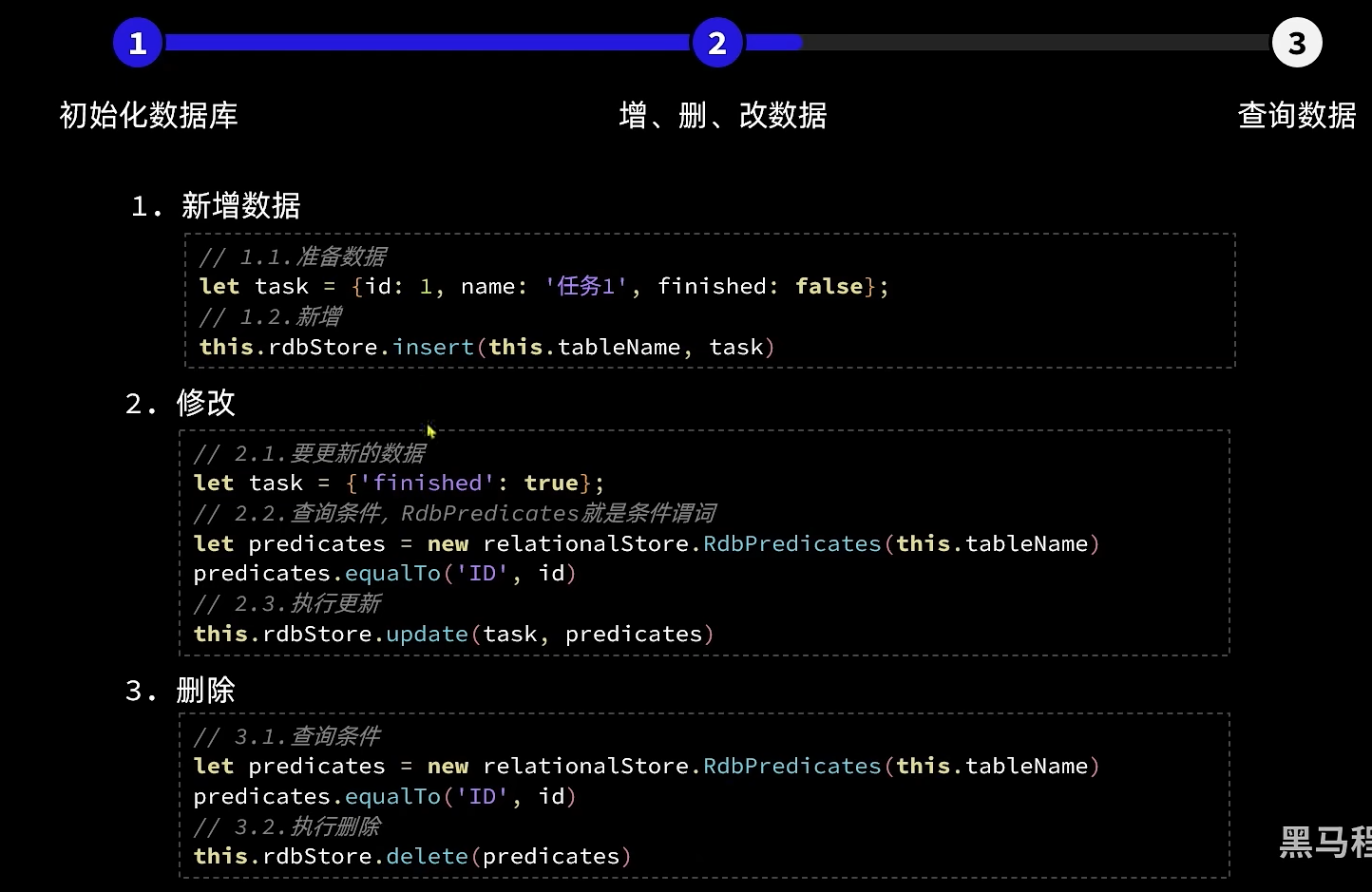
//TaskInfo.ets
@Observed
export default class TaskInfo{
  id: number
  // 任务名称
  name: string
  // 任务状态:是否完成
  finished: boolean

  constructor(id: number, name: string) {
    this.id = id
    this.name = name
    this.finished = false
  }
}
// TaskModel.ets,因为要引用ets文件,所以这里它也需要时ets
import relationalStore from '@ohos.data.relationalStore';
import TaskInfo from '../viewmodel/TaskInfo';

class TaskModel {

  private rdbStore: relationalStore.RdbStore
  private tableName: string = 'TASK'

  /**
   * 初始化任务表
   */
  initTaskDB(context){
    // 1.rdb配置
    const config = {
      name: 'MyApplication.db',//数据库名
      securityLevel: relationalStore.SecurityLevel.S1// 安全等级
    }
    // 2.初始化SQL语句
    const sql = `CREATE TABLE IF NOT EXISTS TASK (
                  ID INTEGER PRIMARY KEY AUTOINCREMENT,
                  NAME TEXT NOT NULL,
                  FINISHED bit
                 )`
    // 3.获取rdb
    relationalStore.getRdbStore(context, config, (err, rdbStore) => {
      if(err){
        console.log('testTag', '获取rdbStore失败!')
        return
      }
      // 执行Sql
      rdbStore.executeSql(sql)
      console.log('testTag', '创建task表成功!')
      // 保存rdbStore
      this.rdbStore = rdbStore
    })
  }

  /**
   * 查询任务列表
   */
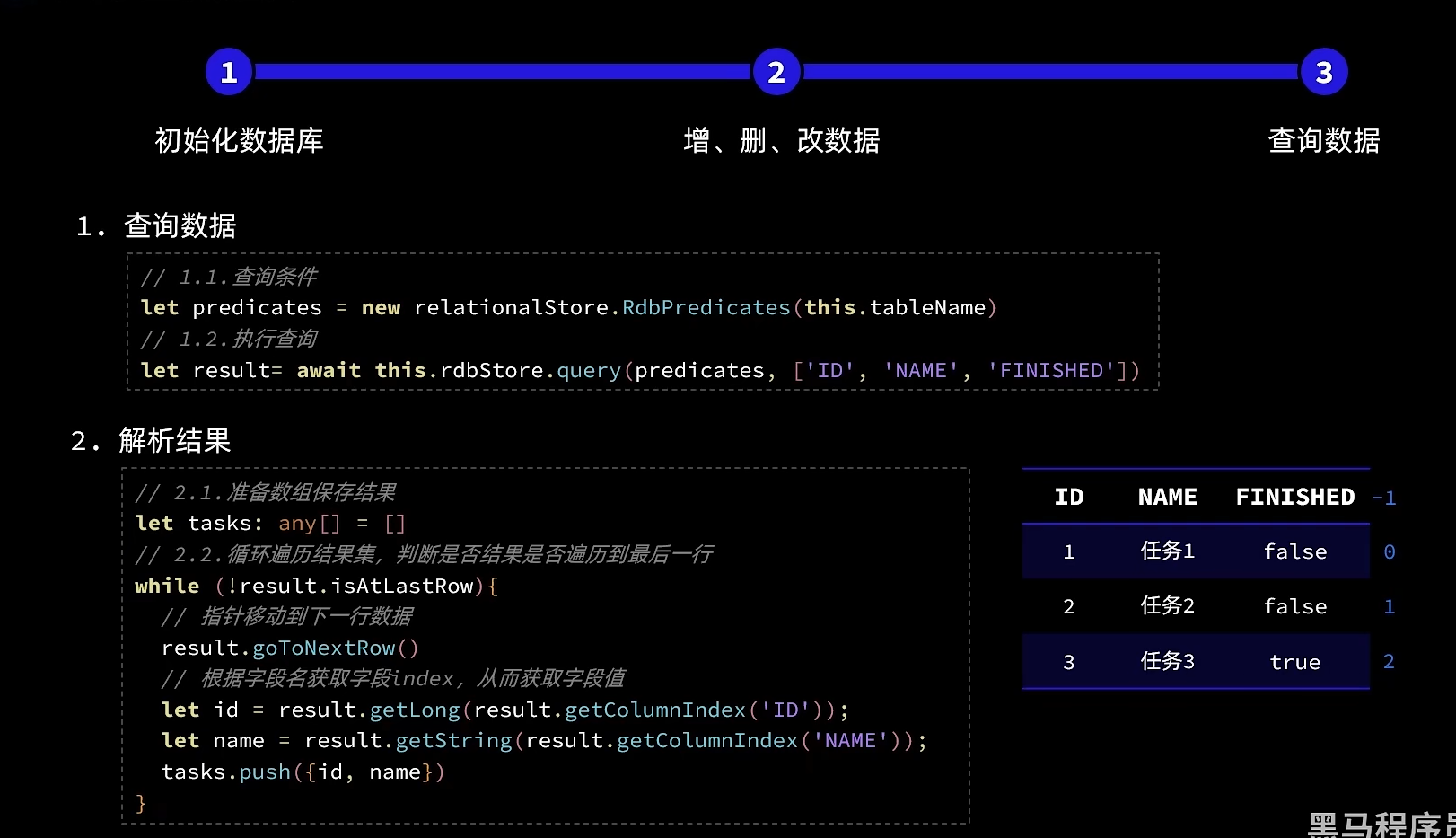
  async getTaskList(){
    // 1.构建查询条件
    let predicates = new relationalStore.RdbPredicates(this.tableName)
    // 2.查询
    let result = await this.rdbStore.query(predicates, ['ID', 'NAME', 'FINISHED'])
    // 3.解析查询结果
    // 3.1.定义一个数组,组装最终的查询结果
    let tasks: TaskInfo[] = []
    // 3.2.遍历封装
    while(!result.isAtLastRow){
      // 3.3.指针移动到下一行
      result.goToNextRow()
      // 3.4.获取数据
      let id = result.getLong(result.getColumnIndex('ID'))
      let name = result.getString(result.getColumnIndex('NAME'))
      let finished = result.getLong(result.getColumnIndex('FINISHED'))
      // 3.5.封装到数组
      tasks.push({id, name, finished: !!finished})
    }
    console.log('testTag', '查询到数据:', JSON.stringify(tasks))
    return tasks
  }

  /**
   * 添加一个新的任务
   * @param name 任务名称
   * @returns 任务id
   */
  addTask(name: string): Promise<number>{
    return this.rdbStore.insert(this.tableName, {name, finished: false})
  }

  /**
   * 根据id更新任务状态
   * @param id 任务id
   * @param finished 任务是否完成
   */
  updateTaskStatus(id: number, finished: boolean) {
    // 1.要更新的数据
    let data = {finished}
    // 2.更新的条件
    let predicates = new relationalStore.RdbPredicates(this.tableName)
    predicates.equalTo('ID', id)
    // 3.更新操作
    return this.rdbStore.update(data, predicates)
  }

  /**
   * 根据id删除任务
   * @param id 任务id
   */
  deleteTaskById(id: number){
    // 1.删除的条件
    let predicates = new relationalStore.RdbPredicates(this.tableName)
    predicates.equalTo('ID', id)
    // 2.删除操作
    return this.rdbStore.delete(predicates)
  }
}

let taskModel = new TaskModel();

export default taskModel as TaskModel;
// EntryAbility,完整配置参见首选项
import UIAbility from '@ohos.app.ability.UIAbility';
import TaskModel from '../model/TaskModel'

export default class EntryAbility extends UIAbility {
  async onCreate(want, launchParam) {
    // 初始化任务表
    TaskModel.initTaskDB(this.context)
  }
}
 // 1.新增任务
  TaskModel.addTask(name)
    .then(id => {
      console.log('testTag', '处理新增任务: ', name)
      // 回显到数组页面
      this.tasks.push(new TaskInfo(id, name))
      // 2.更新任务完成状态
      this.handleTaskChange()
      // 3.关闭对话框
      this.dialogController.close()
    })
    .catch(error => console.log('testTag', '新增任务失败:', name, JSON.stringify(error)))

// 删除任务
    TaskModel.deleteTaskById(id)
      .then(() => {
        this.tasks.splice(index, 1)
        console.log('testTag', `尝试删除任务,index: ${index}`)
      })
      .catch(error => console.log('testTag', '删除任务失败,id = ', id, JSON.stringify(error)))
# 鸿蒙arkts通知
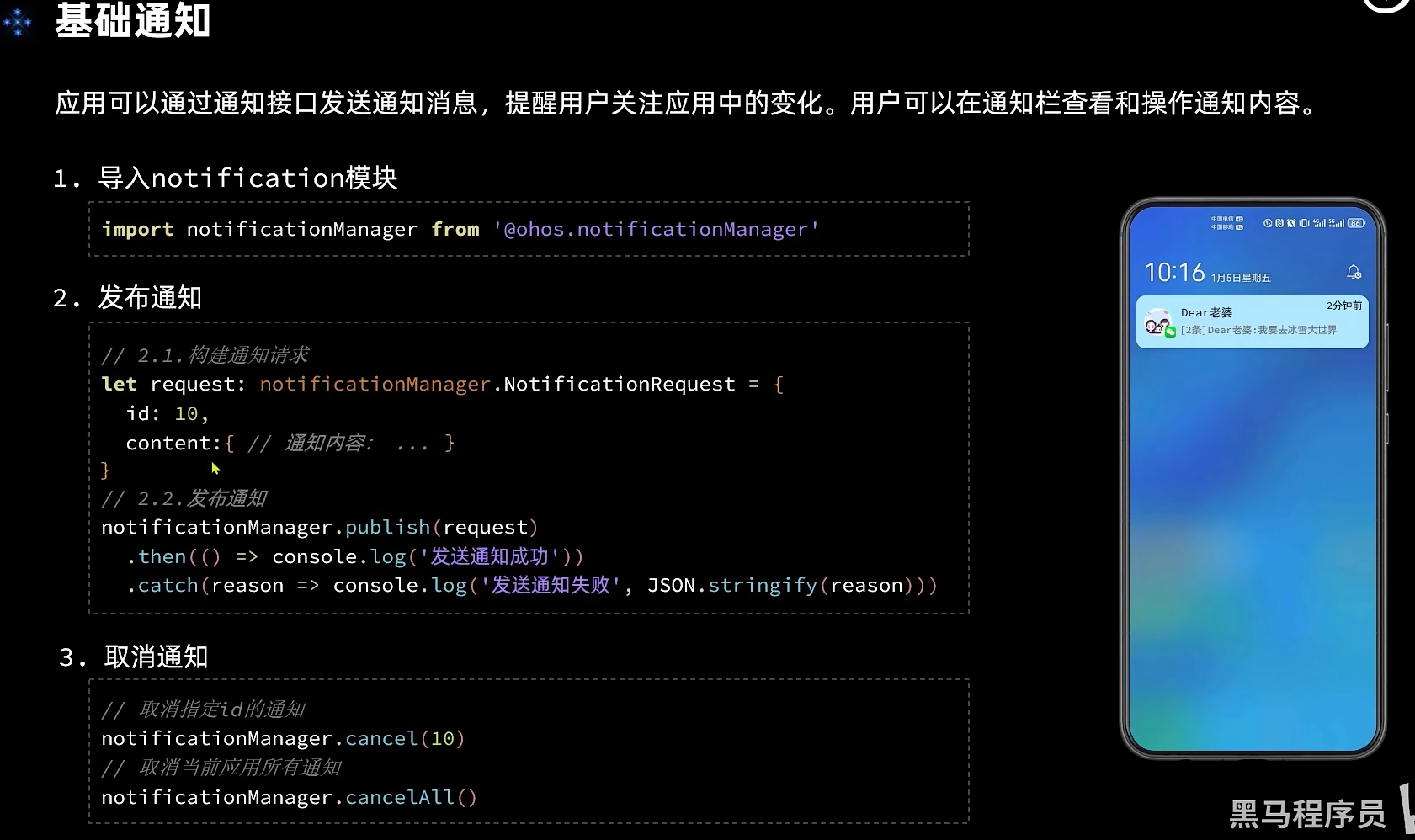
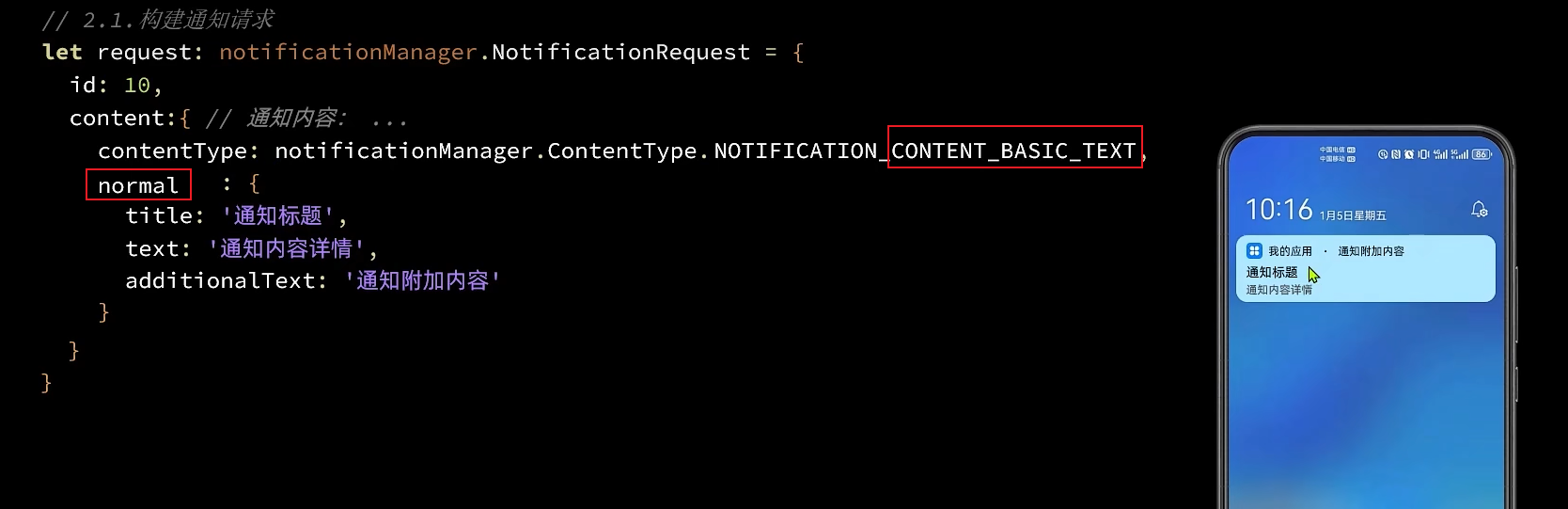
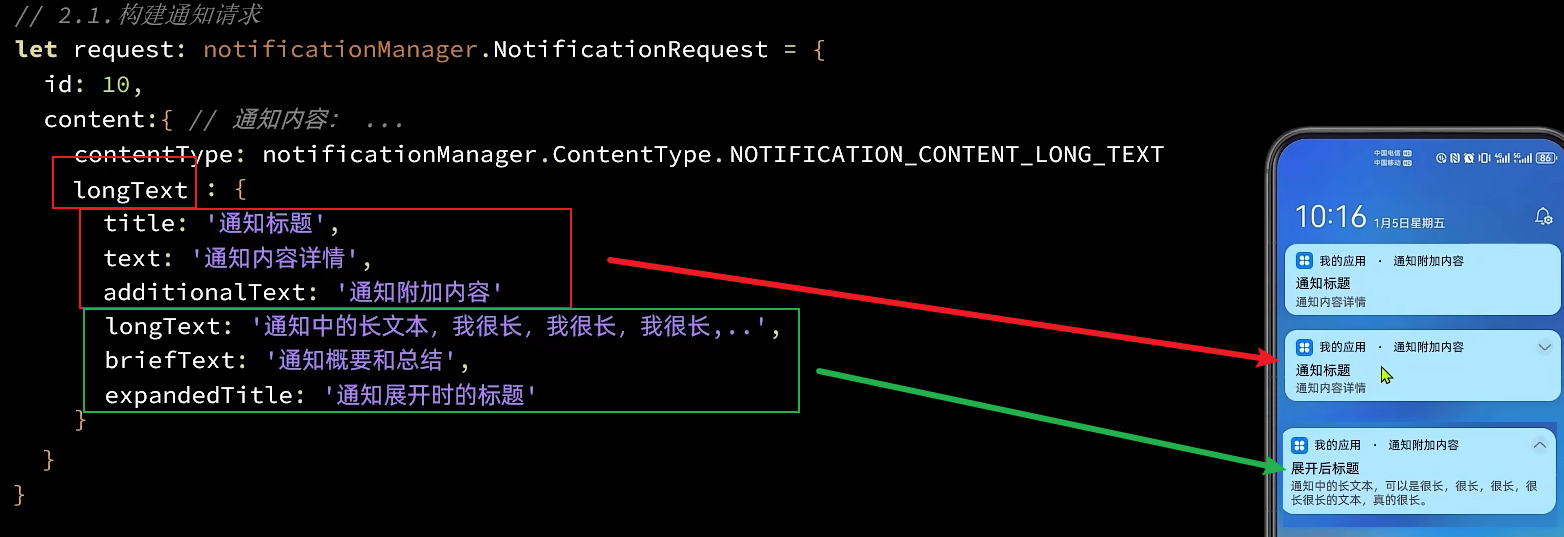
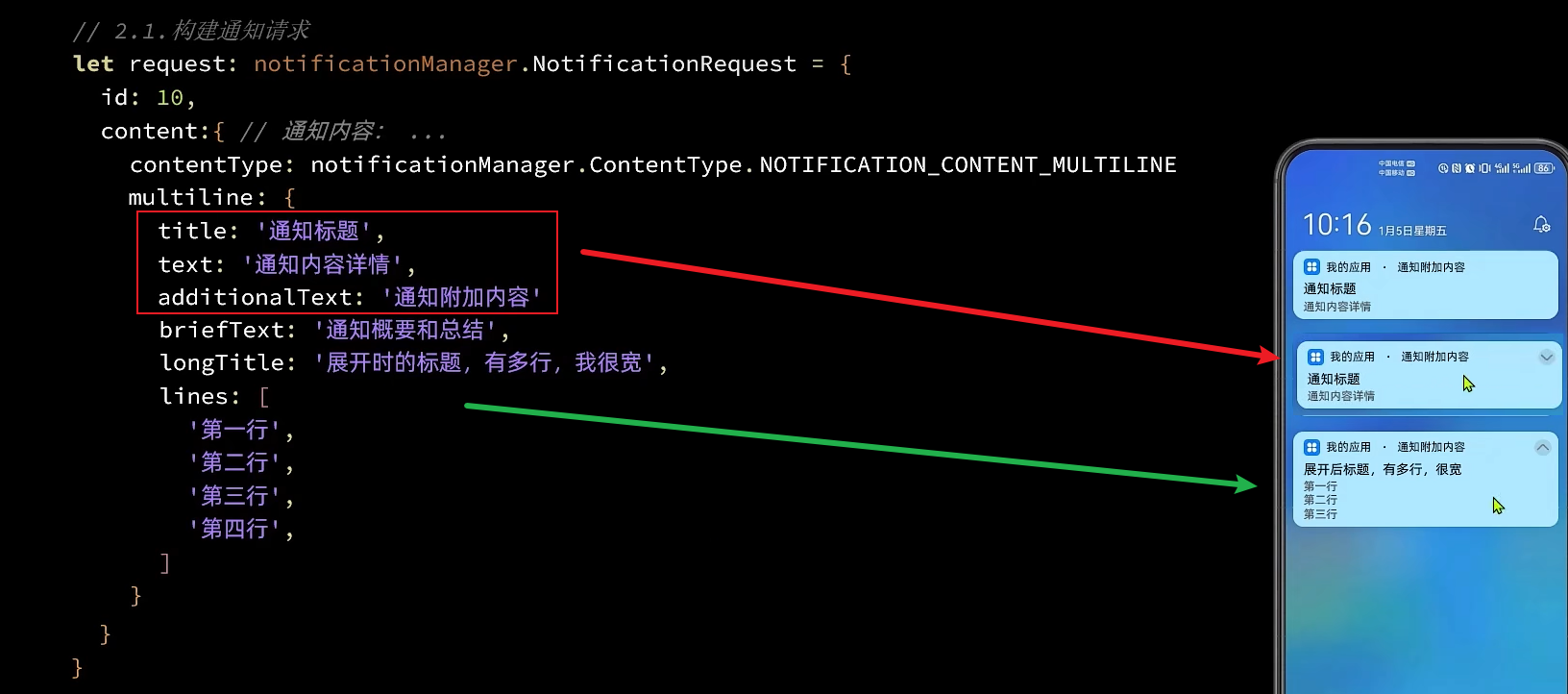
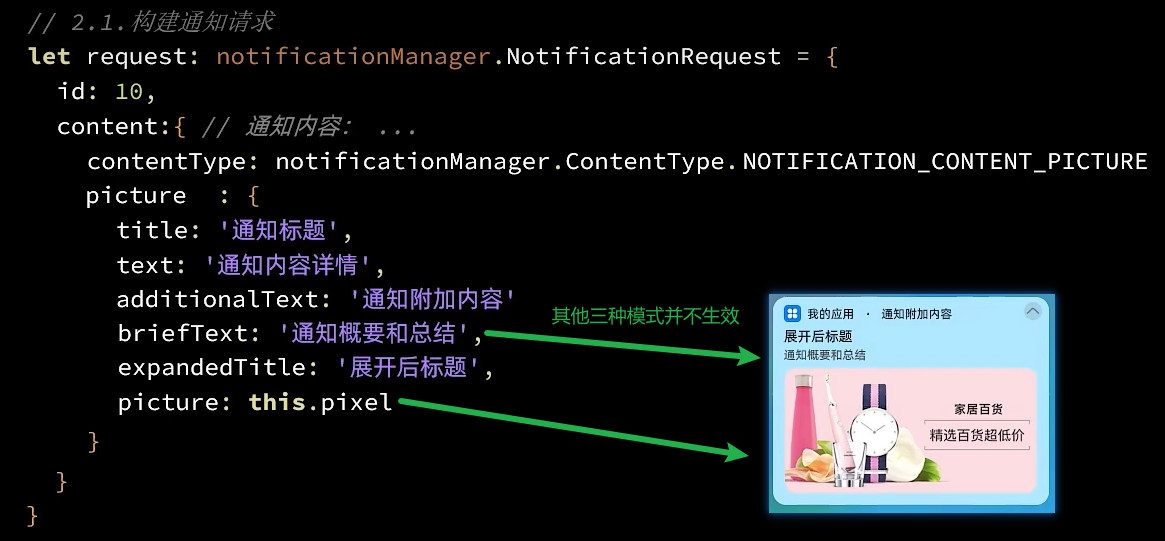
import notify from '@ohos.notificationManager'
import image from '@ohos.multimedia.image'
import DownloadCard from '../views/notification/DownloadCard'
import { Header } from '../common/components/CommonComponents'

@Entry
@Component
struct NotificationPage {
  // 全局任务id
  idx: number = 100
  // 图象
  pixel: PixelMap

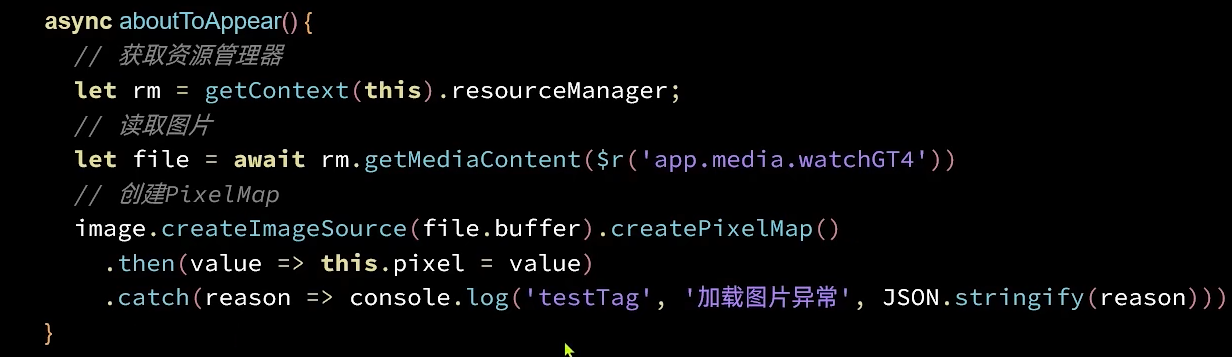
  async aboutToAppear() {
    // 获取资源管理器
    let rm = getContext(this).resourceManager;
    // 读取图片
    let file = await rm.getMediaContent($r('app.media.watchGT4'))
    // 创建PixelMap
    image.createImageSource(file.buffer).createPixelMap()
      .then(value => this.pixel = value)
      .catch(reason => console.log('testTag', '加载图片异常', JSON.stringify(reason)))
  }

  build() {
    Column({space: 20}) {
      Header({title: '通知功能'})

      Button(`发送normalText通知`)
        .onClick(() => this.publishNormalTextNotification())
      Button(`发送longText通知`)
        .onClick(() => this.publishLongTextNotification())
      Button(`发送multiLine通知`)
        .onClick(() => this.publishMultiLineNotification())
      Button(`发送Picture通知`)
        .onClick(() => this.publishPictureNotification())

      // 下载功能卡片
      DownloadCard()
    }
    .width('100%')
    .height('100%')
    .padding(5)
    .backgroundColor('#f1f2f3')
  }

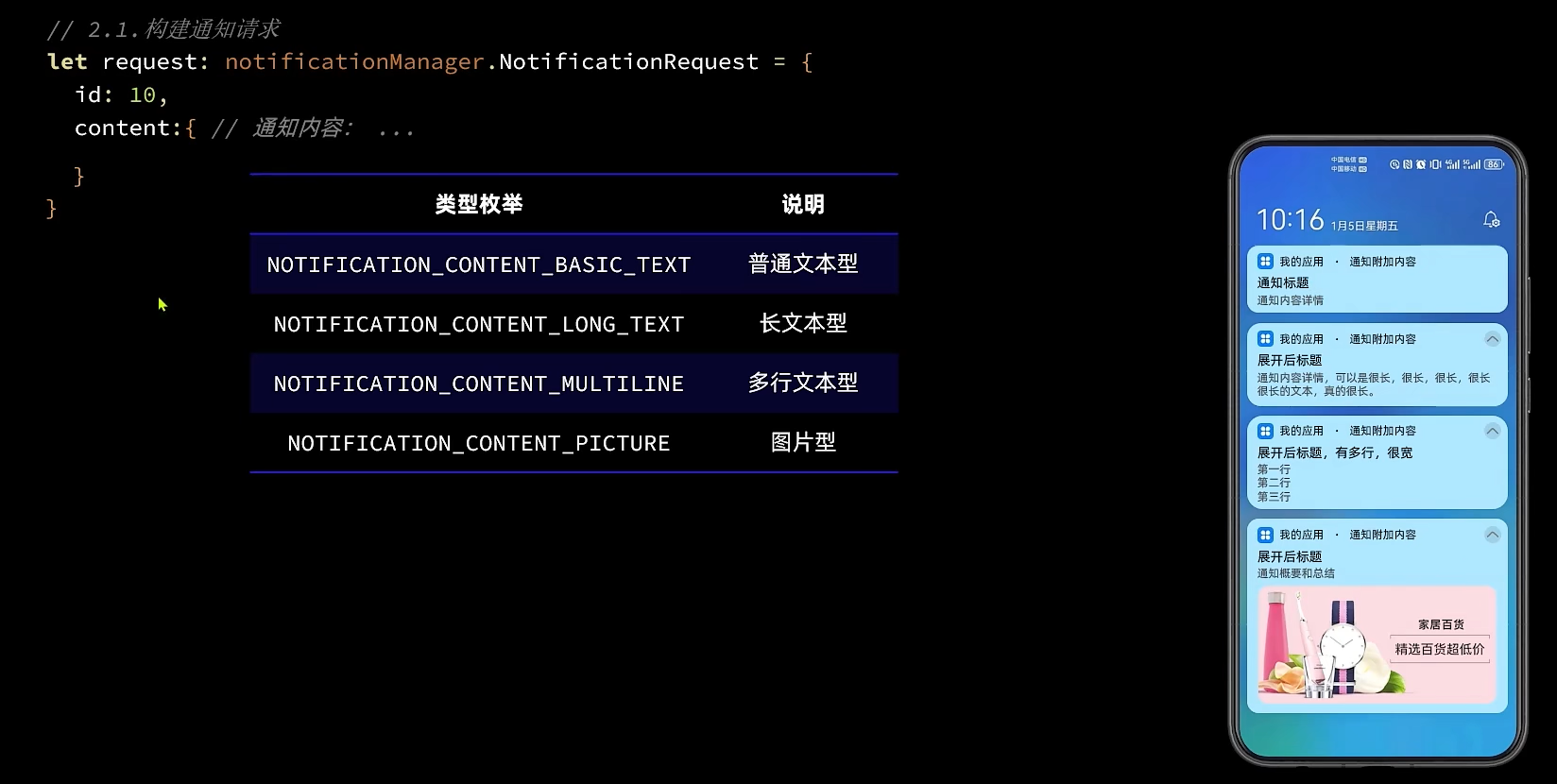
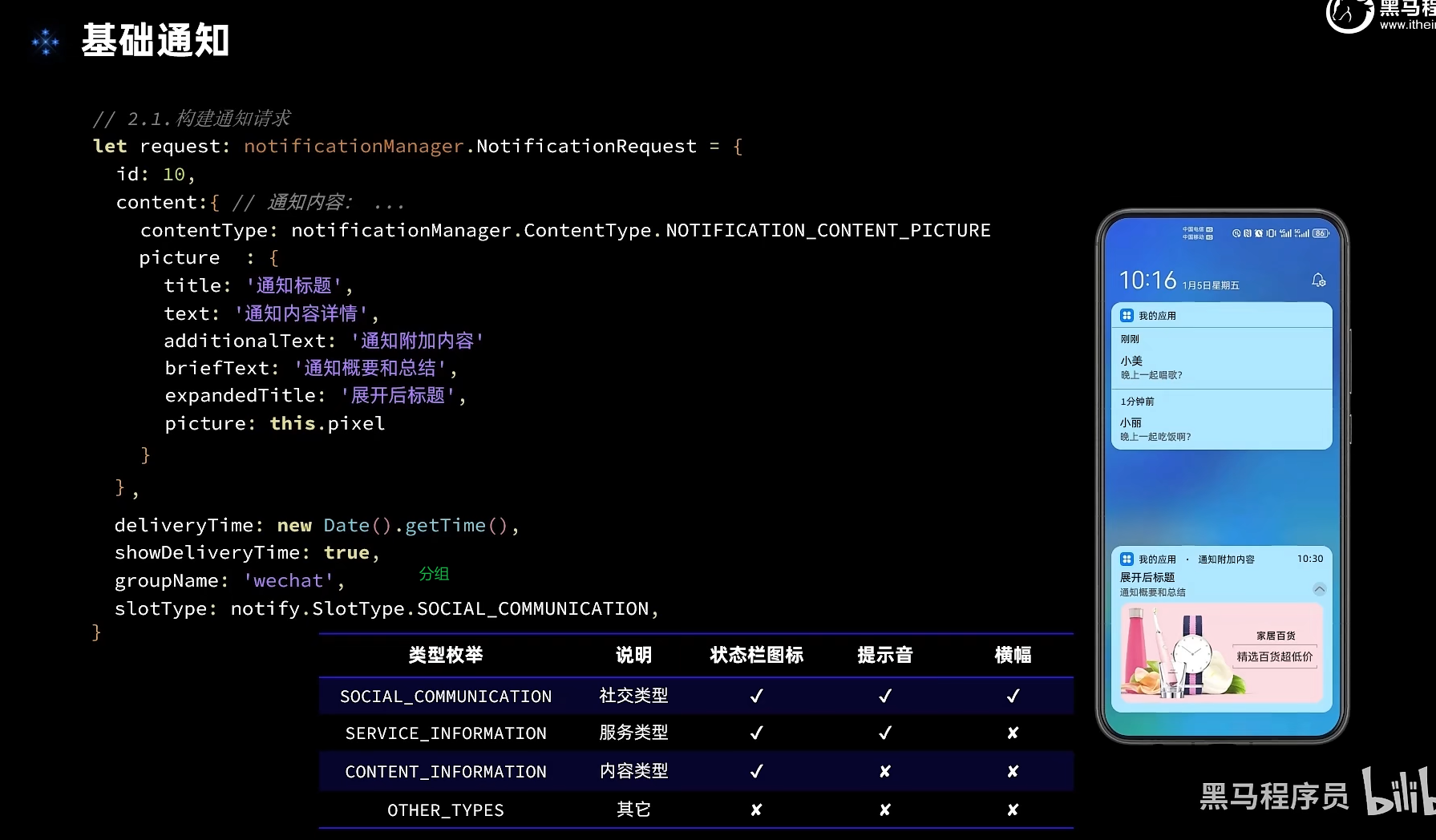
  publishNormalTextNotification() {
    let request: notify.NotificationRequest = {
      id: this.idx++,
      content: {
        contentType: notify.ContentType.NOTIFICATION_CONTENT_BASIC_TEXT,
        normal: {
          title: '通知标题' + this.idx,
          text: '通知内容详情',
          additionalText: '通知附加内容'
        }
      },
      showDeliveryTime: true,
      deliveryTime: new Date().getTime(),
      groupName: 'wechat',
      slotType: notify.SlotType.SOCIAL_COMMUNICATION
    }
    this.publish(request)
  }

  publishLongTextNotification() {
    let request: notify.NotificationRequest = {
      id: this.idx++,
      content: {
        contentType: notify.ContentType.NOTIFICATION_CONTENT_LONG_TEXT,
        longText: {
          title: '通知标题' + this.idx,
          text: '通知内容详情',
          additionalText: '通知附加内容',
          longText: '通知中的长文本,我很长,我很长,我很长,我很长,我很长,我很长,我很长',
          briefText: '通知概要和总结',
          expandedTitle: '通知展开时的标题' + this.idx
        }
      }
    }
    this.publish(request)
  }

  publishMultiLineNotification() {
    let request: notify.NotificationRequest = {
      id: this.idx++,
      content: {
        contentType: notify.ContentType.NOTIFICATION_CONTENT_MULTILINE,
        multiLine: {
          title: '通知标题' + this.idx,
          text: '通知内容详情',
          additionalText: '通知附加内容',
          briefText: '通知概要和总结',
          longTitle: '展开时的标题,我很宽,我很宽,我很宽',
          lines: [
            '第一行',
            '第二行',
            '第三行',
            '第四行',
          ]
        }
      }
    }
    this.publish(request)
  }

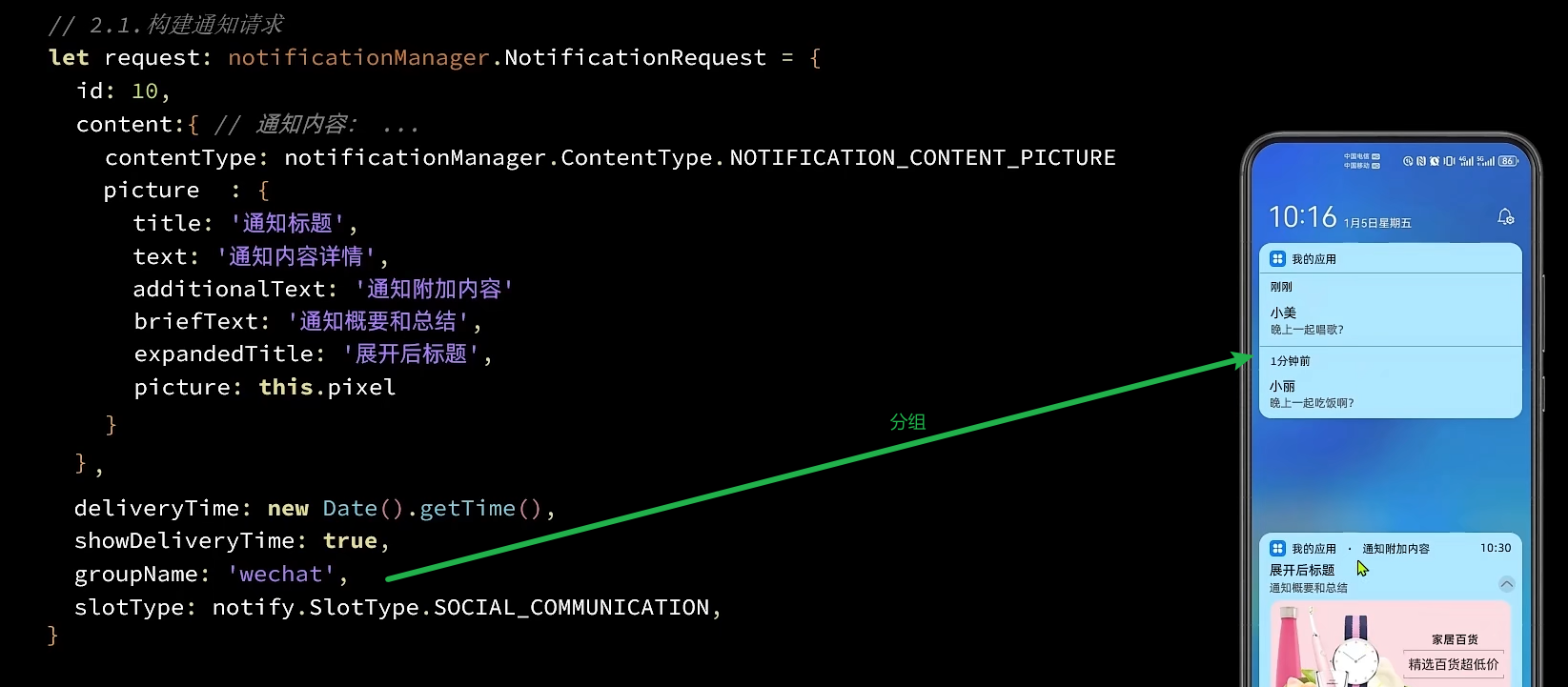
  publishPictureNotification() {
    let request: notify.NotificationRequest = {
      id: this.idx++,
      content: {
        contentType: notify.ContentType.NOTIFICATION_CONTENT_PICTURE,
        picture: {
          title: '通知标题' + this.idx,
          text: '通知内容详情',
          additionalText: '通知附加内容',
          briefText: '通知概要和总结',
          expandedTitle: '展开后标题' + this.idx,
          picture: this.pixel
        }
      }
    }
    this.publish(request)
  }

  private publish(request: notify.NotificationRequest) {
    notify.publish(request)
      .then(() => console.log('notify test', '发送通知成功'))
      .then(reason => console.log('notify test', '发送通知失败', JSON.stringify(reason)))
  }
}
# arkts进度条通知
import notify from '@ohos.notificationManager'
import wantAgent, { WantAgent } from '@ohos.app.ability.wantAgent'
import promptAction from '@ohos.promptAction'

enum DownloadState {
  NOT_BEGIN = '未开始',
  DOWNLOADING = '下载中',
  PAUSE = '已暂停',
  FINISHED = '已完成',
}

@Component
export default struct DownloadCard {
  // 下载进度
  @State progressValue: number = 0
  progressMaxValue: number = 100
  // 任务状态
  @State state: DownloadState = DownloadState.NOT_BEGIN

  // 下载的文件名
  filename: string = '圣诞星.mp4'

  // 模拟下载的任务的id
  taskId: number = -1

  // 通知id
  notificationId: number = 999

  isSupport: boolean = false

  wantAgentInstance: WantAgent

  async aboutToAppear(){
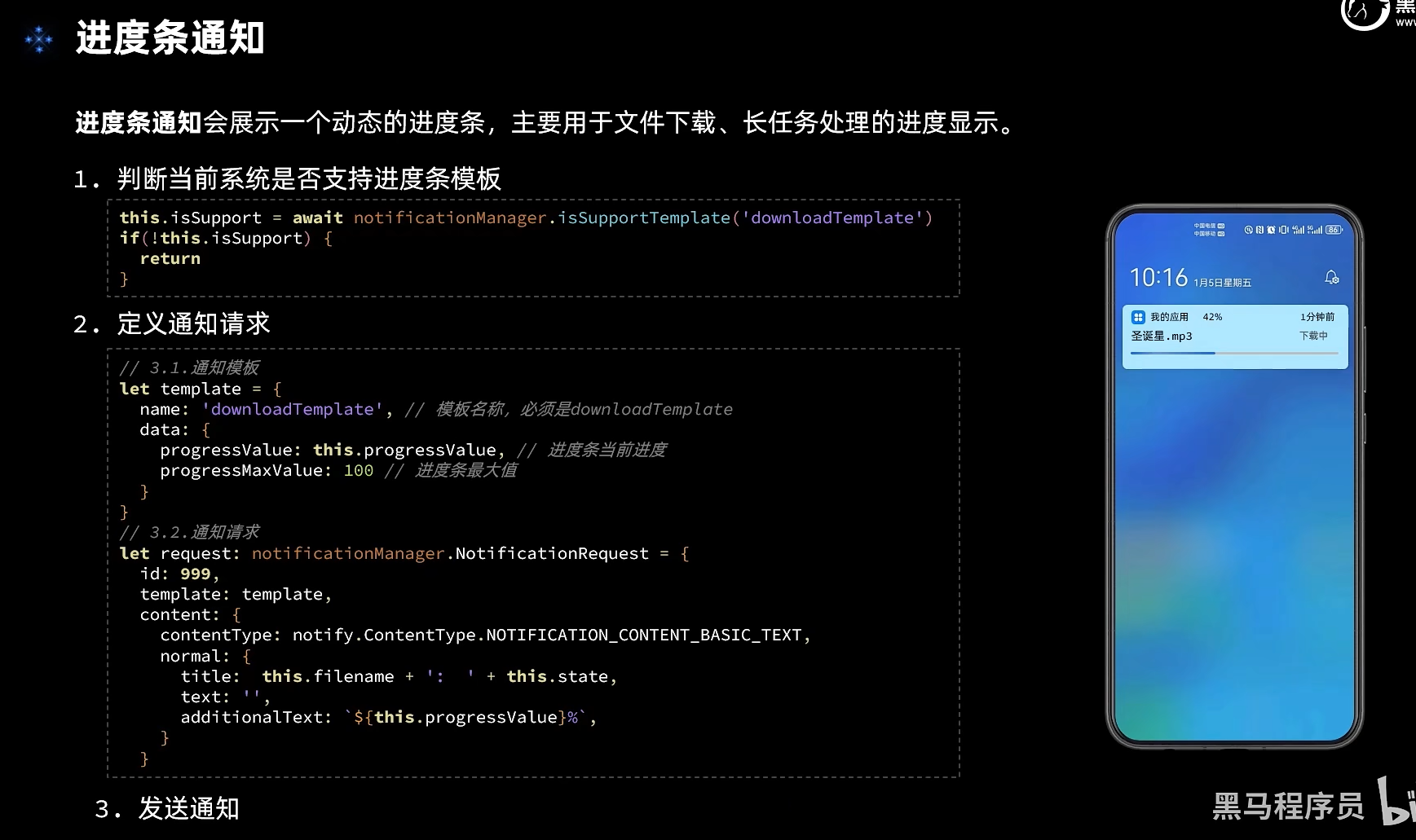
    // 1.判断当前系统是否支持进度条模板
    this.isSupport = await notify.isSupportTemplate('downloadTemplate')
    // 2.创建拉取当前应用的行为意图
    // 2.1.创建wantInfo信息
    let wantInfo: wantAgent.WantAgentInfo = {
      wants: [
        {
          bundleName: 'com.example.myapplication',
          abilityName: 'EntryAbility',
        }
      ],
      requestCode: 0,
      operationType: wantAgent.OperationType.START_ABILITY,
      wantAgentFlags: [wantAgent.WantAgentFlags.CONSTANT_FLAG]
    }
    // 2.2.创建wantAgent实例
    this.wantAgentInstance = await wantAgent.getWantAgent(wantInfo)
  }

  build() {
    Row({ space: 10 }) {
      Image($r('app.media.ic_files_video')).width(50)
      Column({ space: 5 }) {
        Row() {
          Text(this.filename)
          Text(`${this.progressValue}%`).fontColor('#c1c2c1')
        }
        .width('100%')
        .justifyContent(FlexAlign.SpaceBetween)

        Progress({
          value: this.progressValue,
          total: this.progressMaxValue,
        })

        Row({ space: 5 }) {
          Text(`${(this.progressValue * 0.43).toFixed(2)}MB`)
            .fontSize(14).fontColor('#c1c2c1')
          Blank()
          if (this.state === DownloadState.NOT_BEGIN) {
            Button('开始').downloadButton()
              .onClick(() => this.download())

          } else if (this.state === DownloadState.DOWNLOADING) {
            Button('取消').downloadButton().backgroundColor('#d1d2d3')
              .onClick(() => this.cancel())

            Button('暂停').downloadButton()
              .onClick(() => this.pause())

          } else if (this.state === DownloadState.PAUSE) {
            Button('取消').downloadButton().backgroundColor('#d1d2d3')
              .onClick(() => this.cancel())

            Button('继续').downloadButton()
              .onClick(() => this.download())
          } else {
            Button('打开').downloadButton()
              .onClick(() => this.open())
          }
        }.width('100%')
      }
      .layoutWeight(1)
    }
    .width('100%')
    .borderRadius(20)
    .padding(15)
    .backgroundColor(Color.White)
  }

  cancel() {
    // 取消定时任务
    if(this.taskId > 0){
      clearInterval(this.taskId);
      this.taskId = -1
    }
    // 清理下载任务进度
    this.progressValue = 0
    // 标记任务状态:未开始
    this.state = DownloadState.NOT_BEGIN
    // 取消通知
    notify.cancel(this.notificationId)
  }

  download() {
    // 清理旧任务
    if(this.taskId > 0){
      clearInterval(this.taskId);
    }
    // 开启定时任务,模拟下载
    this.taskId = setInterval(() => {
      // 判断任务进度是否达到100
      if(this.progressValue >= 100){
        // 任务完成了,应该取消定时任务
        clearInterval(this.taskId)
        this.taskId = -1
        // 并且标记任务状态为已完成
        this.state = DownloadState.FINISHED
        // 发送通知
        this.publishDownloadNotification()
        return
      }
      // 模拟任务进度变更
      this.progressValue += 2
      // 发送通知
      this.publishDownloadNotification()
    }, 500)
    // 标记任务状态:下载中
    this.state = DownloadState.DOWNLOADING
  }

  pause() {
    // 取消定时任务
    if(this.taskId > 0){
      clearInterval(this.taskId);
      this.taskId = -1
    }
    // 标记任务状态:已暂停
    this.state = DownloadState.PAUSE
    // 发送通知
    this.publishDownloadNotification()
  }

  open() {
    promptAction.showToast({
      message: '功能未实现'
    })
  }

  publishDownloadNotification(){
    // 1.判断当前系统是否支持进度条模板
    if(!this.isSupport){
      // 当前系统不支持进度条模板
      return
    }
    // 2.准备进度条模板的参数
    let template = {
      name: 'downloadTemplate',
      data: {
        progressValue: this.progressValue,
        progressMaxValue: this.progressMaxValue
      }
    }
    let request: notify.NotificationRequest = {
      id: this.notificationId,
      template: template,
      wantAgent: this.wantAgentInstance,
      content: {
        contentType: notify.ContentType.NOTIFICATION_CONTENT_BASIC_TEXT,
        normal: {
          title: this.filename + ':  ' + this.state,
          text: '',
          additionalText: this.progressValue + '%'
        }
      }
    }
    // 3.发送通知
    notify.publish(request)
      .then(() => console.log('test', '通知发送成功'))
      .catch(reason => console.log('test', '通知发送失败!', JSON.stringify(reason)))
  }
}

@Extend(Button) function downloadButton() {
  .width(75).height(28).fontSize(14)
}
# arkts 行为意图
代码参见进度条通知中的内容
← 鸿蒙