# 属性特性attribute
# property 和attribute
Attribute:HTML属性,书写在标签内的属性,使用setAttribute()和getAttribute()进行设置和获取。
Property:DOM属性,html标签对应的DOM节点属性,使用 .属性名 或者 ['属性名']进行设置和获取。
简单理解,Attribute就是dom节点自带的属性,例如html中常用的id、class、title、align等;而Property是这个DOM元素作为对象,其附加的内容,例如childNodes、firstChild等。
另外,常用的Attribute,例如id、class等,已经被作为Property附加到DOM对象上,可以和Property一样取值和赋值。但是自定义的Attribute,就不会有这样的优待。
优先使用property。
# 非自定义的Attribute与property之间存在映射关系
不管是修改attribute还是property都会影响到对方的属性值
<!DOCTYPE html>
<html>
	<head>
		<meta charset="utf-8" />
		<meta name="viewport" content="width=device-width, initial-scale=1">
		<title></title>
	</head>
	<body>
		<div class="switch">
			<input type="text" value="1" name="sex" class="k1">男

	</div>
	</body>
</html>
<script type="text/javascript">
	let a=document.querySelectorAll('input')[0];
	a.className="k1 k2";
	console.log(a.getAttribute('class'))
	//k1 k2
	console.log(a.className);
	//k1 k2
	a.setAttribute('class','k3')
	//k3
	console.log(a.getAttribute('class'))
	//k3
	console.log(a.className);

</script>
<!DOCTYPE html>
<html>
	<head>
		<meta charset="utf-8" />
		<meta name="viewport" content="width=device-width, initial-scale=1">
		<title></title>
	</head>
	<body>
		<div class="switch">
			<input type="text" value="1" name="sex" class="k1">男

	</div>
	</body>
</html>
<script type="text/javascript">
	let a=document.querySelectorAll('input')[0];
	console.log(a.value===a.getAttribute('value'))//true
	a.setAttribute('value',99);
	console.log(a.value===a.getAttribute('value'))//true
	a.value="19"
	console.log(a.value===a.getAttribute('value'))//false
	console.log(a.value)//19
	console.log(a.getAttribute("value"))//99
	a.setAttribute('value',88)
	console.log(a.value)//19
	console.log(a.getAttribute("value"))//88
</script>
value
value比较特殊!
- 如果input在html中初始设置了value,在没有任何input.value=“xxx”这种操作时,input.value===input.getAttribute("value");而且还可以继续通过input.setAttribute('value','xxx')来更改新值,input.value会同步修改。
- 当修改了input.value='xxx'后,input.getAttribute('value')和input.value似乎再也没任何交集了,input.value会反映在页面上的input框中的数据,而input的attribue中的value也就是打开控制台里的元素结构会看到
<input type="text" value="1" name="sex" class="k1">是某个值,这个值只能通过setAttribute来修改 - value的Attriubte和property没有映射关系
# 自定义Attribute,在property上没有对应的属性
自定义的属性,在property上是不存在的,修改或者获取都只能通过setAttribute()或getAttribute()
<!DOCTYPE html>
<html>
	<head>
		<meta charset="utf-8" />
		<meta name="viewport" content="width=device-width, initial-scale=1" >
		<title></title>
	</head>
	<body>
		<div class="switch">
			<input type="text"  name="sex" class="k1" data-test="自定义属性test" bili="we">男

	</div>
	</body>
</html>
<script type="text/javascript">
	let a=document.querySelectorAll('input')[0];
	console.log(a.getAttribute('data-test'))//自定义属性test
	console.log(a.setAttribute('data-test','999'))
	console.log(a.getAttribute('data-test'))//999
	console.log(a['data-test'])//undefined
</script>
注意
class变成Property之后叫做className,因为class是关键字。以下代码等价
 var className = div1.className;
 var className1 = div1.getAttribute("class");
getAttribute()可以取得任何特性,不管是标准的还是自定义的。但是这个方法的有 兼容性 问题,有些浏览器可能会获取属性Property的值。
用setAttrbute()赋值,任何Attribute都可以,包括自定义的。而且,赋值的Attribute会立刻表现到DOM元素上。
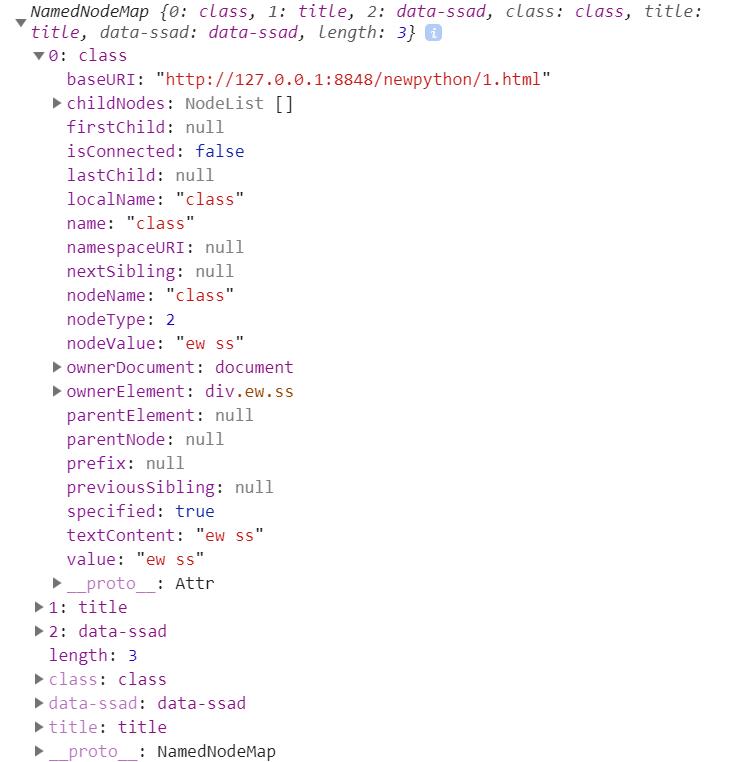
# attributes
<!DOCTYPE html>
<html>
	<head>
		<meta charset="utf-8" />
		<meta name="viewport" content="width=device-width, initial-scale=1">
		<title></title>
	</head>
	<body>
			<div class="ew ss" title="zzz" data-ssad="sdasd">12</div>
	</body>
</html>
<script type="text/javascript">
	var s=document.getElementsByClassName("ss")[0]
	console.log(s.attributes)

</script>
# dataset
- 获取data-xx的自定义属性
<div id="user" data-id="1234567890" data-user="johndoe" data-date-of-birth>John Doe
</div>
<script type="text/javascript">
	var el = document.querySelector('#user');
	console.log(el.dataset.id )//1234567890
	console.log(el.dataset.skt )//undefined
	el.dataset.dateOfBirth = '1960-10-03';
	console.log('someDataAttr' in el.dataset)//false
	el.dataset.someDataAttr = 'mydata';
	console.log('someDataAttr' in el.dataset)//true
</script>